4
Panel Descriptions
2
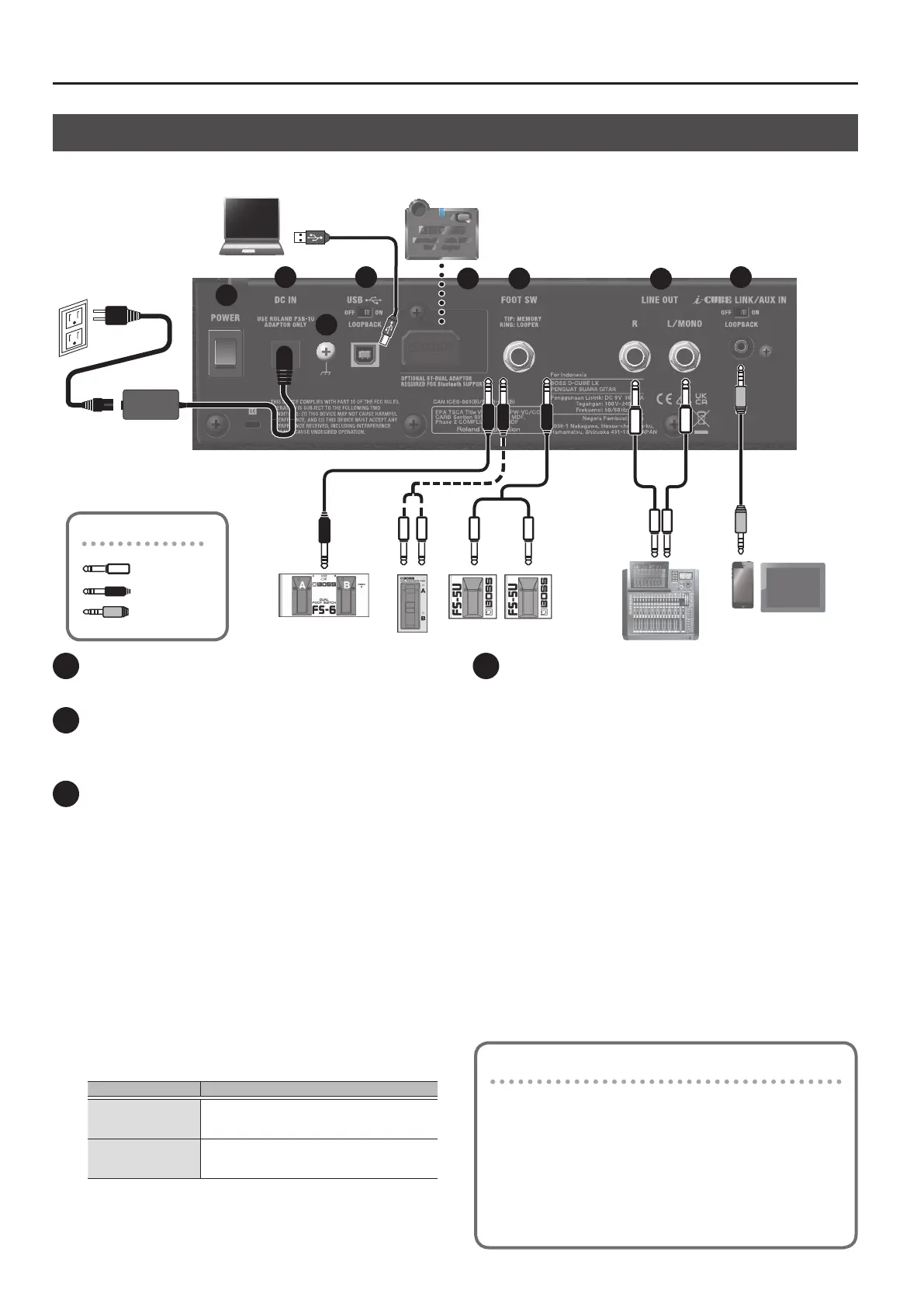
Plugs shown in this illustration
1/4” phone (mono)
1/4” phone (stereo)
4-pole mini phone
3
4 5
6
7
8
1 [POWER] switch
Turns the power of this unit on/o (p. 5).
2 DC IN jack
Connect the included AC adaptor to this jack.
* Use only the AC adaptor that came with this unit.
3 USB port
Connect a commercially available USB 2.0 cable to play back and
record the sound from this unit on your computer. You can also use
dedicated software to edit the settings of the internal eects.
Playing back/recording the sound of this unit using your
computer, iPad or iPhone
Use the standard driver provided by the operating system.
When using a computer, you can also use the dedicated USB driver.
When connecting an iPad or iPhone, use a commercially-available
USB B type adaptor or cable.
Using the dedicated software
When using the dedicated software, use the dedicated USB driver.
Download the USB driver from the BOSS website. For details, refer
to the “Readme.htm” le included with the download.
https://www.boss.info/support/
Conguring the USB driver to use
USB driver What to do
Dedicated USB driver
Set the [AMP TYPE] knob to “ACOUSTIC SIM”,
and turn on the power while holding down the
[MEMORY] button.
Standard OS USB
driver
Set the [AMP TYPE] knob to “JC CLEAN”, and turn
on the power while holding down the [MEMORY]
button.
[LOOPBACK] switch
When the [LOOPBACK] switch is on, the USB audio input sound can
be sent back to your computer, iPad or iPhone.
4 Bluetooth ADAPTOR jack
Connect the Bluetooth® Audio MIDI Dual Adaptor (model:
BT-DUAL, sold separately) to wirelessly play back music from your
mobile device such as a smartphone or tablet (hereafter “mobile
device”), or to edit the eects using an app on your mobile device
(p. 8).
Rear Panel (Connecting Your Equipment)
* To prevent malfunction and equipment failure, always turn down the volume, and turn o all the units before making any connections.
1
Using the DUAL CUBE LX’s dedicated software
You can connect the DUAL CUBE LX via USB to your computer and
use it with dedicated software. Using the dedicated software lets
you do the following:
¹ Edit the eect settings.
¹ Back up eects and other internal settings, or restore settings
from a backup.
Download the dedicated software from the BOSS website (https://
www.boss.info/support/).



 To Next Page