Panel Descriptions
4
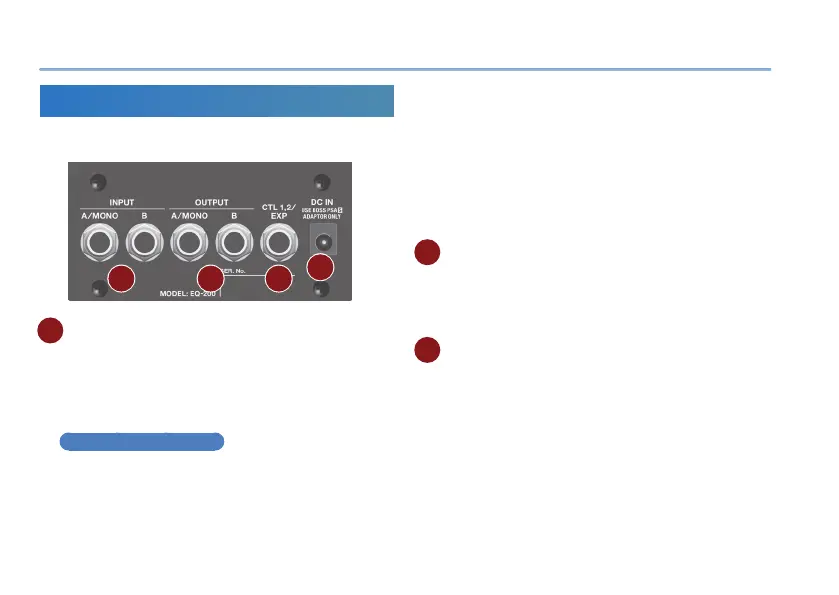
Rear Panel (Connecting Your Equipment)
* To prevent malfunction and equipment failure, always turn down the
volume, and turn o all the units before making any connections.
A B C
D
A
INPUT (A/MONO, B) jacks
Connect your guitar, bass, or eect unit here.
Use the A and B jacks if connecting an eect unit that
has stereo output. Use only the A jack if using this unit
in mono.
Turning On/O the Power
The INPUT A jack also operates as the power switch.
The power turns on when you insert a plug into the
INPUT A jack.
When powering up
Power-up equipment such as your guitar amp last.
When powering down
Power-down equipment such as your guitar amp rst.
* Before turning the unit on/o, always be sure to turn the volume
down. Even with the volume turned down, you might hear some
sound when switching the unit on/o. However, this is normal and
does not indicate a malfunction.
B OUTPUT (A/MONO, B) jacks
Connect this jack to your amp or monitor speakers.
Use only the OUTPUT A jack if using this unit in mono.
Even sound that is input in stereo is output in mono.
C CTL 1, 2/EXP jack
Using the jack as CTL 1/2
You can connect a footswitch (sold separately: FS-5U,
FS-6, FS-7) and use it to switch memories or channels
(p. 7).



 To Next Page