7
Basic Operation
1. Press the [CHANNEL] button and [MEMORY]
button simultaneously.
You enter menu mode.
2. Press the [CHANNEL] button or [MEMORY]
button to select a parameter.
3. Press the [ON/OFF] switch or [MEMORY] switch
to change the value.
4. Press the [CHANNEL] button and [MEMORY]
button simultaneously.
You exit menu mode.
Assigning functions to external pedals
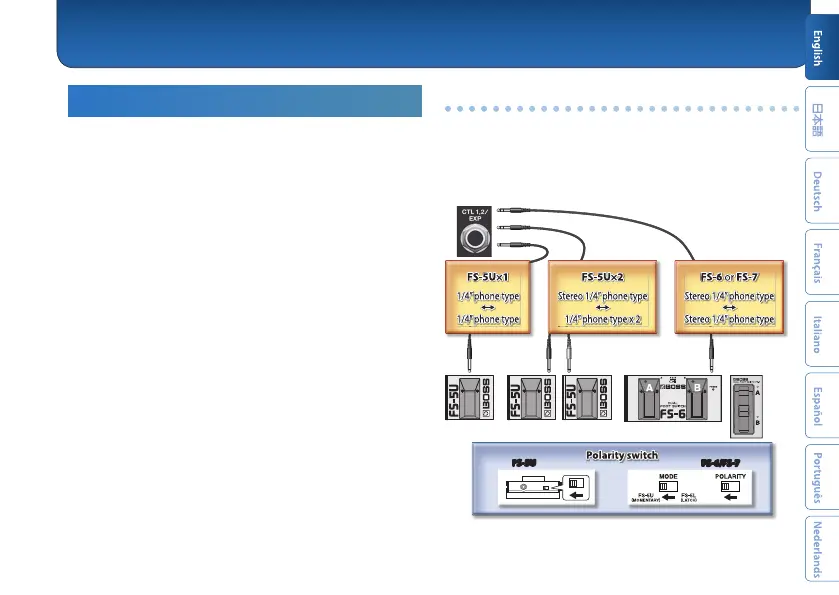
You can connect footswitches (sold separately: FS-5U, FS-6, FS-7)
to the CTL 1, 2/EXP jack, and use them to switch memories or
channels.
Use the menu items “C1 FNC” or “C2 FNC” to make these settings
(p. 8).
FS-5U FS-6/FS-7
CTL 2 CTL 1
CTL 2 CTL 1
CTL 2
CTL 1
CTL 1
FS-5U x 2
FS-5U
FS-6/FS-7
Overall Settings (Menu)



 To Next Page