12
Operating the Unit
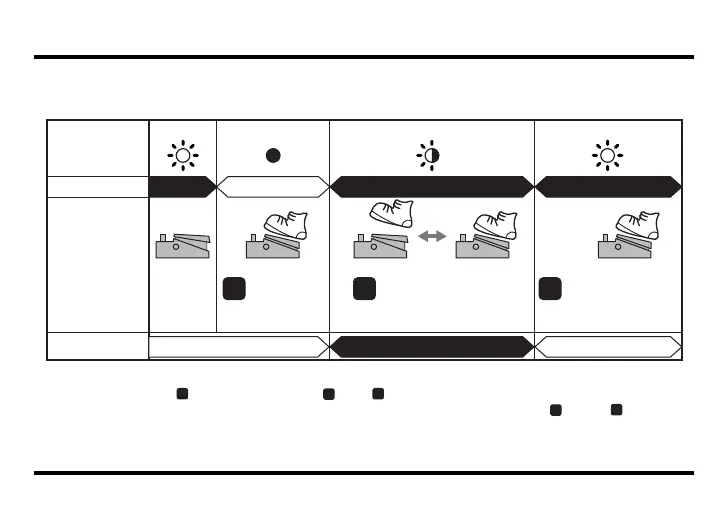
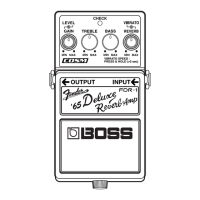
Setting the Vibrato Rate Using the Pedal Switch (RATE Setting Mode)
When Setting the Vibrato by Inputting the Tempo with the Effect On (CHECK indicator: Red)
fig.FDR-1_vibrato1.eps
* Vibrato rate for use with the tempo settings can be made in the range of 0.3–3.0 seconds.
* If you carry out Step immediately after Step , Step may inadvertently be interpreted as tempo input, thus
changing the RATE setting. Allow a brief interval to pass before progressing from Step to Step .
* You can also set the rate by turning the VIBRATO knob while depressing the pedal switch (p. 11). When you’ve
finished setting the rate, release the pedal switch, then depress it again, holding it down for two or more seconds.
Off
Off
Red RedRed/Green Blinking
OnOn
Off Off→Rate confirmed
On
On
1 32
Tap the FDR-1’s pedal
switch in timing with the
tempo.
CHECK
Indicator
Effect
Pedal Switch
Rate Setting
Press and hold
the FDR-1’s
pedal switch
for at least two
seconds.
Press and hold
the FDR-1’s pedal
switch for at least
two seconds.
The rate is stored.
3
2
3
2
FDR-1_e1.book 12 ページ 2007年5月7日 月曜日 午後5時4分


 To Next Page