5
Panel Descriptions
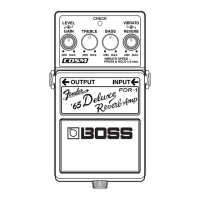
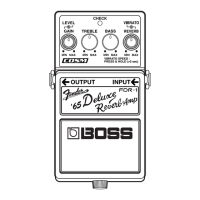
2. CHECK Indicator
This indicator shows whether the effect is on
or off, and also doubles as the battery check
indicator. The indicator lights when the ef-
fect is on.
* If you’re powering the unit with a battery
and the CHECK indicator goes dim—or
doesn’t light at all—when you try to turn the
effect on, the battery is near depletion and
should be replaced. For instructions on
changing the battery, refer to “Changing the
Battery” (p. 14).
* The CHECK indicator shows whether the
effect is being applied or not. It does not
indicate whether the power to the device is on
or not.
3. OUTPUT Jack
This output jack is used for connecting to
guitar amps and other effects processors.
4. Pedal Switch
This switch turns the effect on/off.
5. Thumbscrew
When this screw is loosened, the pedal will
open, allowing you to change the battery.
For instructions on changing the battery, re-
fer to “Changing the Battery” (p. 14).
6. INPUT Jack
These jacks are for connecting the output
from an electric guitar or other instrument or
effects device.
* These jacks double as power switch. Power to
the FDR-1 is turned on when you plug into
the INPUT jack; the power is turned off when
the cable is unplugged. When not using the
FDR-1, be sure to disconnect the plug from
the INPUT jack.
FDR-1_e1.book 5 ページ 2007年5月7日 月曜日 午後5時4分


 To Next Page