EasyManua.ls Logo

Boss FZ-2 Hyper fuzz - Panel Description and Connections; AC Adaptor Jack; Check Indicator; Level Knob

Boss FZ-2 Hyper fuzz
6 pages
Print Icon
To Next Page IconTo Next Page
To Previous Page IconTo Previous Page
Loading...
CD
CD
CO
.PANEL
DESCRIPTION
'
.
LCVKL
-Qjj
_
JWLJtir
O
**"!
ro*£
oam
moT?
J
MOM
]r.
.i
4
OUTPUT
INPUT
4>
HVP65R
Fuzz
_
FZ-2
l
^
.
3QSS
.
;
.
rrrJ
1
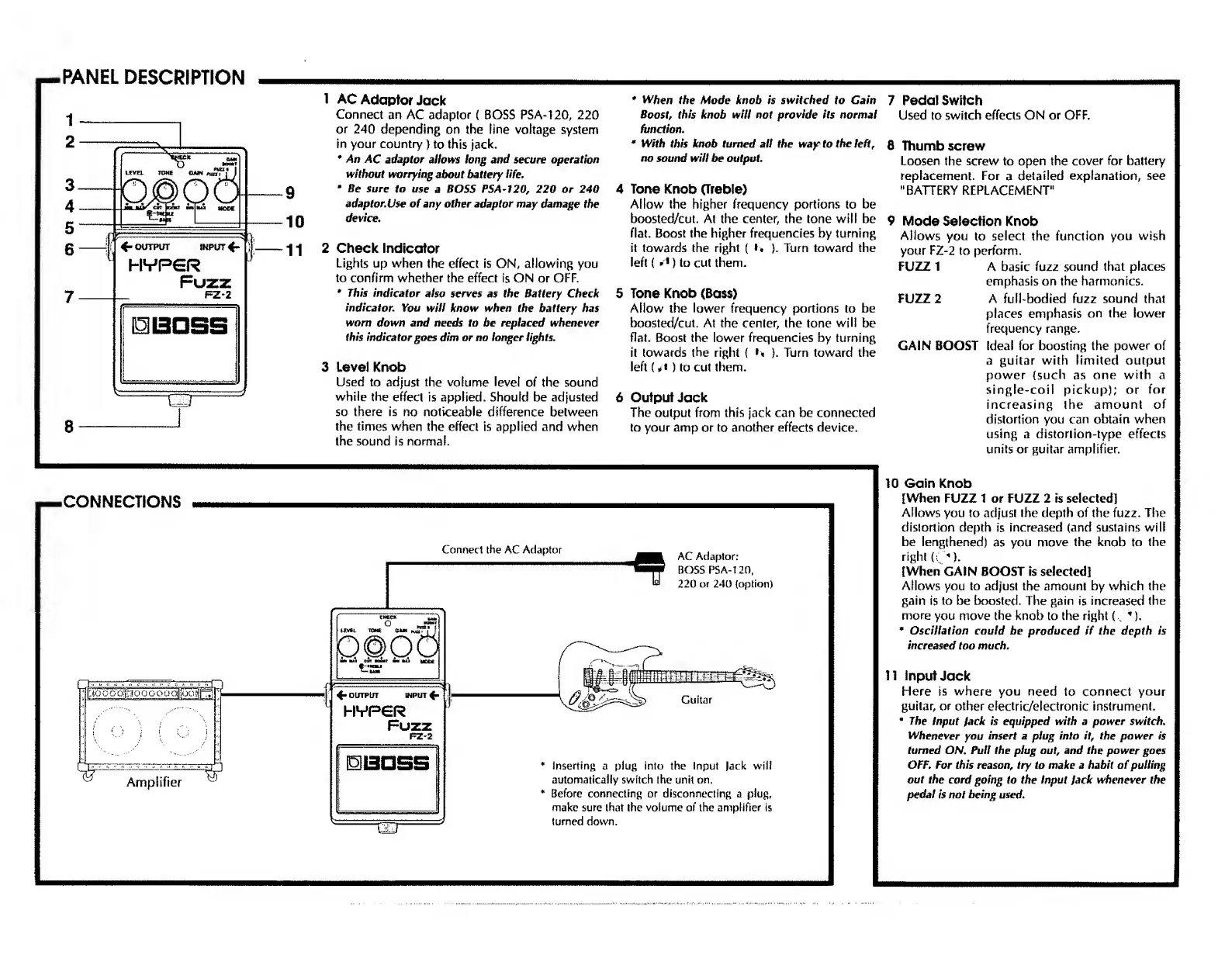
AC
Adaptor
Jack
Connect
an
AC
adaptor
(
BOSS
PSA-120,
220
or
240
depending
on
the
line
voltage
system
in
your
country
)
to
this
jack.
*
An
AC
adaptor
allows
long
and
secure
operation
without
worrying
about
battery
life
,
*
Be
sure
to
use
a
BOSS
PSA-120,
220
or
240
adaptor.Use
of
any
other
adaptor
may
damage
the
device.
2
Check
Indicator
Lights
up
when
the
effect
is
ON,
allowing
you
to
confirm
whether
the
effect
is
ON
or
OFF.
*
This
indicator
also
serves
as
the
Battery
Check
indicator.
You
will
know
when
the
battery
has
worn
down
and
needs
to
be
replaced
whenever
this
indicator
goes
dim
or
no
longer
lights.
3
Level
Knob
Used
to
adjust
the
volume
level
of
the
sound
while
the
effect
is
applied.
Should
be
adjusted
so
there
is
no
noticeable
difference
between
the
times
when
the
effect
is
applied
and
when
the
sound
is
normal.
*
When
the
Mode
knob
is
switched
to
Cain
Boost,
this
knob
will
not
provide
its
normal
function.
*
With
this
knob
turned
all
the
way
to
the
left,
no
sound
will
be
output.
4
Tone
Knob
(Treble)
Allow
the
higher
frequency
portions
to
be
boosted/cut.
At
the
center,
the
tone
will
be
flat.
Boost
the
higher
frequencies
by
turning
it
towards
the
right
(
*>
).
Turn
toward
the
left
(
»*)
to
cut
them.
5
Tone
Knob
(Bass)
Allow
the
lower
frequency
portions
to
be
boosted/cut.
At
the
center,
the
tone
will
be
flat.
Boost
the
lower
frequencies
by
turning
it
towards
the
right
(
**
).
Turn
toward
the
left
(d
)
to
cut
them.
6
Output
Jack
The
output
from
this
jack
can
be
connected
to
your
amp
or
to
another
effects
device.
7
Pedal
Switch
Used
to
switch
effects
ON
or
OFF.
8
Thumbscrew
Loosen
the
screw
to
open
the
cover
for
battery
replacement.
For
a
detailed
explanation,
see
"BATTERY
REPLACEMENT"
9
Mode
Selection
Knob
Allows
you
to
select
the
function
you
wish
your
FZ-2
to
perform.
FUZZ
1
A
basic
fuzz
sound
that
places
emphasis
on
the
harmonics.
FUZZ
2
A
full-bodied
fuzz
sound
that
places
emphasis
on
the
lower
frequency
range.
GAIN
BOOST
Ideal
for
boosting
the
power
of
a
guitar
with
limited
output
power
(such
as
one
with
a
single-coil
pickup);
or
for
increasing
the
amount
of
distortion
you
can
obtain
when
using
a
distortion-type
effects
units
or
guitar
amplifier.
CONNECTIONS
Connect
the
AC
Adaptor
4*
OUTPUT
WPUT
(-
HVPGR
Fuzz
AC
Adaptor:
BOSS
PS
A-120,
220
or
240
{option)
Inserting
a
plug
into
the
Input
lack
will
automatically
switch
the
unit
on.
Before
connecting
or
disconnecting
a
plug,
make
sure
(hat
the
volume
of
the
amplifier
is
turned
down.
10
Gain
Knob
[When
FUZZ
1
or
FUZZ
2
is
selected]
Allows
you
to
adjust
the
depth
of
the
fuzz.
The
distortion
depth
is
increased
(and
sustains
will
be
lengthened)
as
you
move
the
knob
to
the
right
O'”).
[When
GAIN
BOOST
is
selected]
Allows
you
to
adjust
the
amount
by
which
the
gain
is
to
be
boosted.
The
gain
is
increased
the
more
you
move
the
knob
to
the
right
(
*),
*
Oscillation
could
be
produced
if
the
depth
is
increased
too
much.
11
Input
Jack
Flere
is
where
you
need
to
connect
your
guitar,
or
other
electric/electronic
instrument.
The
Input
lack
is
equipped
with
a
power
switch.
Whenever
you
insert
a
plug
into
it,
the
power
is
turned
ON.
Pull
the
plug
out,
and
the
power
goes
OFF.
For
this
reason,
try
to
make
a
habit
of
pulling
out
the
cord
going
to
the
Input
lack
whenever
the
pedal
is
not
being
used.
Amplifier

Related product manuals