EasyManua.ls Logo

Boss FZ-2 Hyper fuzz - Operating the FZ-2 HYPER FUZZ; Operation for FUZZ 1 or FUZZ 2; Operation for GAIN BOOST

Boss FZ-2 Hyper fuzz
6 pages
Print Icon
To Next Page IconTo Next Page
To Previous Page IconTo Previous Page
Loading...
-OPERATION-
For
FUZZ
1
or
FUZZ
2:
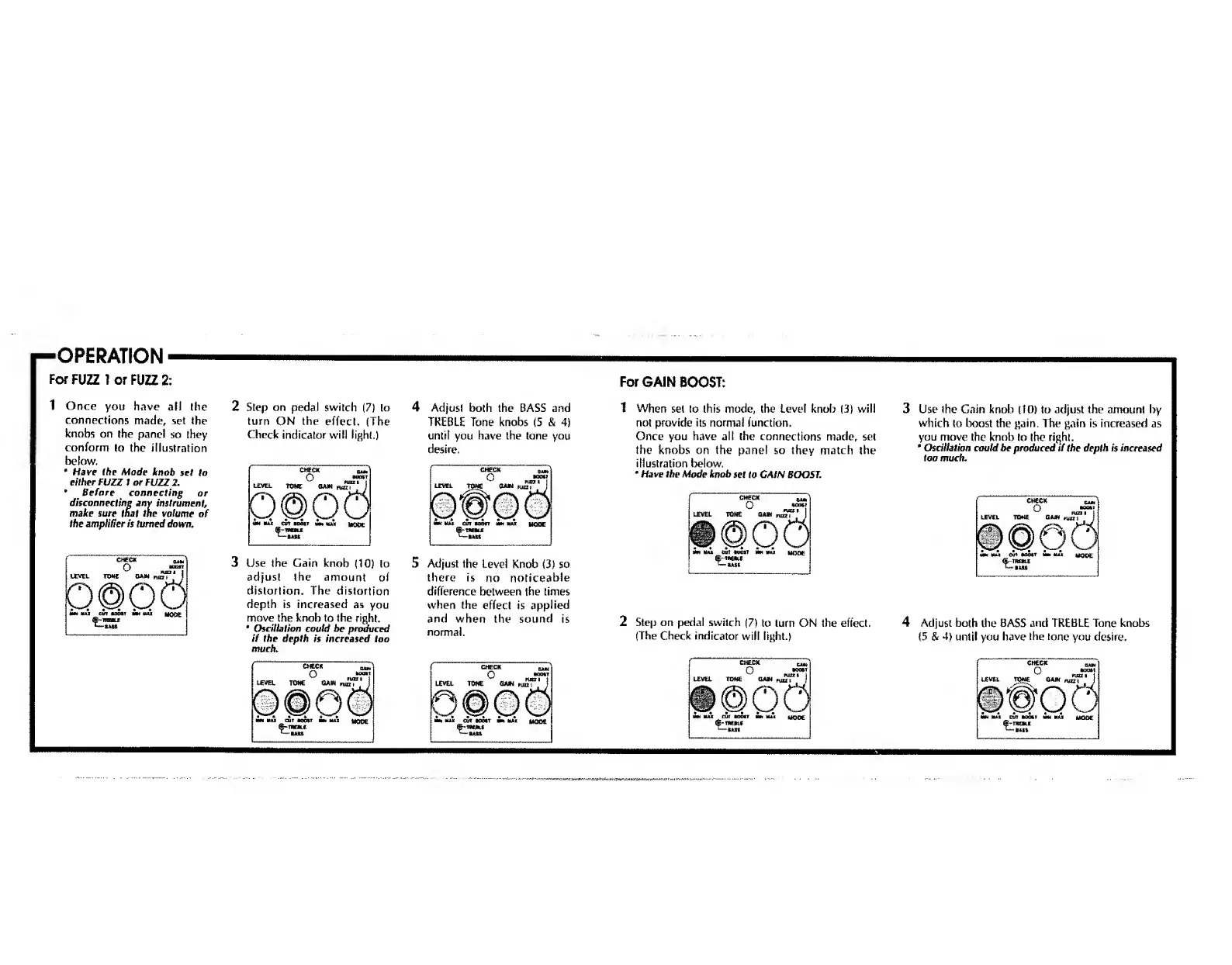
1
Once
you
have
all
the
connections
made,
set
the
knobs
on
the
panel
so
they
conform
to
the
illustration
below.
*
Have
Ihe
Mode
knob
set
to
either
FUZZ
1
or
FUZZ
2.
*
Before
connecting
or
disconnecting
any
instrument,
make
sure
that
the
volume
of
the
amplifier
is
turned
down.
2
Step
on
pedal
switch
(7)
to
turn
ON
the
effect.
(The
Check
indicator
will
light.)
3
Use
the
Gain
knob
(10)
to
adjust
the
amount
of
distortion.
The
distortion
depth
is
increased
as
you
move
the
knob
to
the
right.
Oscillation
could
be
produced
if
the
depth
is
increased
too
much.
4
Adjust
both
the
BASS
and
TREBLE
Tone
knobs
(5
&
4)
until
you
have
the
tone
you
desire.
5
Adjust
the
Level
Knob
(3)
so
there
is
no
noticeable
difference
between
the
times
when
the
effect
is
applied
and
when
the
sound
is
normal.
For
GAIN
BOOST:
1
When
set
to
this
mode,
the
Level
knob
(3)
will
not
provide
its
normal
function.
Once
you
have
all
the
connections
made,
set
the
knobs
on
the
panel
so
they
match
the
illustration
below.
*
Have
the
Mode
knob
set
to
CAIN
BOOST.
3
Use
the
Gain
knob
(10)
to
adjust
the
amount
by
which
to
boost
the
gain.
The
gain
is
increased
as
you
move
the
knob
to
Ihe
right.
*
Oscillation
could
be
produced
if
the
depth
is
increased
too
much.
2
Step
on
pedal
switch
(7)
to
turn
ON
the
effect.
(The
Check
indicator
will
light.)
4
Adjust
both
the
BASS
and
TREBLE
Tone
knobs
(5
&
4)
until
you
have
Ihe
tone
you
desire.

Related product manuals