EasyManua.ls Logo

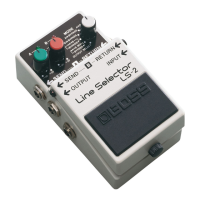
Boss LS-2 - BOSS LS-2 Panel Description; Level Control Knobs A;B; Pedal Switch; Mode Selector Switch

Boss LS-2
6 pages
Print Icon
To Next Page IconTo Next Page
To Previous Page IconTo Previous Page
Loading...
MSPECIFICATIONS
Controls
co.cc
ecccecccccssesesseesecees
Pedal
Switch,
Mode
Selector
Switch,
Level
Control
Knobs
A
/B
INCH
CALOES
janie
a
Sspn
sidered
Abas
Line
Indicators
A/B
(serves
also
as
battery
check
indicator)
JACKSON
2h)
oie
ice
hire,
hted
hs
5
are
Input,
Output,
AC
Adaptor
In/Out,
Send
A/B,
Return
A/B
Input
Impedanee..........
1MQ
Output
Impedance
1kQ
Recommended
Load
Impedance...
10
kQ
or
greater
Residual
Noise
-85
dBu
or
less
(IHF-A,
Typ.)
Power
Supply
...........
...
DC
9
V;
Dry
battery
(6F22/9V),
AC
Adaptor
(PSA-series:
Option)
Current
Draw
.....0.0.....
.
25
mA
(DC
9V)
Dimensions
...0.ccc
eee
ee:
73
(W)
x
129
(D)
x
59
(H)
mm
2-7/8
(W)
x
5-1/8
(D)
x
2-3/8
(H)
inches
VA
CRIM
Riad
Matec
clare
neat
410
2
/
14
oz
(including
battery)
ACCOSSOPIOS
:
iisheGe
Se
Seen
cecdeteiies
Instructions,
Dry
Battery;
6F22/9V
(Carbon),
Rubber
Feet
x2
(For
BCB-6),
Leaflet
(“USING
THE
UNIT
SAFELY,”
“IMPORTANT
NOTES,”
and
“Information”)
CU
OUGIIS
4
spade
pect
eet
auld!
AC
Adaptor
PSA-Series,
DC
cord
PCS-20A
*
OdBu
=
0.775
Vrms
*
In
the
itterest
of
product
unprovement,
the
specifications
and/or
appearance
of
this
unit
are
subject
to
change
without
prior
notice.
Copyright
©
BOSS
CORPORATION
All
rights
reserved.
No
part
of
this
publication
may
be
®
reproduced
in
any
form
without
the
written
permis-
sion
of
BOSS
CORPORATION.
Printed
in
Taiwan
2003-3-B3-3C
2604781202
BOSS
Corporation
MIPANEL
DESCRIPTION
rT)
@AC
Adaptor
In
Jack
240
:option)
to
this
jack.
battery.
BM
BYPASS
¢
-B™..
a.
tt»
+448
\
)
{
)
Cayeasse
®
(
)
a
ei
ArB
MIE
%
NM
_
Coveassd?
SS
o
920
OUTPUT
SELECT
adaptor
may
damage
the
unit.
@AC
Adaptor
Out
Jack
Connect
an
AC
adaptor
(
BOSS
PSA-120,
220
or
*
Use
of
an
AC
adaptor
eliminates
the
need
for
*Be
sure
to
use
the
specified
AC
adaptor
(PSA-120,
220
or
240).
Using
any
other
UBOSS
Instructions
Thank
you
for
purchasing
the
BOSS
LS-2
Line
Selector.
To
make
the
best
use
of
the
unit,
please
read
the
instructions
caretully.
@The
LS-2
provides
two
separate
line-loop
oul-
puts.
@The
LS-2
features
6
different
modes
(including
effect
loop
selector
and
line
selector)
that
enhance
its
versatility.
@The
LS-2
provides
individual
contro!
over
the
output
level
of
each
line.
@£Each
line
has
an
indicator,
allowing
you
to
easily
determine
the
current
state of
the
unit.
@An
AC
Adaptor
Output
Jack
is
provided
to
supply
power
to
an
external
effect
unit
when
an
AC
adaptor
is
being
used
to
supply
power
to
the
LS-2.
*
These
indicators
also
serve
as
a
battery
check.
When
they
become
dim
(or
do
not
light
at
all),
replace
the
battery
immediately.
@Level
Contro!
Knobs
A/B
Each
knob
controls
the
output
level
of
the
corre-
sponding
line
(
A/B
).
The
output
level
is
variable
from
—co(
muted
)
to
+20qB.
%*
When
a
knob
is
set
to
the
center
position,
the
input
and
output
levels
are
equal.
When
an
AC
adaptor
is
being
used
to
power
the
LS-2,
power
can
also
be
supplied
to
another
compact
effect
unit
by
connecting
a
paralleled
DC
cord
(
PCS-20A
:
option
)
to
this
jack.
*When
you
are
using
battery
power,
the
AC
Adaptor
Out
Jack
does
not
function.
*
When
using
the
PSA-120,
220
or
240,
be
sure
that
the
total
current
draw
of
the
LS-2
and
any
external
effect
unit
does
not
exceed
200mA.
©
output
Line
Selector
@Line
Indicators
A/B
The
appropriate
indicator
lights
when
the
corre-
8
sponding
line
(
A/B
)
is
selected.
@Send
Jacks
(
A/B
)
These
jacks
send
the
signals
received
by
the
Input
Jack
when
the
corresponding
line
(
A/B
)
is
in
use.
@oOutput
Jack
Connect
an
amplifier
or
other
effect
unit
to
this
jack.
@Pedal
Switch
This
switch
selects
the
line
to
be
used.
LS-2
ane
Amurbassg
©
7
“oN
kee
OE
Pine
®
Bet
cae
soordrecie
©
SEND
E)-
RETURNE-
~
B-
RETURNG
|F
output
INPUT
Line
Selector
LS-2
nc
8
barren
wd
POWERED
@Thumb
Screw
Loosen
this
screw
to
open
the
pedal
for
battery
replacement.
For
a
detailed
explanation,
see
"Battery
Replacement”.
@Mode
Selector
Switch
This
switch
selects
the
operating
mode.
For
a
detailed
explanation,
see
"MODE
DESCRIPTION’,
@Return
Jacks
A/B
These
jacks
feed
the
signal
from
the
correspond-
ing
line
(
A/B
)
into
the
unit.
@input
Jack
Connect
an
electric/electronic
musical
instrument
(such
as
an
electric
guitar)
to
this
jack.
*
Connecting
a
plug
to
the
input
Jack
automati-
cally
turns
the
unit
on.
Disconnect
the
plug
from
the
Input
Jack
when
the
unit
is
not
in
use.
Line
Selector

Related product manuals