Need help?
Do you have a question about the Boss LS-2 and is the answer not in the manual?
Each knob controls the output level of the corresponding line (A/B).
This switch selects the line to be used.
This switch selects the operating mode.
Connect an electric/electronic musical instrument (such as an electric guitar) to this jack.
Connect units, select mode/line, adjust levels as described.
Instructions for malfunctions and contacting service personnel.
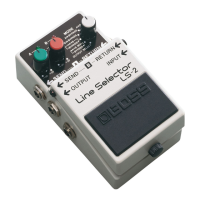
The BOSS LS-2 Line Selector is a versatile audio routing device designed to enhance the flexibility of your effects setup. It allows users to manage and switch between different signal paths, offering a range of modes to suit various performance and recording needs.
The primary function of the LS-2 is to provide two separate line-loop outputs, enabling the integration of multiple effects chains or instruments into a single signal path. It acts as a selector, allowing you to choose which signal path is active at any given time. The unit features six distinct operating modes, which include effect loop selection, line selection, and various bypass options. Each mode is designed to offer specific routing capabilities, from simple A/B switching to more complex mixed signals and output selections.
The LS-2 is equipped with individual level control knobs for each line (A and B), allowing precise adjustment of the output level for the corresponding signal path. This feature ensures that volume differences between different effects or instruments can be balanced, maintaining a consistent sound level. The output level can be varied from muted (-∞) up to +20dB, providing ample range for boosting or cutting signals. When a knob is set to the center position, the input and output levels are equal.
Line indicators (A and B) are present to visually confirm the currently selected line, making it easy to monitor the unit's status during use. These indicators also double as a battery check function, dimming or not lighting at all when the battery is low, prompting immediate replacement.
The device includes an AC Adaptor Output Jack, which is a convenient feature for powering external effect units. When the LS-2 itself is powered by an AC adaptor, this jack can supply power to another compact effect unit, simplifying power management on your pedalboard. This function is active only when the LS-2 is powered by an AC adaptor; it does not work when the unit is running on battery power.
To operate the LS-2, first select the desired mode using the Mode Selector Switch. The manual provides detailed descriptions of each of the six modes, along with sample settings to guide users. After selecting a mode, connect your musical instruments, amplifiers, and effect units to the appropriate jacks (Input, Output, Send A/B, Return A/B). It is crucial to turn down the volume on your amplifier before connecting or disconnecting any cords to prevent sudden loud noises or potential damage.
Once connections are made, you can select the desired line by pressing the pedal switch. The line indicators will light up to show which line is active. Adjust the output level of each line using the Level Control Knobs A/B to achieve the desired balance and volume.
The six operation modes offer diverse routing possibilities:
Connecting a plug to the Input Jack automatically turns the unit on. To conserve battery life, always disconnect the plug from the Input Jack when the unit is not in use.
Battery replacement is a straightforward process. To access the battery compartment, loosen the thumb screw on the pedal and open it. Remove the old battery from the battery housing and disconnect the battery snap. Connect a new 9-volt battery to the battery snap, ensuring correct polarity, and then place it back into the battery housing. Push the coil spring into the spring base on the rear of the pedal, then close the pedal. Finally, insert the thumb screw into the guide bush hole and firmly tighten it. It is important to ensure that the snap cord is not caught in the pedal or coil spring during this process.
For extended periods of non-use, it is recommended to remove the battery from the unit to prevent leakage and potential damage. As mentioned, the line indicators serve as a battery check; if they become dim or do not light, replace the battery immediately.
The LS-2 can be integrated into a BOSS Carrying Box (BCB-6). To do this, attach the supplied rubber feet to the BCB-6 as illustrated in the manual.
In case of a power interruption while using an AC adaptor, if a battery is also installed, the unit will seamlessly switch to battery power, ensuring continuous operation. This provides a reliable backup in live performance or recording situations.
Should any malfunction occur or if you suspect a problem, discontinue use immediately and contact qualified service personnel for assistance.
 General
| Type | Line Selector |
|---|---|
| Bypass Switching | Buffered Bypass |
| Power Supply | 9V DC |
| Connectors | 1/4" Input/Output Jacks |
| Accessories | Owner's Manual |
| Inputs | 2 x 1/4" (A, B) |
| Controls | Mode selector, Level knobs for A and B channels |
| Dimensions | 73mm (W) x 129mm (D) x 59mm (H) |
| Weight | 420g (excluding battery) |

 To Next Page