EasyManua.ls Logo

Boss ME-8 - Page 8

Boss ME-8
40 pages
Print Icon
To Next Page IconTo Next Page
To Previous Page IconTo Previous Page
Loading...
Specify
the
Number
of
the
Patch
you
wish
to
use
by
pressing
the
relevant
Number
pedal.
The
indicator
for
the
Number
pedal
you
have
pressed
lights,
4
Changing
the
Group
and
Bank
The
Group
and
Bank
can
be
changed
at
the
same
time,
similar
to
2
and
3
above.
showing
that
the
new
Patch
is
now
selected.
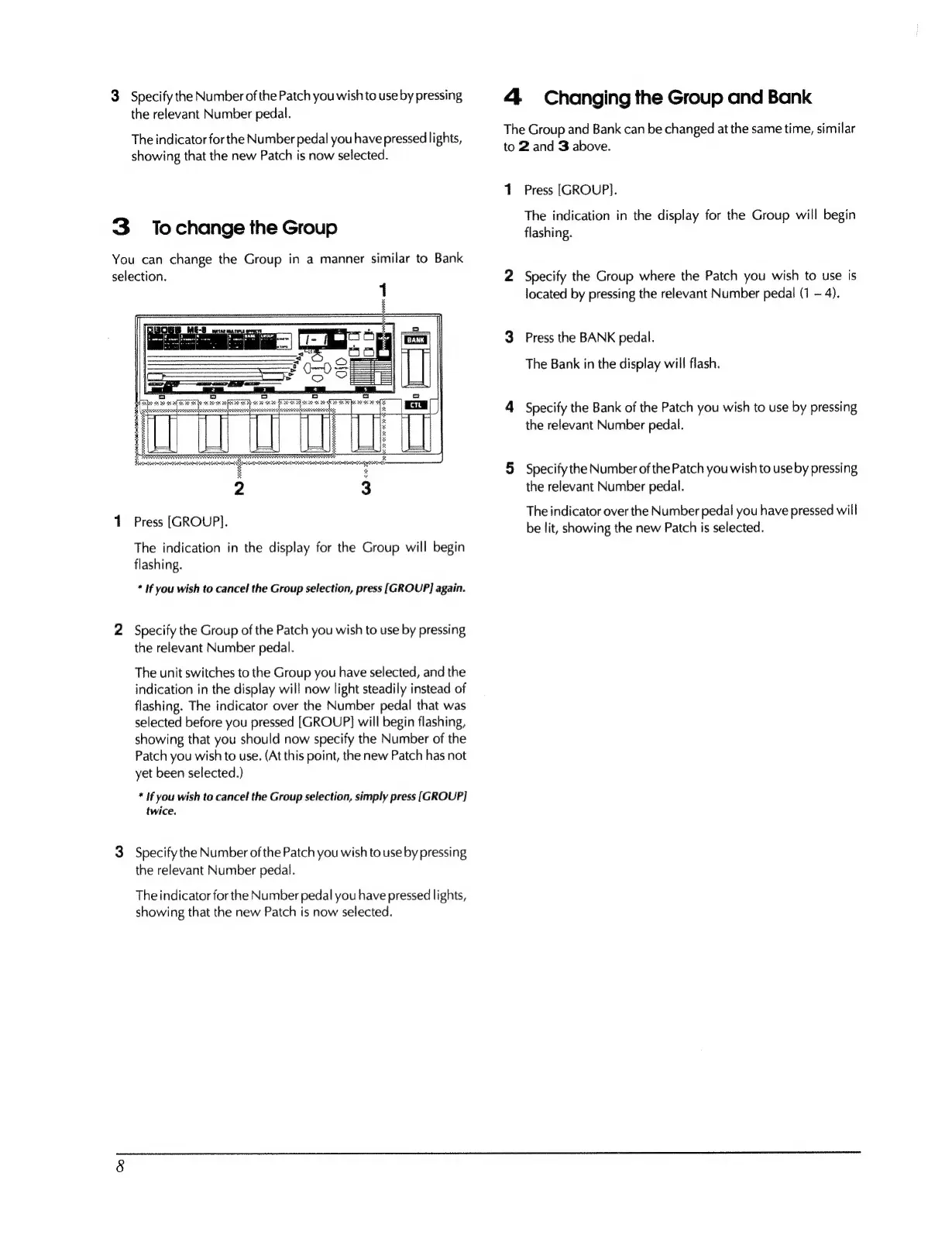
3
Tochange
the
Group
You
can
change
the
Group
in
a
manner
similar
to
Bank
selection.
Press
[GROUP].
The
indication
in
the
display
for
the
Group
will
begin
flashing.
*
If
you
wish
to
cancel
the
Group
selection,
press
[GROUP]
again.
2
Specify
the
Group
of
the
Patch
you
wish
to
use
by
pressing
the
relevant
Number
pedal.
The
unit
switches
to
the
Group
you
have
selected,
and
the
indication
in
the
display
will
now
light
steadily
instead
of
flashing.
The
indicator
over
the
Number
pedal
that
was
selected
before
you
pressed
[GROUP]
will
begin
flashing,
showing
that
you
should
now
specify
the
Number
of
the
Patch
you
wish
to
use.
(At
this
point,
the
new
Patch
has
not
yet
been
selected.)
*
If
you
wish
to
cancel
the
Group
selection,
simply
press
[GROUP]
twice,
3
Specify
the
Number
of
the
Patch
you
wish
to
use
by
pressing
the
relevant
Number
pedal.
The
indicator
for
the
Number
pedal
you
have
pressed
lights,
showing
that
the
new
Patch
is
now
selected.
Press
[GROUP].
The
indication
in
the
display
for
the
Group
will
begin
flashing.
Specify
the
Group
where
the
Patch
you
wish
to
use
is
located
by
pressing
the
relevant
Number
pedal
(1
-
4).
Press
the
BANK
pedal.
The
Bank
in
the
display
will
flash.
Specify
the
Bank
of
the
Patch
you
wish
to
use
by
pressing
the
relevant
Number
pedal.
Specify
the
Number
of
the
Patch
you
wish
to
use
by
pressing
the
relevant
Number
pedal.
The
indicator
over
the
Number
pedal
you
have
pressed
will
be
lit,
showing
the
new
Patch
is
selected.

Other manuals for Boss ME-8

Related product manuals