EasyManua.ls Logo

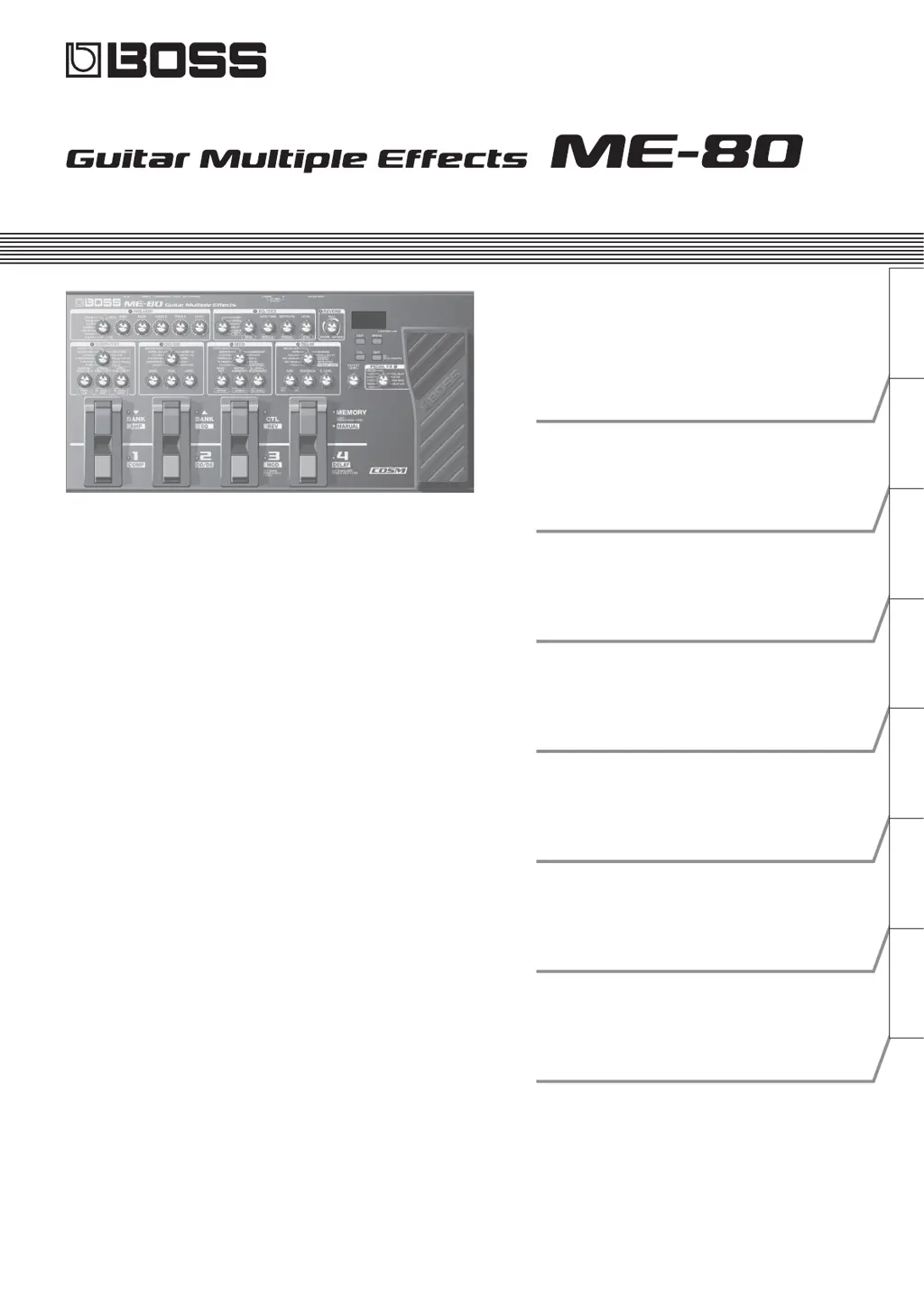
Boss ME-80 - User Manual

Boss ME-80
160 pages
Print Icon
To Next Page IconTo Next Page
Loading...
Deutsch Français Italiano Español Português NederlandsEnglish
Owners Manual
Bedienungsanleitung
Mode d’emploi
Manuale dell'utente
Manual del usuario
Manual do proprietário
Gebruikershandleiding

Table of Contents

Questions and Answers

  • O
    Olivia HughesAug 18, 2025
    What to do if parameters can’t be controlled on my Boss ME-80?
    • D
      Daniel MayAug 18, 2025
      If you're having trouble controlling parameters, consider these possible causes: * Ensure the effect you're trying to control is switched on. You must switch on the effect that contains the parameter you intend to control, to control a parameter using the expression pedal. * Verify that the MIDI controller number settings of your devices match. * Check and adjust the expression pedal if it might be out of adjustment.
  • J
    Jose Brown DDSAug 20, 2025
    What to do if patch does not change on Boss ME-80?
    • S
      susanhendersonAug 21, 2025
      If the patch isn't changing, it might be because the operation setting for switching bank is set to H0. If it is, the patch won't change until you press the number pedal ([1] to [4]).
  • J
    Jerry AyalaAug 23, 2025
    What to do if my Boss ME-80 Music Pedal has no sound or the volume is too low?
    • N
      Natalie HesterAug 23, 2025
      If you're experiencing no sound or low volume with your Boss Music Pedal, consider these potential causes and solutions: * **Broken connection cables?** Try using a different set of connection cables. * **Incorrect connection to other devices?** Verify the connections with your other devices. * **Amp/mixer settings?** Check if your connected amp/mixer is turned on and the volume is appropriately adjusted. * **[OUTPUT LEVEL] knob position?** Adjust the knobs to an appropriate position. * **Tuner on?** When the tuner is active, the effect will be off. * **Incorrect effect settings?** Review the settings for each effect. * **Low “USB LEVEL”?** Adjust the “USB LEVEL” setting to a suitable value. * **Low batteries?** Replace the batteries with new ones.
  • L
    Laura RushAug 26, 2025
    What to do if patch does not change on my Boss ME-80 Music Pedal?
    • A
      Allen EvansAug 26, 2025
      If the patch isn't changing on your Boss Music Pedal, it might be because the operation setting for switching banks is set to H0. If it is set to H0, the patch won't change until you press one of the number pedals ([1] to [4]).
  • F
    fletchertoniAug 28, 2025
    What to do if the volume level of the instrument connected to AUX IN jack is too low on my Boss Music Pedal?
    • A
      amberromeroAug 28, 2025
      If the volume level of an instrument connected to the AUX IN jack is too low on your Boss Music Pedal, the issue might be a connection cable that contains a resistor. Try using a connection cable that does not contain a resistor.
  • M
    Ms. Grace BrooksAug 30, 2025
    Why is there no sound or low volume from my Boss ME-80 Music Pedal?
    • J
      Jacob AndersonAug 30, 2025
      Several factors might be at play. Here's what to check: * Ensure your connection cables aren't faulty by trying a different set. * Verify that the Boss Music Pedal is correctly connected to your other devices. * Confirm that your connected amp/mixer is on and the volume isn't set too low. * Check the [OUTPUT LEVEL] knob on the pedal and adjust it appropriately. * Make sure Tuner is not set to On, as the effect will be off during tuning. * Review the settings for each effect you're using. * Adjust the “USB LEVEL” if it's set too low. * Replace low batteries with new ones.
  • M
    michael60Sep 2, 2025
    Why does oscillating sound occur with my Boss ME-80?
    • T
      Timothy BrownSep 2, 2025
      An oscillating sound might occur if the value for any gain- or volume-related effects parameters is set too high. Try lowering these values.
  • A
    Allison ReeseSep 5, 2025
    What to do if sound from devices connected to the INPUT jack is not heard in the headphones connected to my Boss ME-80 Music Pedal?
    • A
      Adam CarterSep 5, 2025
      If you can't hear sound from devices connected to the INPUT jack in your headphones, check if “USB DIRECT MONITOR” is set to OFF. If it is, set it to ON.
  • J
    James GriffinSep 7, 2025
    Why is the volume level of the instrument connected to AUX IN jack too low on my Boss ME-80 Music Pedal?
    • R
      robert80Sep 7, 2025
      The volume level might be low if you're using a connection cable that contains a resistor. Try using a connection cable that does not contain a resistor.
  • J
    johnsonkimberlySep 10, 2025
    Why can't I control parameters on my Boss ME-80 Music Pedal?
    • J
      Jamie HorneSep 10, 2025
      If you're having trouble controlling parameters on your Boss Music Pedal, here are some things to check: * **Effect switched off?** Ensure the effect containing the parameter you want to control is switched on. * **MIDI controller number settings match?** Verify that the MIDI controller numbers of both devices are the same. * **Expression pedal out of adjustment?** The expression pedal may need adjustment due to extended use or environmental factors.

Summary

Using the Effects

COMP;FX1 (Compressor;Effect 1)

Details the Compressor/Effect 1 section, including its types and parameter settings.

OD;DS (Overdrive;Distortion)

Explains the Overdrive/Distortion effects, their types, and how to adjust their parameters.

MOD (Modulation)

Covers the Modulation effects, listing various types and their corresponding controls and settings.

DELAY (Delay)

Describes the Delay effects, including different delay types and how to set time, feedback, and level.

PREAMP (Preamp)

Details the amplifier simulation (Preamp) section, listing available amp models and their controls.

REVERB (Reverb)

Covers the Reverb effects, specifying reverb types and size adjustments.

EQ;FX2 (Equalizer;Effect 2)

Describes the EQ/FX2 section, including the equalizer and other effects like Phaser and Delay.

PEDAL FX (Pedal Effects)

Explains how to use the expression pedal for various effects like Wah, Pitch Shift, and others.

Outputting Sounds

Switching the Unit On and Off

Provides instructions for powering the ME-80 unit and connected equipment on and off.

Saving;Calling Up Tones (Memory Mode)

Making Global Settings (System Settings)

USING THE UNIT SAFELY

Boss ME-80 Specifications

General IconGeneral
Bit rate24 bit
Product colorGray
Sound effectsDelay, Looper
Sound effects quantity-
Battery typeAA
Operating time7 h
Power source typeBattery, DC
Number of batteries supported6
Display typeLCD
Built-in displayYes
USB 2.0 ports quantityUSB 2.0 ports have a data transmission speed of 480 Mbps, and are backwards compatible with USB 1.1 ports. You can connect all kinds of peripheral devices to them.
Connectivity technologyWired
6.35 mm (1⁄4-inch) output1
Weight and Dimensions IconWeight and Dimensions
Depth231 mm
Width447 mm
Height70 mm
Weight3600 g

Related product manuals