EasyManua.ls Logo

Boss ME-8 - Playing the Guitar Using the ME-8 - Play Mode; Selecting Patches

Boss ME-8
40 pages
Print Icon
To Next Page IconTo Next Page
To Previous Page IconTo Previous Page
Loading...
Playing
the
Guitar
Using
the
ME-8
Play
Mode
<What
Is
a
Patch?>
On
the
ME-8,
a
collection
of
settings
which
specifies
how
the
various
effects
are
to
be
combined,
and
contains
specific
settings
which
fine
tune
the
sound
are
stored
together
into
what
‘is
called
a
“Patch.”
The
unit
offers
100
Patches
in
all.
Patches
are
organized
by
Group,
Bank,
and
Number,
as
illustrated
below.
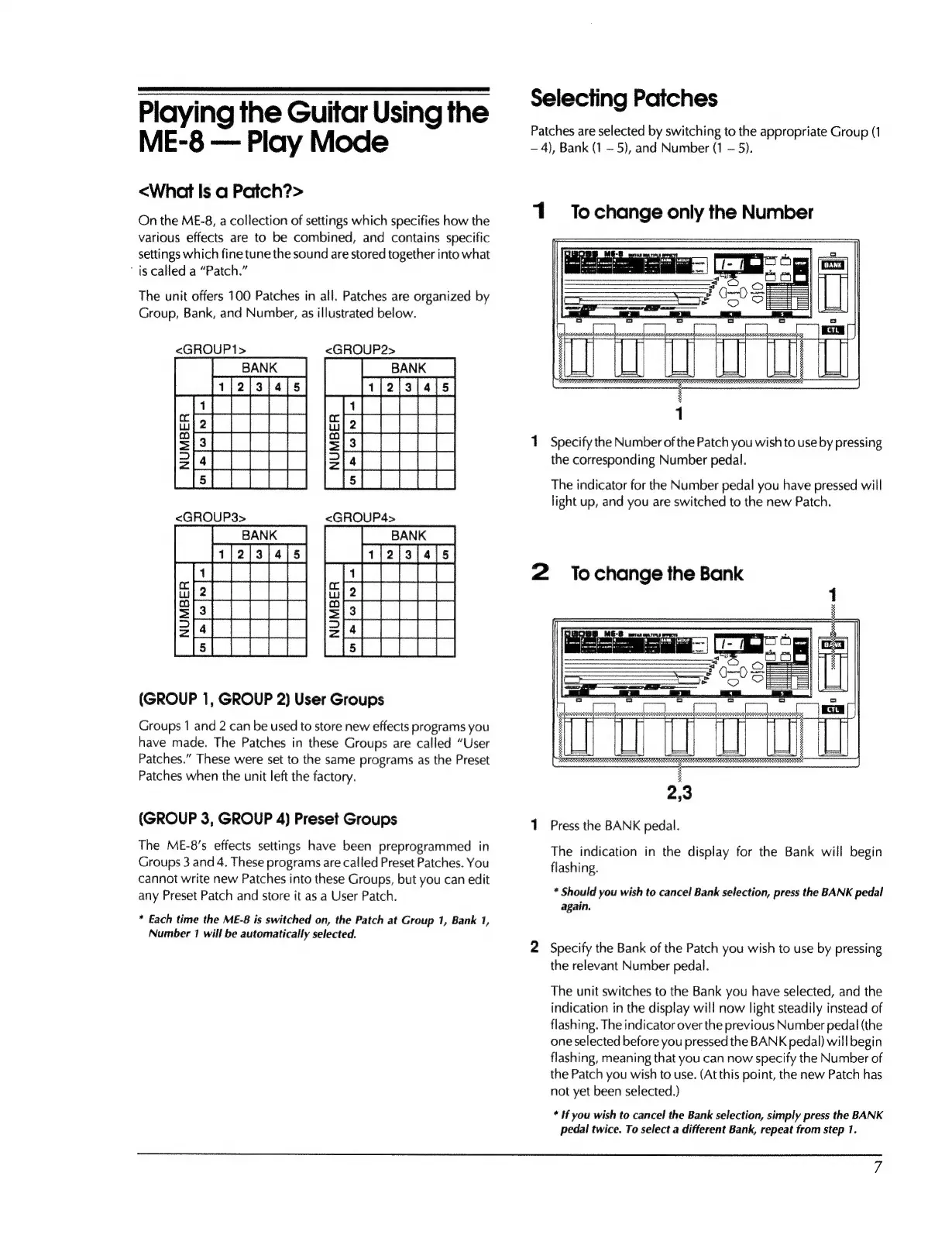
<GROUP1>
<GROUP2>
(GROUP
1,
GROUP
2)
User
Groups
Groups
1
and
2
can
be
used
to
store
new
effects
programs
you
have
made.
The
Patches
in
these
Groups
are
called
“User
Patches.”
These
were
set
to
the
same
programs
as
the
Preset
Patches
when
the
unit
left
the
factory.
(GROUP
3,
GROUP
4)
Preset
Groups
The
ME-8's
effects
settings
have
been
preprogrammed
in
Groups
3
and
4.
These
programs
are
called
Preset
Patches.
You
cannot
write
new
Patches
into
these
Groups,
but
you
can
edit
any
Preset
Patch
and
store
it
as
a
User
Patch.
*
Each
time
the
ME-8
is
switched
on,
the
Patch
at
Group
1,
Bank
1,
Number
1
will
be
automatically
selected.
Selecting
Patches
Patches
are
selected
by
switching
to
the
appropriate
Group
(1
~
4),
Bank
(1
5),
and
Number
(1
5).
1
Tochange
only
the
Number
3
ok
|
:
SSF
SE
UU
ou
1
1
Specify
the
Number
of
the
Patch
you
wish
to
use
by
pressing
the
corresponding
Number
pedal.
The
indicator
for
the
Number
pedal
you
have
pressed
will
light
up,
and
you
are
switched
to
the
new
Patch.
2
Tochange
the
Bank
1
Press
the
BANK
pedal.
The
indication
in
the
display
for
the
Bank
will
begin
flashing.
*
Should
you
wish
to
cancel
Bank
selection,
press
the
BANK
pedal
again.
2
Specify
the
Bank
of
the
Patch
you
wish
to
use
by
pressing
the
relevant
Number
pedal.
The
unit
switches
to
the
Bank
you
have
selected,
and
the
indication
in
the
display
will
now
light
steadily
instead
of
flashing.
The
indicator
over
the
previous
Number
pedal
(the
one
selected
before
you
pressed
the
BANK
pedal)
will
begin
flashing,
meaning
that
you
can
now
specify
the
Number
of
the
Patch
you
wish
to
use.
(At
this
point,
the
new
Patch
has
not
yet
been
selected.)
*
If
you
wish
to
cancel
the
Bank
selection,
simply
press
the
BANK
pedal
twice.
To
select
a
different
Bank,
repeat
from
step
1.

Other manuals for Boss ME-8

Related product manuals