EasyManua.ls Logo

Boston SA1 - User Manual

Boston SA1
25 pages
Print Icon
To Next Page IconTo Next Page
Loading...
BostonSA1
Subwoofer
Amplifier
Boston
Boston
Acoustics
Question and Answer IconNeed help?

Do you have a question about the Boston SA1 and is the answer not in the manual?

Summary

Important Safety Instructions

Regulatory Compliance Statements

Declaration of Conformity

Declares product conformity with applicable standards and directives.

European Users

Lists compliance with relevant European directives for audio equipment.

SA1 Specifications

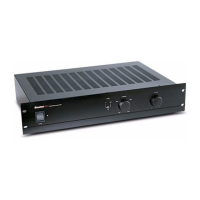
Product Description

Front Panel Controls

POWER Switch and LED

Controls power and indicates device operational status (standby, on, protection).

PHASE Switch

Adjusts speaker output polarity for optimal bass response.

LOWPASS Crossover Knob

Sets the crossover point and upper frequency range for the subwoofer.

VOLUME Knob

Adjusts the subwoofer's output level to match main speakers.

Rear Panel Controls

EQ MODE Switch

Selects appropriate equalization settings for the subwoofer.

12-volt TRIGGER Switch

Controls amplifier turn-on via a 12V signal or audio input.

Connecting Audio Components To The SA1

Dolby Pro Logic and Digital System Connection

Connects receiver's Sub out/LFE out to SA1's LFE/XOVER BYPASS.
Stereo Preamp Line-Level System Connection

Connecting Your Subwoofer to the SA1

Service and Support Information

Limited Warranty

Boston SA1 Specifications

General IconGeneral
BrandBoston
ModelSA1
CategoryAmplifier
LanguageEnglish

Related product manuals