EasyManua.ls Logo

BougeRV CR 35 - Function and Operation Details; Powering and Display Initialization; Control Panel Operations; Mode and Protection Settings

BougeRV CR 35
12 pages
Print Icon
To Next Page IconTo Next Page
To Previous Page IconTo Previous Page
Loading...
4.Function
and
Operation
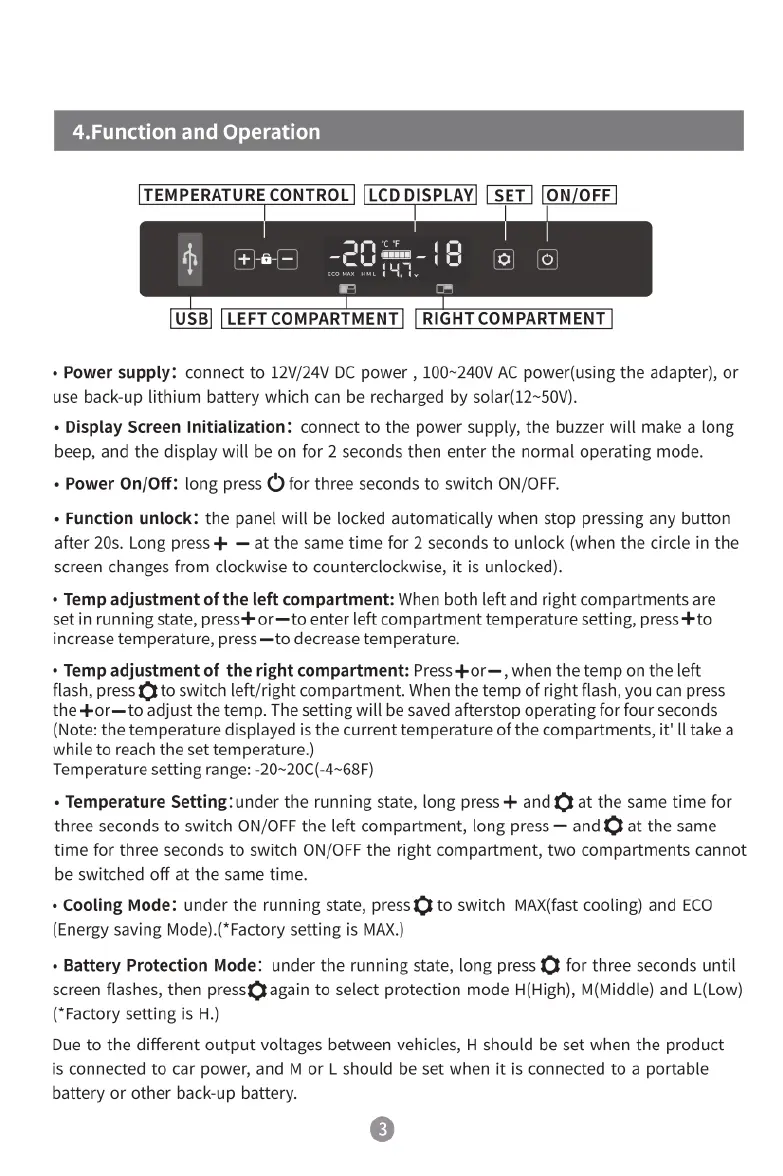
[TEMPERATURE
CONTROL]
[LCD
DIISPLAVI
[SET]
[ON/OFF]
[USB]
[LEFT
COMPARTMENT]
[RIGHT
COMPARTMENT]
+
Power
supply:
connect
to
12V/24V
DC
power
,
100~240V
AC
power(using
the
adapter),
or
use
back-up
lithium
battery
which
can
be
recharged
by
solar(12~50V).
«
Display
Screen
Initialization:
connect
to
the
power
supply,
the
buzzer
will
make
a
long
beep,
and
the
display
will
be
on
for
2
seconds
then
enter
the
normal
operating
mode.
«
Power
On/Off:
long
press O
for
three
seconds
to
switch
ON/OFF.
«
Function
unlock:
the
panel
will
be
locked
automatically
when
stop
pressing
any
button
after
20s.
Long
press
+
at
the
same
time
for
2
seconds
to
unlock
(when
the
circle
in
the
screen
changes
from
clockwise
to
counterclockwise,
it is
unlocked).
+
Temp
adjustment
of
the
left
compartment:
When
both
left
and
right
compartments
are
set
in
running
state,
press+
or—to
enter
left
compartment
temperature
setting,
press+to
increase
temperature,
press
—to
decrease
temperature.
+
Temp
adjustment
of
the
right
compartment:
Press4or—,
when
the
temp
on the
left
flash,
press
X
to
switch
left/right
compartment.
When
the
temp
of
right
flash,
you
can
press
the
+or—to
adjust
the
temp.
The
setting
will
be
saved
afterstop
operating
for
four
seconds
(Note:
the
temperature
displayed
is
the
current
temperature
of
the
compartments,
it'
[l
take
a
while
to
reach
the
set
temperature.)
Temperature
setting
range:
-20~20C(-4~68F)
«
Temperature
Setting:under
the
running
state,
long
press
+
and
¥
at
the
same
time
for
three
seconds
to
switch
ON/OFF
the
left
compartment,
long
press
and
€}
at
the
same
time
for
three
seconds
to
switch
ON/OFF
the
right
compartment,
two
compartments
cannot
be
switched
off
at
the
same
time.
«
Cooling
Mode:
under
the
running
state,
press
¥
to
switch
MAX(fast
cooling)
and
ECO
(Energy
saving
Mode).(*Factory
setting
is
MAX.)
«
Battery
Protection
Mode:
under
the
running
state,
long
press
£}
for
three
seconds
until
screen
flashes,
then
pressg¥again
to
select
protection
mode
H(High),
M(Middle)
and
L{Low)
(*Factory
setting
is
H.)
Due
to
the
different
output
voltages
between
vehicles,
H
should
be
set
when
the
product
is
connected
to
car
power,
and
M
or
L
should
be
set
when
it
is
connected
to
a
portable
battery
or
other
back-up
battery.
©

Related product manuals