EasyManua.ls Logo

BougeRV CR 35 - Battery Indicators and Saving Tips; Discharge Time and Solar Charging

BougeRV CR 35
12 pages
Print Icon
To Next Page IconTo Next Page
To Previous Page IconTo Previous Page
Loading...
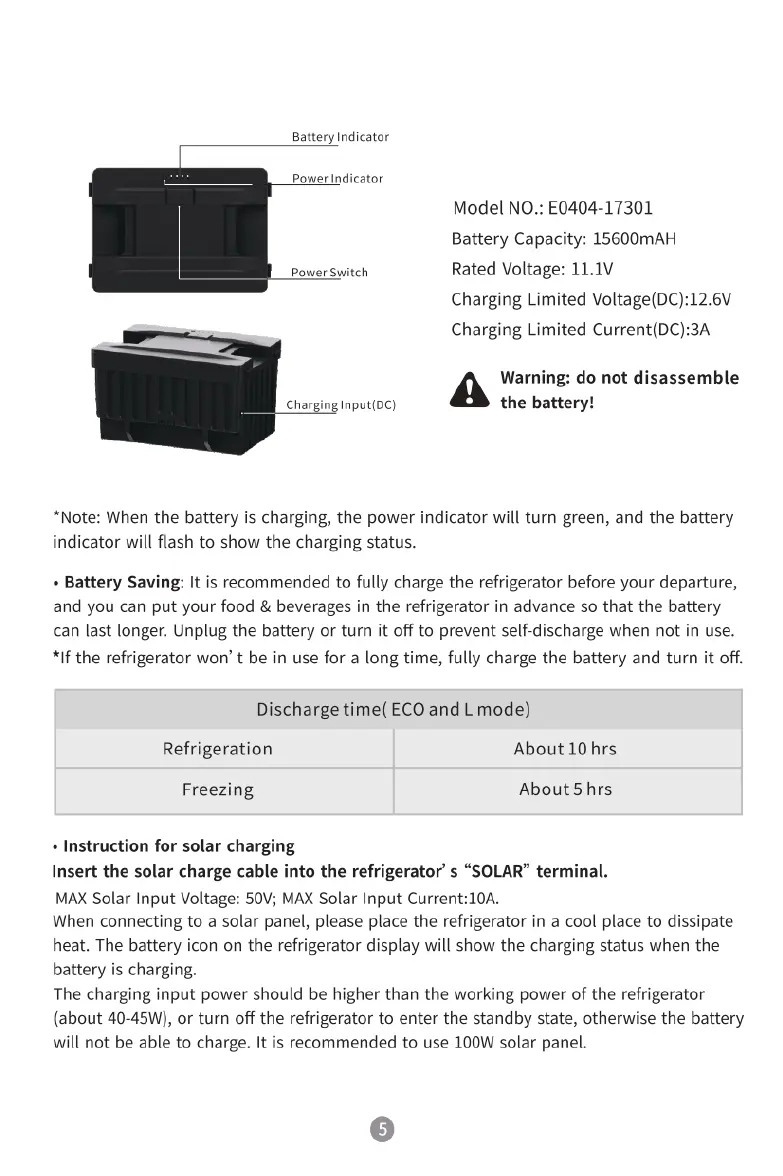
Battery
Indicator
Power
Indicator
Model
NO.:
E0404-17301
Battery
Capacity:
15600mAH
Power
Switch
Rated
Voltage:
11.1V
Charging
Limited
Voltage(DC):12.6V
-
Charging
Limited
Current(DC):3A
Warning:
do
not
disassemble
Charging
Input(DC)
the
battery!
*Note:
When
the
battery
is
charging,
the
power
indicator
will
turn
green,
and
the
battery
indicator
will
flash
to
show
the
charging
status.
+
Battery
Saving:
It
is
recommended
to
fully
charge
the
refrigerator
before
your
departure,
and you
can put
your
food
&
beverages
in
the
refrigerator
in
advance
so
that
the
battery
can
last
longer.
Unplug
the
battery
or
turn
it
off
to
prevent
self-discharge
when
not
in
use.
*If
the
refrigerator
won’
t
be
in
use
for
a
long
time,
fully
charge
the
battery
and
turn
it
off.
Discharge
time(ECO
and
L
mode)
Refrigeration
About
10
hrs
Freezing
About
5
hrs
«
Instruction
for
solar
charging
Insert
the
solar
charge
cable
into
the
refrigerator’
s
“SOLAR”
terminal.
MAX
Solar Input
Voltage:
50V;
MAX
Solar Input
Current:10A.
When
connecting
to
a
solar
panel,
please
place
the
refrigerator
in
a
cool
place
to
dissipate
heat.
The
battery
icon on the
refrigerator
display
will
show
the
charging
status
when
the
battery
is
charging.
The
charging
input
power
should
be
higher
than
the
working
power
of
the
refrigerator
(about
40-45W),
or
turn
off
the
refrigerator
to
enter
the
standby
state,
otherwise
the
battery
will
not
be
able
to
charge.
It
is
recommended
to
use
100W
solar
panel.
6

Related product manuals