EasyManua.ls Logo

BougeRV CR65 - Function and Operation

BougeRV CR65
12 pages
Print Icon
To Next Page IconTo Next Page
To Previous Page IconTo Previous Page
Loading...
7.FUNCTION
AND
OPERATION
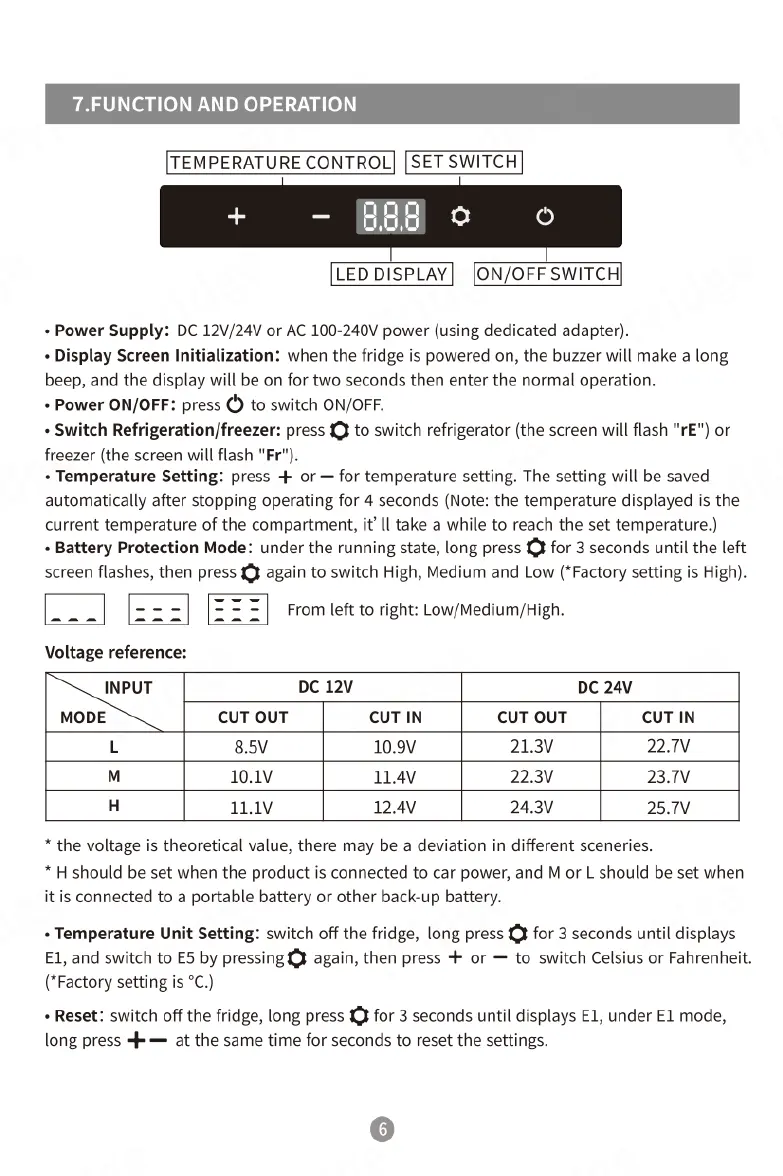
[TEMPERATURE
CONTROL|
[SET
SWITCH]
[LEDDISPLAY]
[ON/OFF
SWITCH|
«
Power
Supply:
DC
12V/24V
or
AC
100-240V
power
(using
dedicated
adapter).
«
Display
Screen
Initialization:
when
the
fridge
is
powered
on,
the
buzzer
will
make
a
long
beep,
and
the
display
will
be
on
for
two
seconds
then
enter
the
normal
operation.
«
Power
ON/OFF:
press
()
to
switch
ON/OFF.
«
Switch
Refrigeration/freezer:
press £}
to
switch
refrigerator
(the
screen
will
flash "rE")
or
freezer
(the
screen
will
flash
"Fr").
«
Temperature
Setting:
press
+
or
for
temperature
setting.
The
setting
will
be
saved
automatically
after
stopping
operating
for
4
seconds
(Note:
the
temperature
displayed
is
the
current
temperature
of
the
compartment,
it’
Il
take
a
while
to
reach
the
set
temperature.)
«
Battery
Protection
Mode:
under
the
running
state,
long
press
¥
for
3
seconds
until
the
left
screen
flashes,
then
press
¥
again
to
switch
High,
Medium
and
Low
(*Factory
setting
is
High).
2
From
et
o
rights
LowMediumHigh
Voltage
reference:
INPUT
DC
12v
DC
24V
MODE
CUT
OUT
CUTIN
CUT
OUT
CUT
IN
L
8.5V
10.9V
21.3V 22.7V
10.1v 11.4v 22.3V 23.1v
H
11.1v 12.4v 24.3V 25.7V
*
the
voltage
is
theoretical
value,
there
may
be
a
deviation
in
different
sceneries.
*
H
should
be
set
when
the
product
is
connected
to
car
power,
and
M
or
L
should
be
set
when
it
is
connected
to
a
portable
battery
or
other
back-up
battery.
«
Temperature
Unit
Setting:
switch
off
the
fridge,
long
press
£}
for
3
seconds
until
displays
E1,
and
switch
to
ES
by
pressing
again,
then
press
+
or
to
switch
Celsius
or
Fahrenheit.
(*Factory
setting
is
°C.)
«
Reset:
switch
off
the
fridge,
long
press
£}
for
3
seconds
until
displays
E1,
under
E1
mode,
long
press
4=
at
the
same
time
for
seconds
to
reset
the
settings.

Related product manuals