User’s Manual
4
Getting Started
2. Download the Bowflex Boost
™
App
Download the App “Bowex Boost”, available on iTunes
®
. The Bowex Boost
™
device requires the App to
read your data. The App works with an iProduct that is equipped with Bluetooth
®
4.0 BLE.
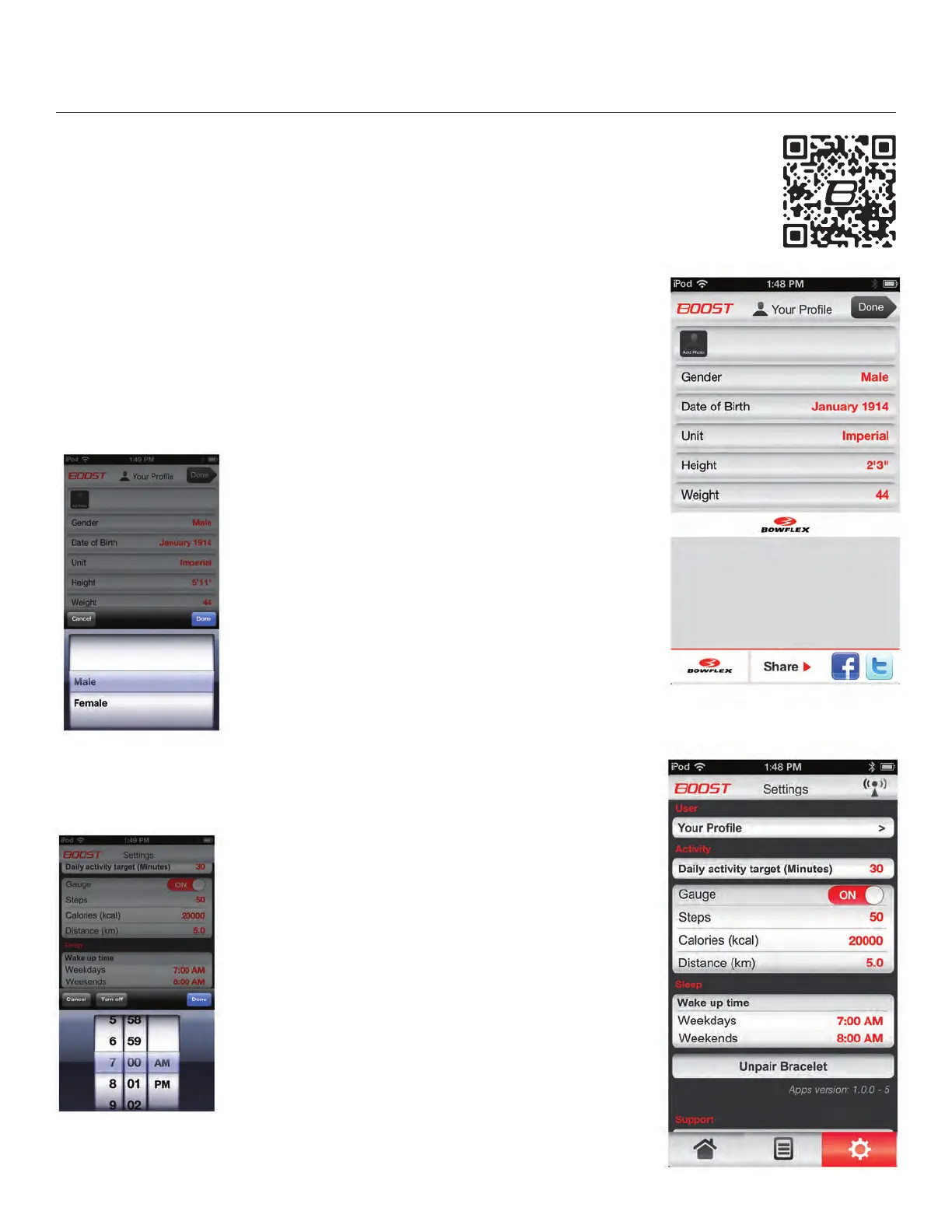
3. Define the User
Start the the Bowex Boost
™
App. It will ask you to dene the User and setup the daily goals on
the Settings Tab.
The values in red can be adjusted to the User. Tap the red value with your nger and the options
window will open at the lower part of the screen. Select the desired value and push “DONE”. The
setting is now set to the new value.
When the User Prole has been updated, push “DONE” to accept and set the values.
4. Define the Activity Goals and Sleep
Times
Your daily Goals and Wake up times (Weekday and Weekend)
are set on the Settings Tab. Adjust these values to the User.
Once adjusted, push “DONE”. The User settings are now set,
and can be adjusted at any time.
“GAUGE” allows you to gauge, or see, where you are with your
current totals and your goals on the Current Day: Activity tab.
Note: The device will automatically switch to Awake mode
based on the Wake up time settings.
Sample screen of “Wake up time” being adjusted:
5. Wear the Device and be active!
Sample screen of “Gender” being adjusted:


 To Next Page