14
SCHM-001
Rev 2
Model: S2601 & S2605 Chairs
Note: Chair movement can be stopped by depressing any direconal control (i.e. back up / back down,
base up / base down, or any programmed posion).
Adjustments to chair posioning can be made anyme using the “Up / Down” buons or pedals.
Hand & Foot Control
Operang Instrucons (connued)
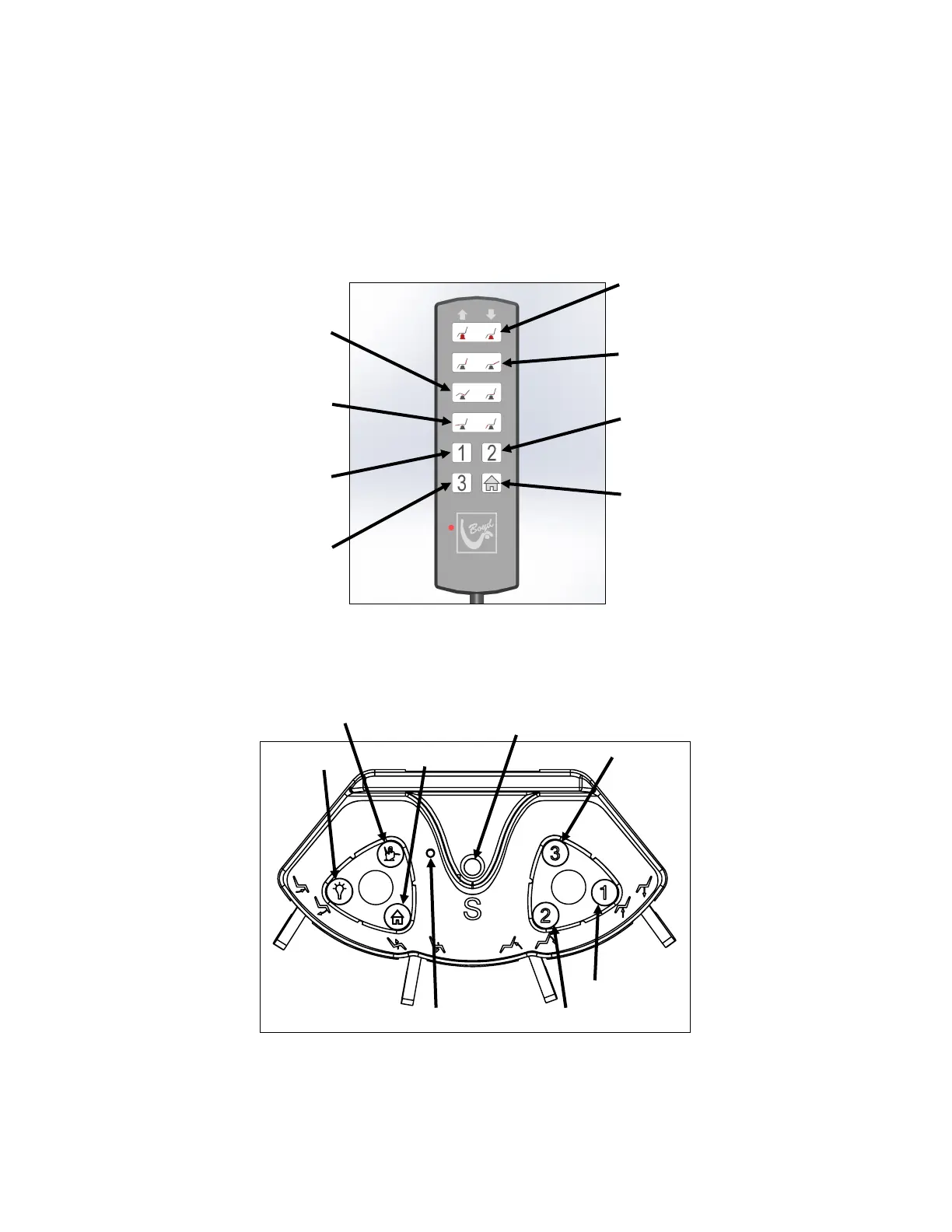
BASE UP/DOWN:
Press and hold to move chair
upward or downward
BACK UP/DOWN:
Press and hold to move back
upward or downward
POSITION #1:
Press to move to position #1
See separate instructions
POSITION #2:
Press to move to position #2
See separate instructions
POSITION #3:
Press to move to position #3
See separate instructions
HOME:
Returns chair and base to
Original entrance / exit
position
(back up / base down)
Press once to activate.
Hand
Control
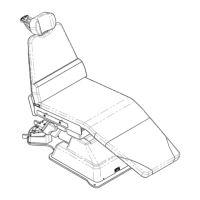
TOE UP/DOWN:
Press to hold to move toe
upward or downward
TILT UP/DOWN:
Press to hold to tilt
upward or downward
SAVE:
Used for programming
See separate instructions
Foot Control
Posion 2
Posion 3
Position 1
LOCK OUT:
Used for locking chair
position
Light On/O
Toe Posion
Tilt Posion
Back Posion
Base Posion
Power Light
Home



 To Next Page