11 12
Chapter Four: Menu Setting
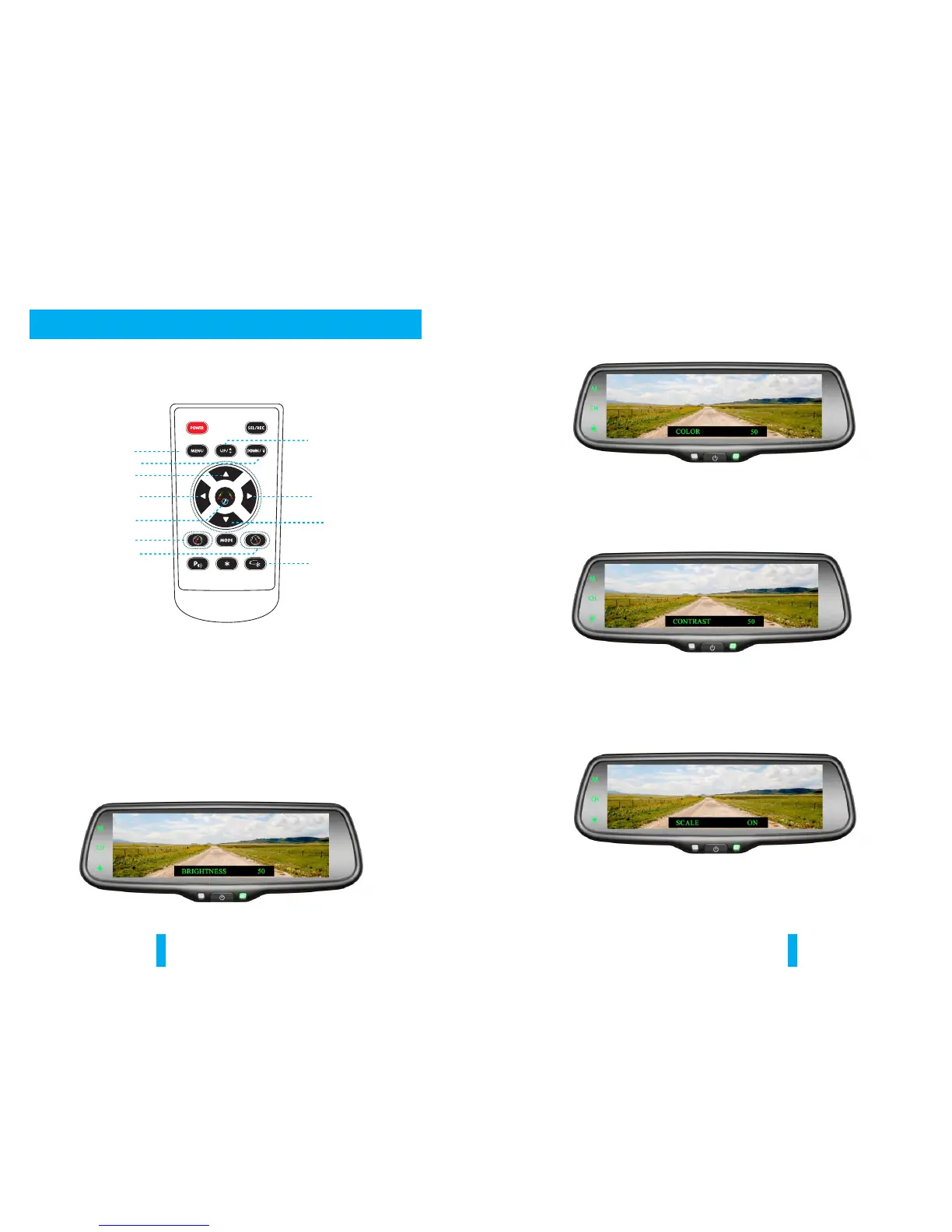
Enter picture menu
Guide line clockwise
Menu parameter decreases
Menu parameter increases
Guide line up
Guide line left
Enter guide line
adjustment
Guide line anti-clockwise
Guide line right
Guide line down
Press to reset all
menu and parameters
4.1 Remote control
The menu only can be set by remote control, and kindly check its definition as below.
4.2 Menu setting guidance
Short press “MENU”to enter “PICTURE”, then you can switch between
“BRIGHTNESS”, “COLOR”, “CONTRAST”, “SCALE”, “START LOGO”, “PRESET”,
or enter out. When it switches to “PRESET”, re-press shortly the MENU, and
you would close the menu. UP and DOWN are to change the figure of each
setting.
4.2.1 BRIGHTNESS ADJUSTMENT
The defaulted setting is 50, ranging from 0 to 100, and only CVBS signal can work.
4.2.2 COLOR ADJUSTMENT
The defaulted setting is 50, ranging from 0 to 100, and only CVBS signal can work.
4.2.3 CONTRAST ADJUSTMENT
The defaulted setting is 50, ranging from 0 to 100, and only CVBS signal can work.
4.2.4 SCALE ADJUSTMENT
Turn on/off the adjustable guidelines.


 To Next Page