
 Need help?
Do you have a question about the Boyo VTW73M and is the answer not in the manual?
Lists the accessories included in the product packaging.
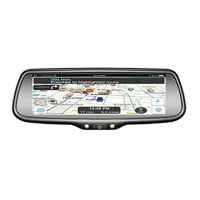
Highlights key features such as the LCD screen, video inputs, and automatic brightness adjustment.
Details technical specifications like screen size, resolution, voltage, and operating temperature.
Explains the function of each button located on the front of the device.
Provides instructions for removing the original mirror and installing the new monitor.
Discusses the availability of various brackets and how to select the correct one for your vehicle.
Details the wiring connections required for the reversing signal and video inputs.
Explains the purpose and distances associated with the colored guide lines.
Discusses the limitations of fixed guide lines and potential accuracy issues.
Guides on adjusting the position and angle of guide lines using the remote control.
Explains the functions of the remote control for navigating menu settings.
Guides on adjusting screen brightness, with a range from 0 to 100.
Guides on adjusting screen color, with a range from 0 to 100.
Guides on adjusting screen contrast, with a range from 0 to 100.
Guides on turning the adjustable guidelines on or off.
Allows users to manually set the startup logo to ON or OFF.
Explains the preset function which automatically turns off after setting.
Details the volume adjustment range from 0 to 100.
Introduces Miracast functionality and general steps for connecting mobile devices.
Step-by-step guide for connecting Android devices via wireless projection.
Instructions for connecting iPhones using AirPlay/DLNA.
Explains how to switch between different display modes like camera, video, and mobile.
Shows how to display video and mobile content side-by-side.
Shows how to display camera and mobile content side-by-side.
Details the steps for updating the device firmware using a mobile device and Wi-Fi.
 General
| Brand | Boyo |
|---|---|
| Model | VTW73M |
| Category | Car Navigation system |
| Language | English |

 To Next Page