EasyManua.ls Logo

boytone BT-326F User Manual

boytone BT-326F
2 pages
To Next Page IconTo Next Page
Page #1 background imageLoading...
Page #1 background image
NO.1
NO.2
Front panel
Thank you for your purchase of an authenic
BOYTONE® product. Prior to first use, please read
this manual carefully.
BT-326F
NO.3
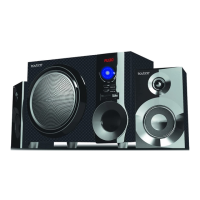
2.1CH MULTIMEDIA SPEAKER SYSTEM
Operation explanation:
Features:
Quality 2.1 speaker system with built-in amplifier
Full audio spectrum performances, ideal for your favourite entertainment
from Mp3, Mp4, CD/DVD movies and digital playbacks
Specially designed woofer cabinet for bass and resolution
Comes with remote control and 3.5mm stereo connection
~120V 60Hz
20W+10Wx2(RMS)
3" x2
5" subwoofer
Package contents:
W160xH277xD302(mm)
W105xH170xD92(mm)
subwoofer cabinet 1 pc
satellite speakers 2 pcs
User manual 1 pc
Audio input cord 1 pc
remote control 1 pc
Using the Remote Control
www.boytone.com
ST-BY/PLAY/PAUSE-----Press to turn on speaker, long press into stand-by.
PLAY/PAUSE in USB/SD/BT mode.
SOURCE-----Change the input mode.
VOLUME-/+ -----Volume down/up.
TUNING+/NEXT -----Press to increase FM frequency 0.1Mhz,
long press to start seek mode for radio.
In USB/SD/BT mode, press NEXT for next song.
TUNING-/PREVIOUS -----Press to decrease FM frequency 0.1Mhz,
long press to start search mode for FM Radio.
In USB/SD/BT mode, press “ PREVIOUS ” for
previous song.
1. ST-BY/
6. TUNING+/
2. SOURCE
5. TUNING-/
3. VOLUME+
4. VOLUME-
(1)
(2)
(5) (6)
(4)
(3)
FM ANT 1 pc
6
1.
STAND-BY
2.
MUTE
3.
SOURCE
4.
TONE
5.
MEMORY
6.
0~9
7.
VOL+/
-
8.
TUNE+/-
9.
LED EFFECT
10.
PREV/|<<
11.
NEXT/>>|
12.
PLAY/PAUSE
VOL+
LED
TONE
MEMORY
TUNE+
TUNE-
VOL-
SOURCE
(1)
(3)
(7)
(4)
(8)
(
10)
(6)
(7)
(2)
(9)
(5)
(8)
(11)
(12)
1.
“ST-BY” - standby mode
2.
MUTE” - activates or deactivates mute.
3.
SOURCE” - select the AUX , DVD ,USB/SD,FM,BL input modes and the
LED display will show “Au18” for AUX mode, “Du18” for DVD mode, “87.5” for
FM mode andBL for Bluetooth mode.
4.TONE” to adjust “TREBLE” and “BASS” Use “VOL+/-” to increase or
decrease “TREBLE” or “BASS” levels.
5.
When in FM Radio mode, press“MEMORY” and the station displayed will
flash/blink. The machine is in station memorization mode. You can change
the station by pressing “NEXT”or “PREV” and pressing “PLAY/PAUSE” will
save that station for that station number. Automatic seek and save can be
done by pressing “MEMORY” for 3-5 seconds
(Note: Previous saved channels will be deleted when you press
“MEMORY”for 3-5 seconds.
Question and Answer IconNeed help?

Do you have a question about the boytone BT-326F and is the answer not in the manual?

boytone BT-326F Specifications

General IconGeneral
Brandboytone
ModelBT-326F
CategorySpeaker System
LanguageEnglish

Summary

System Operation and Specifications

Specifications Overview

Details output power, drive units, frequency response, S/N, distortion, and dimensions.

Key Features and Package Contents

Highlights system capabilities, audio performance, and lists all included items like satellites, remote, and manual.

Front Panel and Remote Control Functions

Front Panel Button Descriptions

Explains the function of each button located on the front panel of the speaker system.

Remote Control Button Operations

Details the operation and purpose of each button on the provided remote control for system management.

System Connections and Rear Panel

Rear Panel Ports Identification

Identifies the various input, output, and power ports located on the rear panel of the unit.

Speaker Terminal Connection Guide

Instructions on how to connect the left and right channel satellite speakers to the system's output terminals.

System Connection Diagram

Provides a visual guide illustrating the overall system connection setup for audio sources and speakers.

Bluetooth Connectivity and Safety Precautions

Connecting a Bluetooth Device

Step-by-step guide to activate Bluetooth and search for devices for wireless audio playback.

Important Safety and Handling Notes

Provides crucial safety warnings and handling advice, including magnetism and remote battery care.

Related product manuals