The Firmware Upgrade can be found on
this home page.
http://www.BPIDION.com
Note
SETUP
9
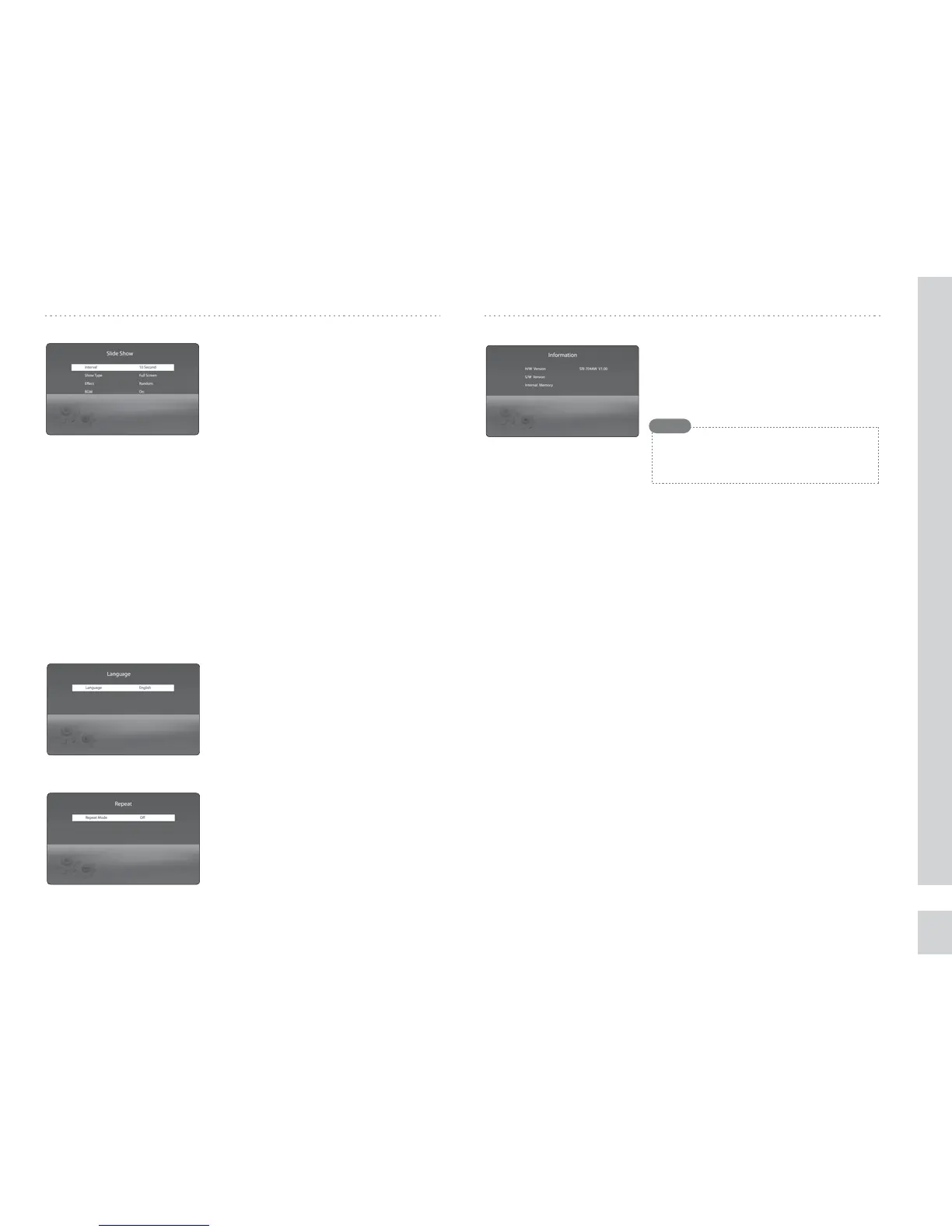
◈ Show Type
Full Screen : Displays the image in full screen,
Fit Screen : Displays the image to t the screen.
◈ Language
Sets the language to be displayed on the
screen.
(Supports English,German,Spanish,
and Japanese.)
◈ Repeat Mode
Use this menu to enable/disable repeat
mode for slide show, mp3, and movie.
O : Do not repeat,
One : Repeat a single song,
Folder : Repeat all songs in a fold,
All : Repeat all les in the memory.
◈ Checking the system information
Display the versions for rmware and
hardware. The memory capacity and free
memory pace are also displayed.
◈ Select transition eect
You can select any of various slide eects.
O : Simple slide show without any eects,
Fade : Fade In/Out eects applied to slide show,
Random : Slide show with various eects in irregular method.
◈ BGM (Back Ground Music)
An MP3 le is played back while the slide show is running.
On : MP3 playback active,
O : MP3 playback not active
▷▷ Language
▷▷ Repeat
▷▷ Information
◈ Slide Show Interval
You can set the interval for slide show.
(1 sec to 30 minute)
▷▷ Slide Show


 To Next Page