Bradyprinter 200M-PLUS User’s Guide 15
&RQILJXULQJWKH3ULQWHU
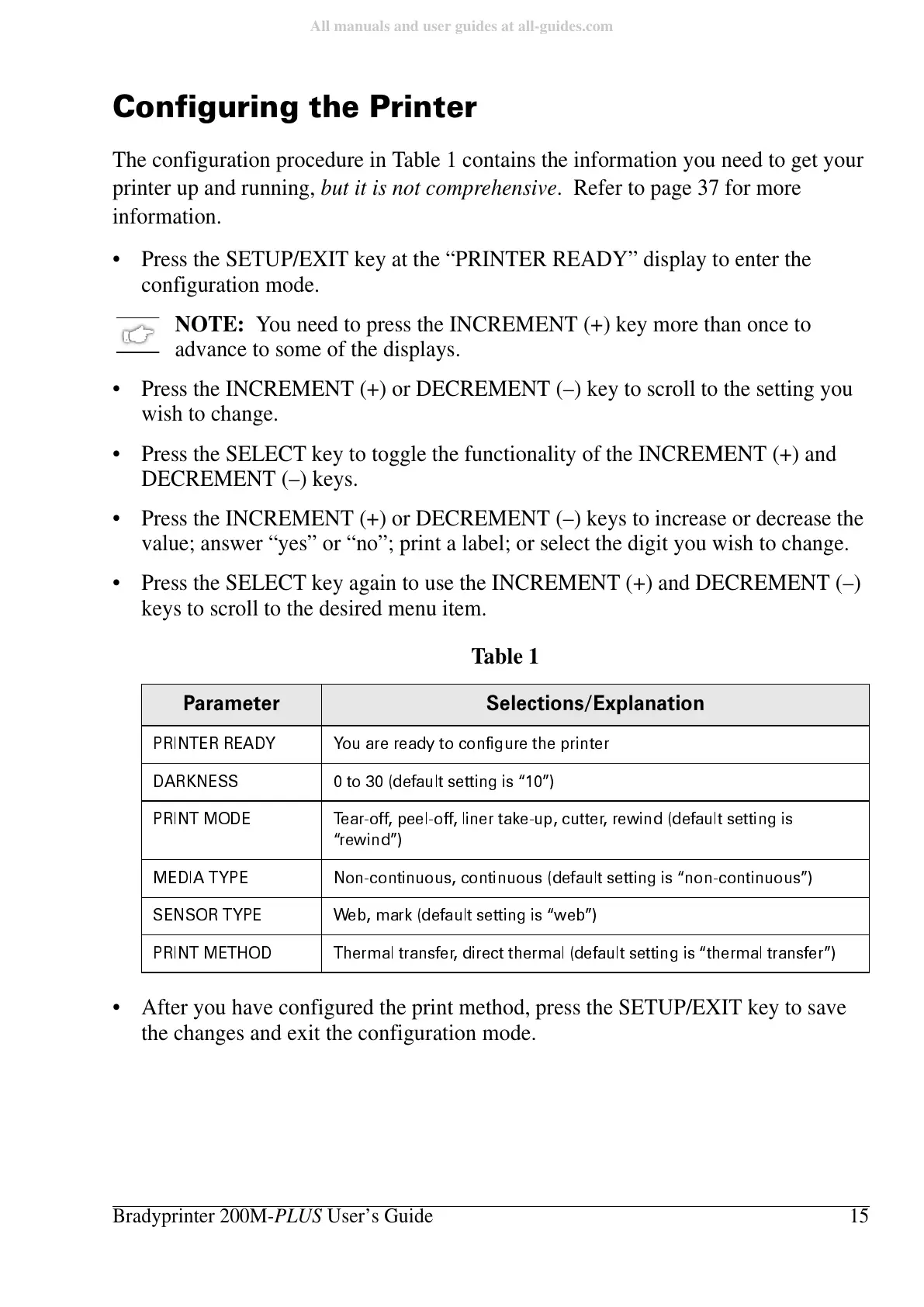
The configuration procedure in Table 1 contains the information you need to get your
printer up and running, but it is not comprehensive. Refer to page 37 for more
information.
• Press the SETUP/EXIT key at the “PRINTER READY” display to enter the
configuration mode.
NOTE: You need to press the INCREMENT (+) key more than once to
advance to some of the displays.
• Press the INCREMENT (+) or DECREMENT (–) key to scroll to the setting you
wish to change.
• Press the SELECT key to toggle the functionality of the INCREMENT (+) and
DECREMENT (–) keys.
• Press the INCREMENT (+) or DECREMENT (–) keys to increase or decrease the
value; answer “yes” or “no”; print a label; or select the digit you wish to change.
• Press the SELECT key again to use the INCREMENT (+) and DECREMENT (–)
keys to scroll to the desired menu item.
• After you have configured the print method, press the SETUP/EXIT key to save
the changes and exit the configuration mode.
Table 1
3DUDPHWHU 6HOHFWLRQV([SODQDWLRQ
35,17(55($'< <RXDUHUHDG\WRFRQILJXUHWKHSULQWHU
'$5.1( 66 WRGH ID XOWV H WWLQJ LV´ µ
35,1702'( 7HDURIISHHORIIOLQHUWDNHXSFXWWHUUHZLQGGHIDXOWVHWWLQJLV
´UHZLQGµ
0(', $ 7< 3( 1RQ F RQWLQXRXV FR QWLQXRXV GH I DXOWV H WWLQJ LV ´QRQFRQW LQXRXV µ
6(1 62 57 <3( :H E P DU N GH ID XOWV H WWLQJ LV´ Z HEµ
35,1 70 (7+ 2' 7KHU PD OWU DQV IH U GLUH FW WKH U PD OGH ID XOWV H WWLQJ LV´ WKH UP DO WUD QV IH Uµ















 To Next Page