5.3.2.1 Navigating-the-interactive-GPS-status-page-
To!navigate!the!interactive!map!of!the!GPS!constellation,!click!and!drag!the!map!to!
reposition!the!map!hemisphere,!using!the!left!and!right!motion!of!your!pointer!to!
adjust!the!orientation!of!the!map,!and!the!up!and!down!motion!of!your!pointer!to!
adjust!the!angle!of!the!map.!
5.3.3 Viewing(the(Current(Phase(Lock(Status(
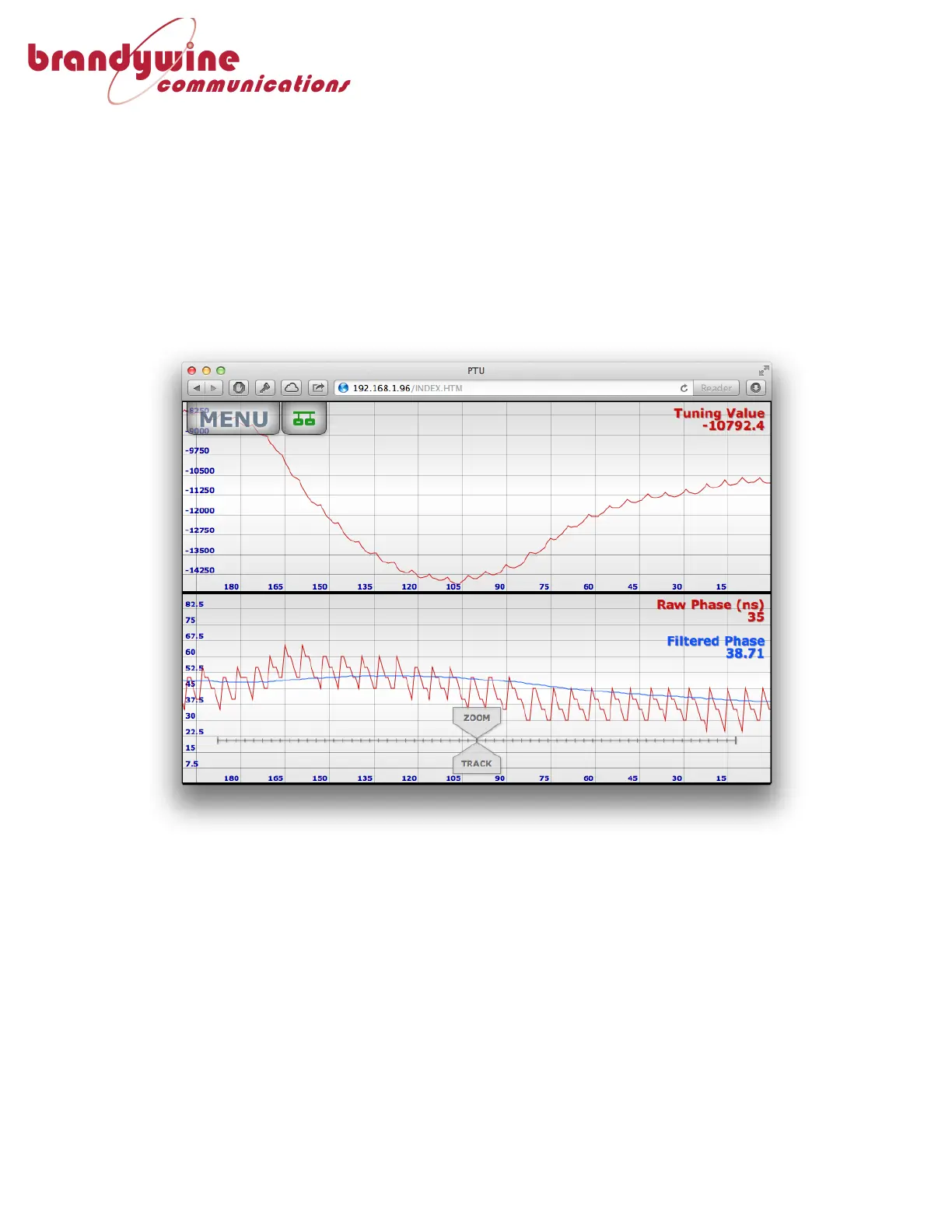
From!the!“MENU”!button,!select!“Phase-Lock”!from!the!status!section,!this!will!
display!an!interactive!graph!showing!the!current!Tuning!Value!and!both!Raw!Phase!
and!Filtered!Phase.!
!
The!Raw!Phase!shows!the!difference!between!the!reference!and!the!PTU!timing.!!
The!filtered!phase!shows!the!value!of!the!phase!after!passing!through!a!software!
filtering!algorithm!to!remove!the!pulse-to-pulse!jitter!typically!found!in!a!GPS!
receiver,!the!tuning!value!shows!the!control ! input!to!the!PTU!Oscillator.!



 To Next Page