3
PANEL CONTROLS
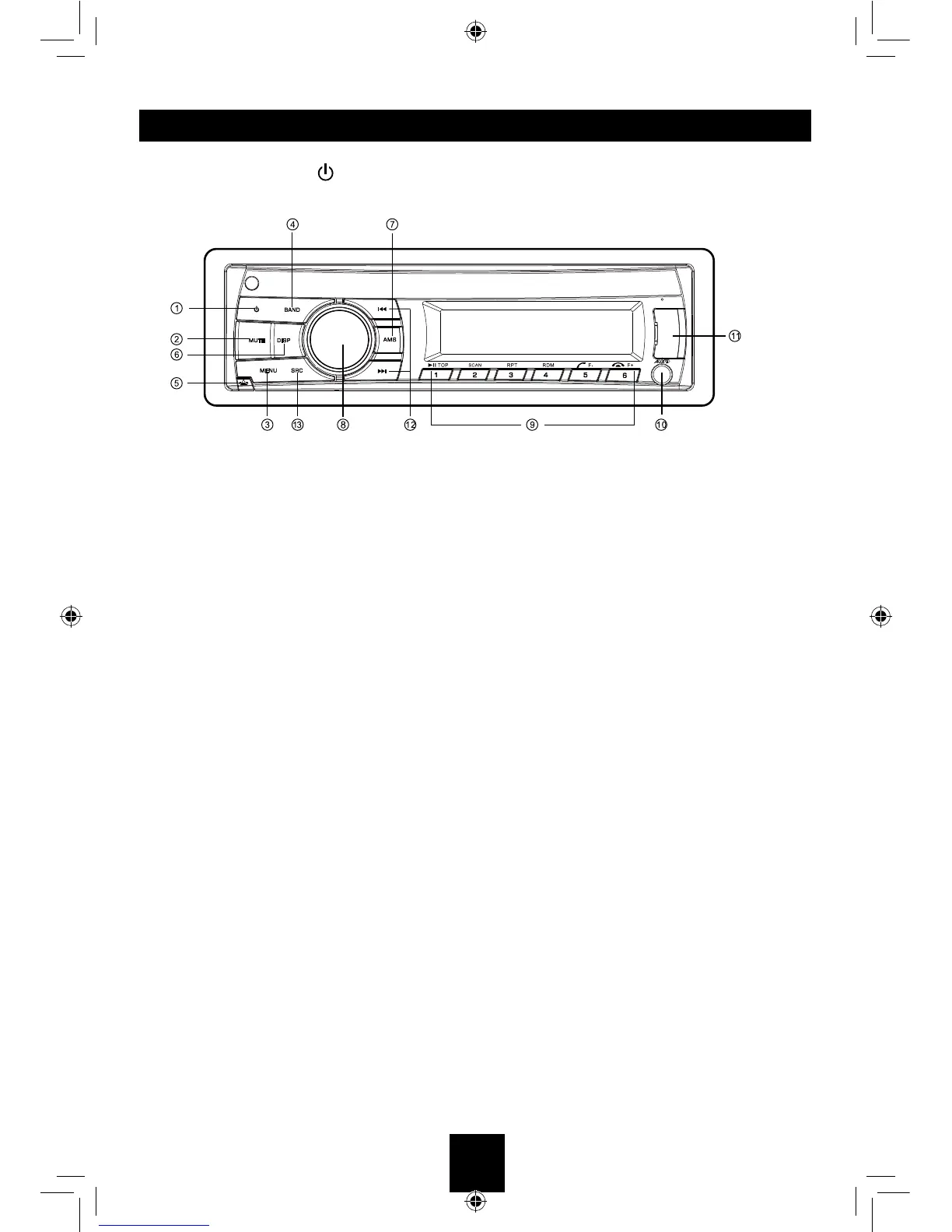
Power ON: Press [ ] button to turn on the unit.
1. - Power
2. - Mute
3. - SD/MMC mode – Search function.
- AUX mode – No function.
- USB mode – Search function
- RADIO mode – PTY function.
4. - Band switch (in Radio mode)
5. - Unlock the front panel.
6. - Display switch
- System setup (long press)
7. - Scan play / Preset scan
- Auto memory store (long press)
8. - Adjust volume level / Conrm (press)
9. - Button 1: Play / Pause / Top play (long press) / Preset station 1
- Button 2: Scan play / Preset station 2.
- Button 3: Repeat play / Preset station 3.
- Button 4: Random play / Preset station 4.
- Button 5: Previous folder / Preset station 5. /MP3 track -10 down (long press)
- BT mode – Dial/Answer / Transfer call
- Button 6: Next folder / Preset station 6. /MP3 track +10 up (long press)
- BT mode – Reject / Terminate call
10.- Aux-in jack
11.- USB connector
12.- Previous / next track
- Seek + / - (long press)
13.- Toggle the audio source



 To Next Page