4
REMOTE CONTROLS
Replacing the lithium battery of
remote control unit.
When the range of the operation of the card
remote control becomes short or no functions
while operating. Replace the battery with a
new lithium battery. Make sure the battery
Polarity replacement is correct.
1. Pull out the battery holder while pressing
the stopper.
2. Insert the button-type battery with the
stamped(+) mark facing upward.
Insert the battery holder into the remote
control.
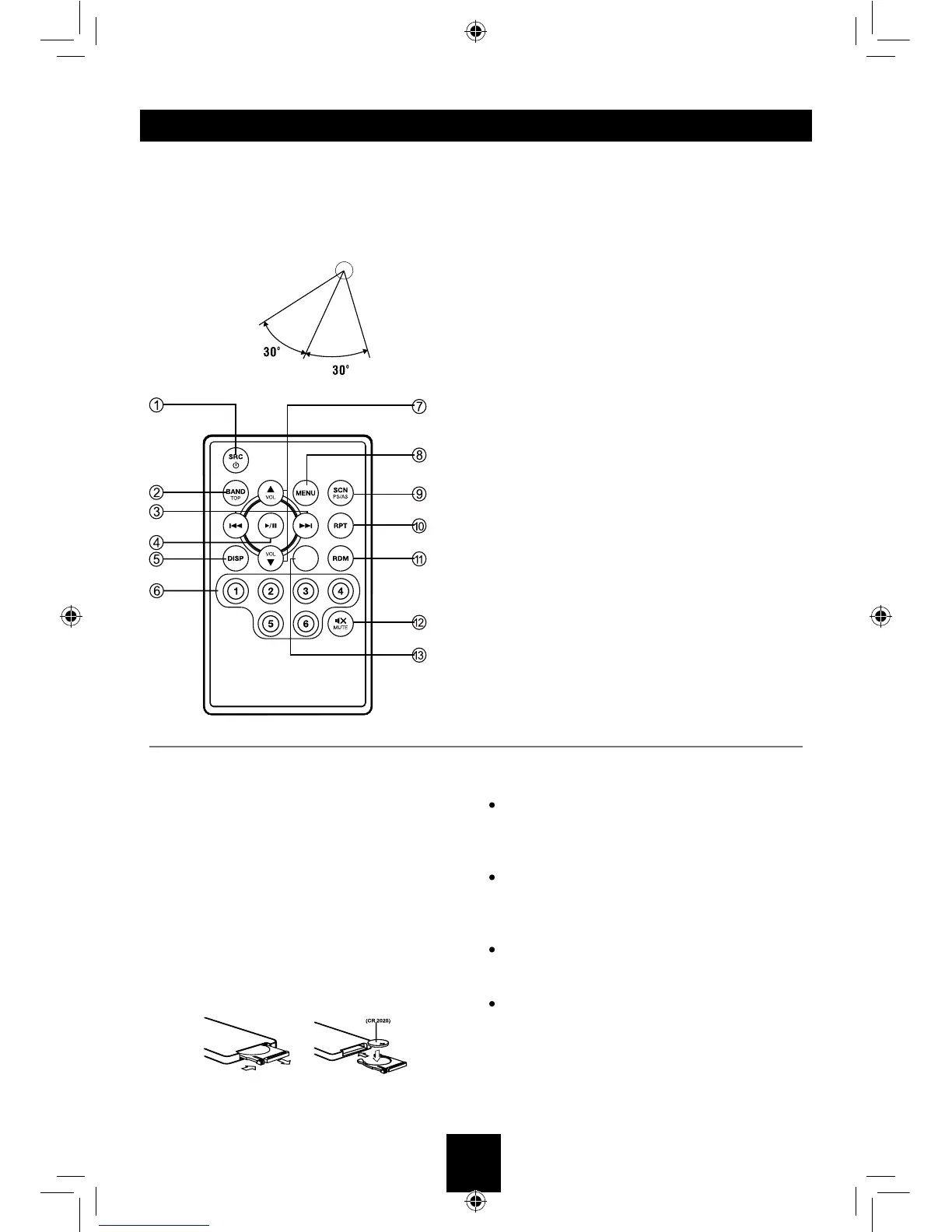
Operating range
Point the remote control unit to the remote
sensor when you operate with it.
The remote control can operate within a
distance of 3~5m.
EQ
WARNING:
Store the battery in place where children
can not re ach . I f a chi ld acc ide nta lly
swallowed the battery, consult a doctor
immediately.
Do not recharge, short, disassemble or heat
the battery or dispose it in a re. Doing this
may cause the battery to give off heat, crack
or start a re.
Do not leave the battery with other metallic
materials or poke the battery with tweezers
or similar tools.
When throwing away or saving the battery,
wrap it in tape and insulate.
1. - Toggle the audio source
- Power on / Power off (long press)
2. - Band switch: FM1, FM2, FM3, MW1, MW2
-MP3/WMA mode – Top play (long press)
- BT mode – Dial / Receive / Transfer call
3. - Radio tune
- Track seek
4. - Play / Pause
5. - Display switch
6. - Buttons
[1] Button: Preset station 1.
[2] Button: Preset station 2.
[3] Button: Preset station 3.
[4] Button: Preset station 4.
[5] Button: Preset station 5.
[6] Button: Preset station 6.
7. - Volume up / down
8. - Press to enter menu mode.
- BT mode – Reject / Terminate call.
9. - Scan play / Preset scan
- Auto memory store (long press)
10. - Repeat play
11. - Random play
12. - Mute the volume
13. - EQ



 To Next Page