BREN-TRONICS, INC.
10 Brayton Court
Commack, NY 11725
P: 631-499-5155 | F: 631-499-5504
www.bren-tronics.com
Page 19 of 25
ALT 170C
(BTC-70844-2)
PR4G WORKSHOP CHARGER
OPERATION MANUAL
850084 REV D
Data presented in this document is subject to change without notice
2-8 PREPARATION FOR MOVEMENT
a. Set both AC and DC POWER switches to OFF.
b. Remove any installed batteries.
c. Disconnect and coil AC power cable.
d. Disconnect and coil DC power cable.
e. Disconnect and coil Battery Adapter cables.
f. Replace ALT 170C cover if it was removed by reinstalling the hinge pins.
g. Store all cables in the cover compartment.
h. Close and latch the cover compartment.
i. Close cover and secure with latches.
j. Close pressure equalization valve on front of unit by turning fully clockwise.
2-9 BATTERY STATE-OF-CHARGE DISPLAYS
Batteries equipped with state-of-charge (SOC) displays indicate battery charge status
on a five-segment LCD bar graph readout. The number of LCD segments activated
corresponds to the battery state-of-charge as follows:
Segments State-of-Charge
0 0% (fully discharged)
1 1 to 20%
2 21 to 40%
3 41 to 60%
4 61 to 80%
5 81 to 100% (fully charged)
2-10 BATTERY CAPACITY RETENTION
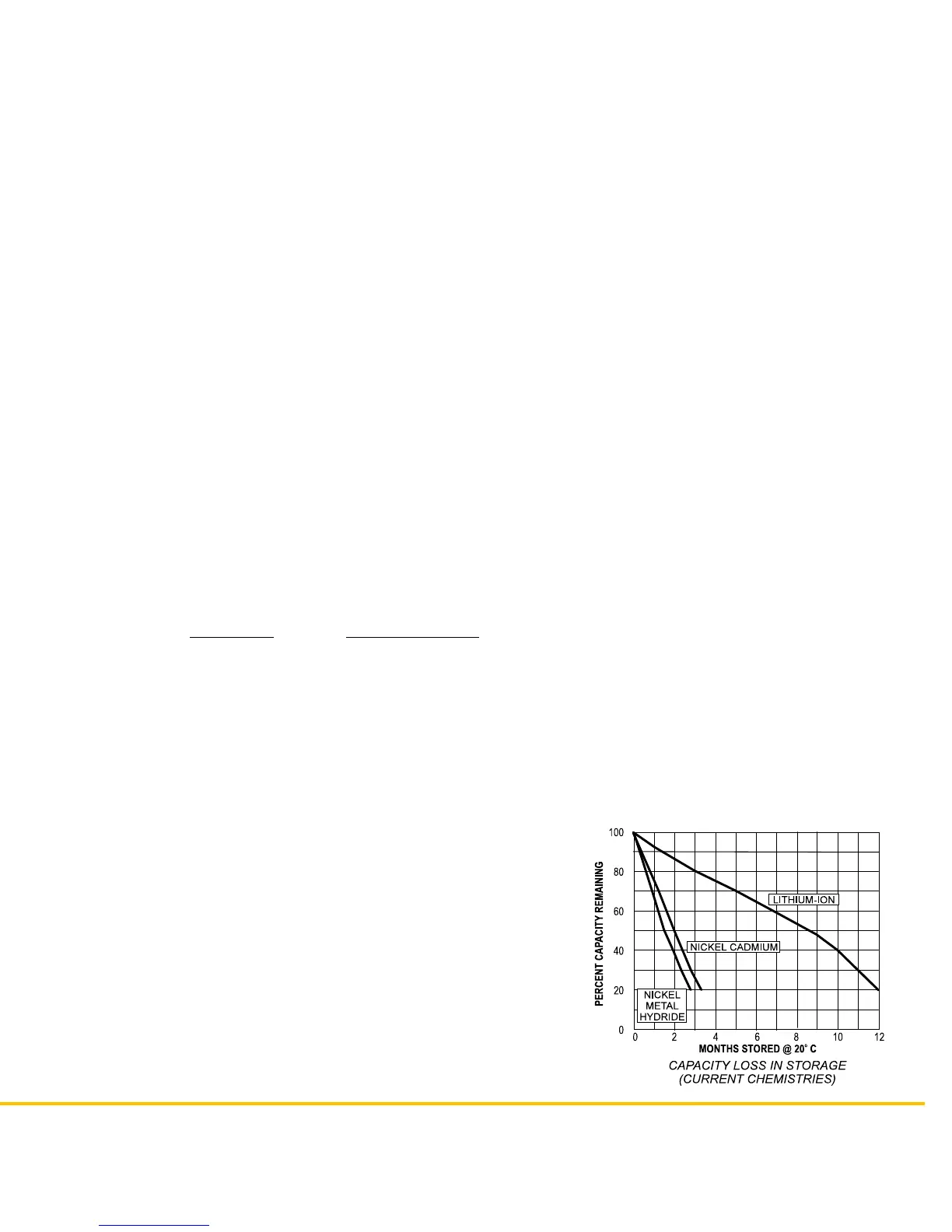
As shown in the adjoining graph, fully charged
batteries that are stored lose a portion of their charge
due to battery the chemistry. This is normal and
should not be interpreted as battery failure. Storage
at higher temperatures increases capacity losses
while storage at lower temperature decreases
capacity loses.


 To Next Page