9
1.4.4 Standalone status operations
When in standalone status, you can set manually by:
• In normal mode, press and hold [SET] button on weather station gateway to enter setting mode.
•
Press [SET] button to skip or move to next step. Press [+ / ] or [�] button to adjust the value.
The setting order is: Weekday Language → Pressure Unit → ℃/℉ → Year → DM/MD Display
Format → Month → Date → 12/24H Time Format → Hour → Minute → exit.
1.4.5 Backlight Function
• When powered by batteries, press [ ] button to turn on the backlight for 20 seconds.
• For continuous backlight, please use power adaptor. Press [ ] button to switch brightness
among 100%,50%,30%,10% and OFF.
• Press and hold [ ] button to turn ON/OFF Automatic Backlight function.
1.5 7910103 Indoor/7910104 Outdoor Sensor
1.5.1 Overview
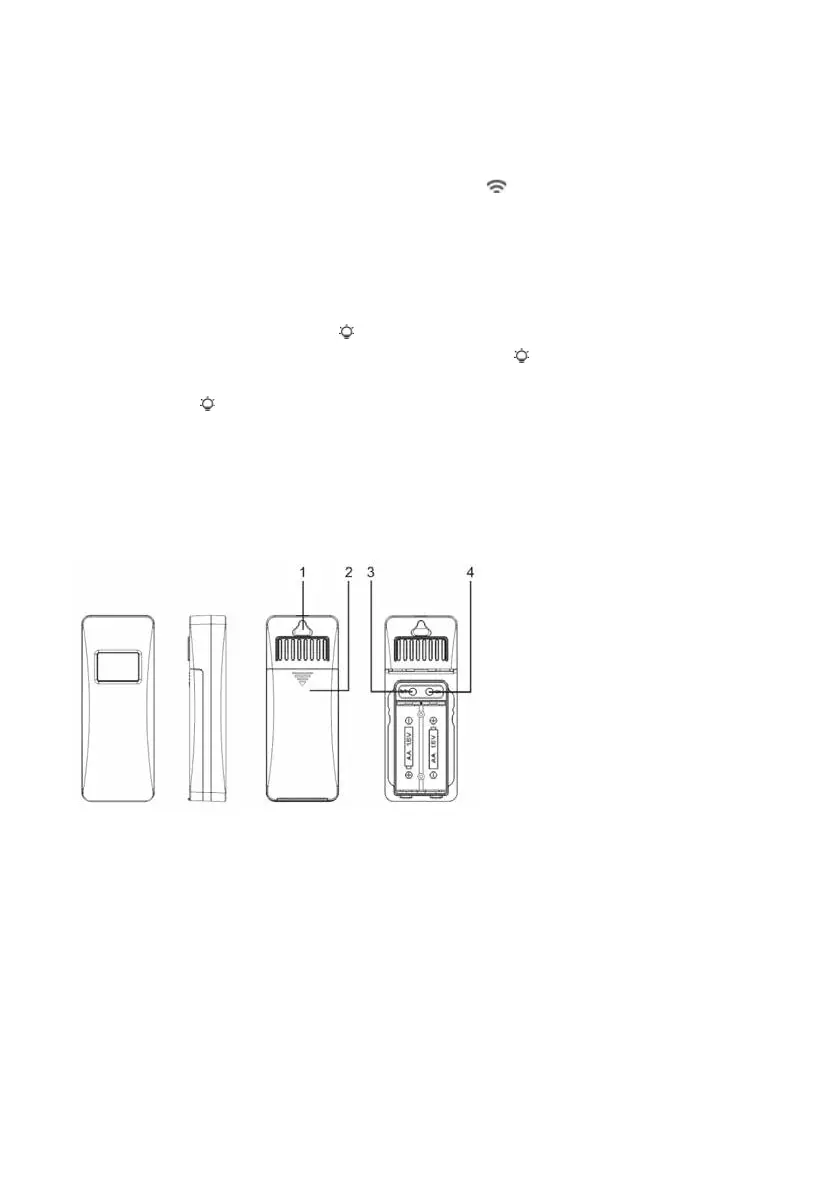
•7910103 indoor sensor
1 Hanging Hole ② Battery compartment ③ °C/°F ④ CH channel switching
*Button Functions
[ºC/ºF]: press to select temperature unit.
[CH]: press to switch channel.



 To Next Page