
 Need help?
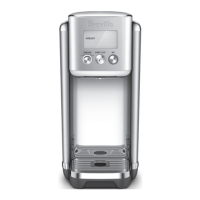
Do you have a question about the Breville AquaStation LWA200BSS and is the answer not in the manual?
 General
| Product Type | Instant Hot Water Dispenser |
|---|---|
| Model Number | LWA200BSS |
| Category | Kitchen Appliances |
| Material | Stainless Steel |
| Water Filter | Yes |
| Instant Hot Water | Yes |
| Finish | Brushed Stainless Steel |
| Installation | Countertop |
| Faucet Design | Single Handle |
| Filter Life Indicator | Yes |
| Power | 1500 Watts |
| Water Filter Type | Carbon Filter |
| Filter Compatibility | Breville Filters |
| Warranty | 1 Year |
Key safety instructions and precautions for safe operation and maintenance.
Details the 4-stage water filter with a pull ring for removal.
Tray that collects drips, designed for easy removal.
Buttons for activating hot water and controlling dispensing.
Dial for settings and screen for displaying information.
How to use the dial for menu navigation, temperature, and volume adjustments.
Functionality of the button to initiate and halt water dispensing.
Button to access the hot water menu with preset beverage temperatures.
Table detailing functions, presets, temperatures, and volumes available.
Alert for the machine to be descaled every 6 months.
Indicates when the water tank level is low and needs refilling.
How to adjust temperature and volume for Custom and Ambient modes.
Procedure to access and select pre-programmed hot beverage options.
Overview of the water purifier and its 4-stage filtration system.
Ease of setup without needing a direct plumbing connection.
System that reminds users to replace the filter cartridge.
Notification on screen indicating the need to change and reset the filter.
Initial setup steps including unpacking and cleaning components.
Procedure to rinse the dispensing system before first use.
Instructions for flushing and preparing the water filter cartridge.
Step-by-step guide to operating the water purifier for dispensing.
How the purifier enters and exits energy-saving standby mode.
Dispensing ambient water without pre-setting volume.
Dispensing ambient water after setting a specific volume.
Using the hot water menu for preset beverage types and temperatures.
Customising temperature and volume for hot beverages.
Details the four main types of tea and their characteristics.
Information on tea blends and their common types.
Recommendations for storing tea for freshness.
Advice on water quality, brewing, and tea-to-water ratios.
Alert displayed every 6 months to remind user to descale.
Step-by-step instructions for performing the descaling cycle.
Caution against using abrasive cleaners or dishwashers for appliance care.
Instructions for cleaning the main purifier unit and its water tanks.
Method for cleaning the external surfaces of the appliance.
How to clean the water dispensing spout.
Instructions for removing, cleaning, and reattaching the drip tray.
Warning to avoid electric shock by keeping cord and plug dry.
Guidelines for storing the appliance when not in use.
Information on error codes and contacting customer service.
Troubleshooting steps for slow water flow, possibly due to a clogged inlet.
Explanation of black particles from the filter and how to flush the system.
Steps to take if the START/STOP button is unresponsive.
Addressing issues of water leakage from the tank or improper fitting.
Causes and solutions for water having an odd taste, including filter replacement.
Instructions to change the filter or reset the filter indicator.
Troubleshooting for water temperature below the minimum threshold.
Troubleshooting for water temperature above the maximum threshold.
Action to take for heating element malfunction errors.
Action for dry boil protection errors, involves turning unit off.


 To Next Page