10
OPERATION
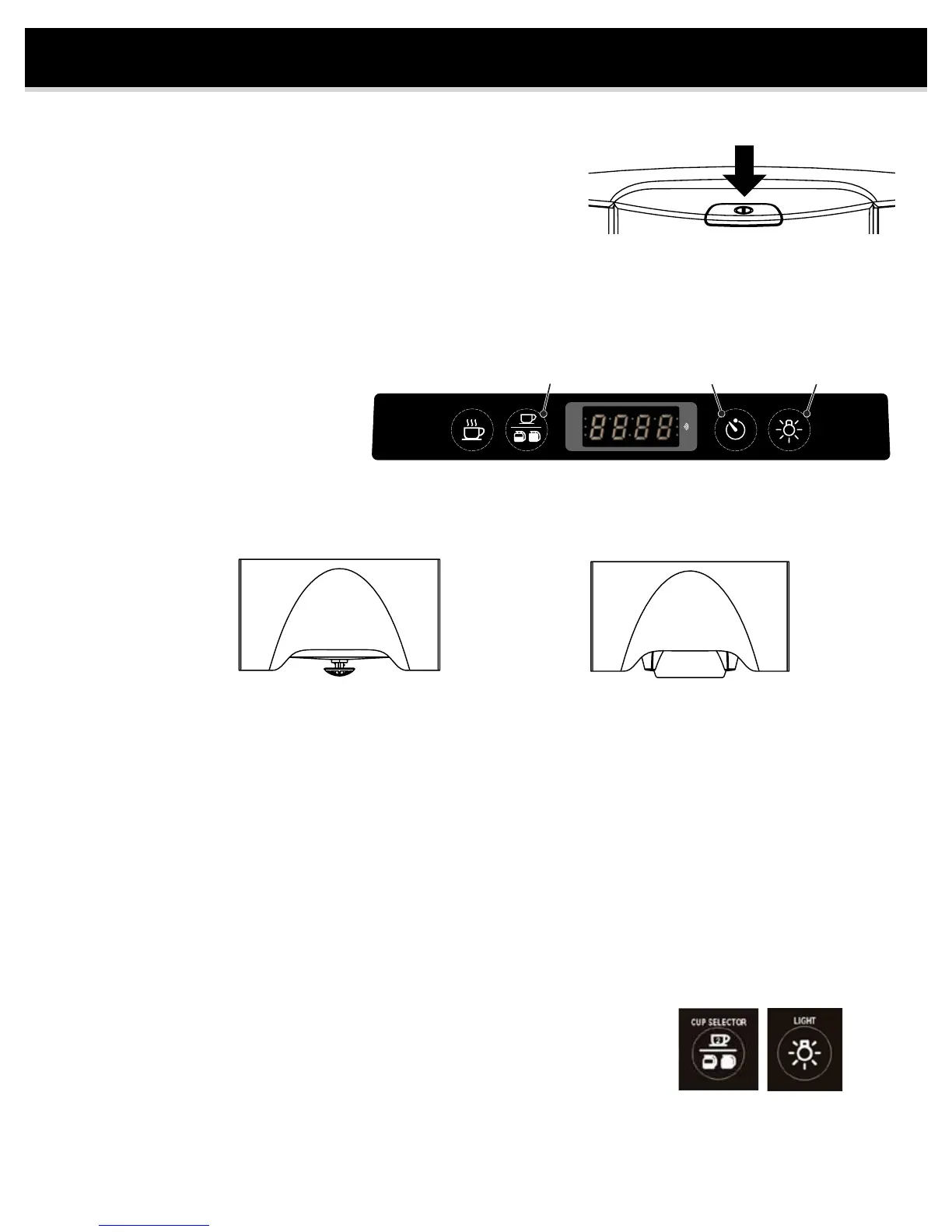
1. Power Switch
Switch located on top of brewer. Depress button to turn on power
2. Set Clock
The clock is preset to 12:00 noon when power is rst applied.
To set the time, follow these steps:
a. Press and hold the “Light” button for 5 seconds.
b. Press “Brew” button to toggle between 12 and 24 hour clock. AM/PM light is off for 24 hour clock.
c. Press the “Cup Selector” button to set hours. Note AM/PM indicator light. Holding down button advances hours.
d. Press the “Timer” button to set the minutes. Holding down button advances minutes.
e. Press “Light” button to nish time setting.
3. Set Up Brew Basket
For brewing into the carafe use the carafe brew basket (with stopper). For brewing into a mug use the single cup
brew basket (cone style). Select the appropriate lter and place into brew basket. Add desired amount of coffee
for taste preference (typically 1 tbsp per cup). Slide the brew basket into the brewer.
CAUTION – Ensure brew basket is completely inserted, otherwise problems may occur such as excessive
steam or overlling.
4. Coffee Filter Selection
10-12 cup at bottom lter for carafe, #4 cone lter for single cup brew basket. Filters vary in height. It is important
to select a lter that extends to the top of the brew basket, otherwise coffee grounds may overll the lter.
5. Position Carafe or Mug
Position an EMPTY carafe or mug in the BREW EXPRESS under the brew basket. The detection sensor
will not allow the brewer to operate unless the carafe or mug is positioned under the brew basket. The brew light
will blink if nothing is detected. When using a cup or mug, place it back far enough to activate sensor.
WARNING: ALWAYS EMPTY CARAFE OR MUG PRIOR TO STARTING THE UNIT OR OVERFILLING WILL OCCUR.
6. Cup Selection
Select the amount of water by pressing the “Cup Selector” button. The icons on the button will illuminate to indicate
selection. The volume of water for each setting is approximately 8 oz (2 cup), 23 oz (1/2 carafe) and 50 oz
(full carafe). The volume of water for each setting can be increased if desired. This is done by increasing the brew
time (see below).
To increase volume:
a. Select volume to change using the “Cup Selector” button.
b. Press and hold the “Cup Selector” button for 5 seconds.
c. The display now shows the current time duration (default: 2 cup = 70 sec,
1/2 carafe = 180 sec, full carafe = 350 sec).
d. Press the “Cup Selector” button to increase time and “Timer” button to decrease time (8 sec = ~ 1 oz).
e. Press “Light” button to nish changing the brew duration.
Single Cup
Brew Basket
(cone style)
BREW CUP SELECTOR
2
TIMER
AM
PM
LIGHT
Clock Set Mode
Hour
Clock Set Mode
Minute Set Clock


 To Next Page