6
Wire control operation
Wire controller operation
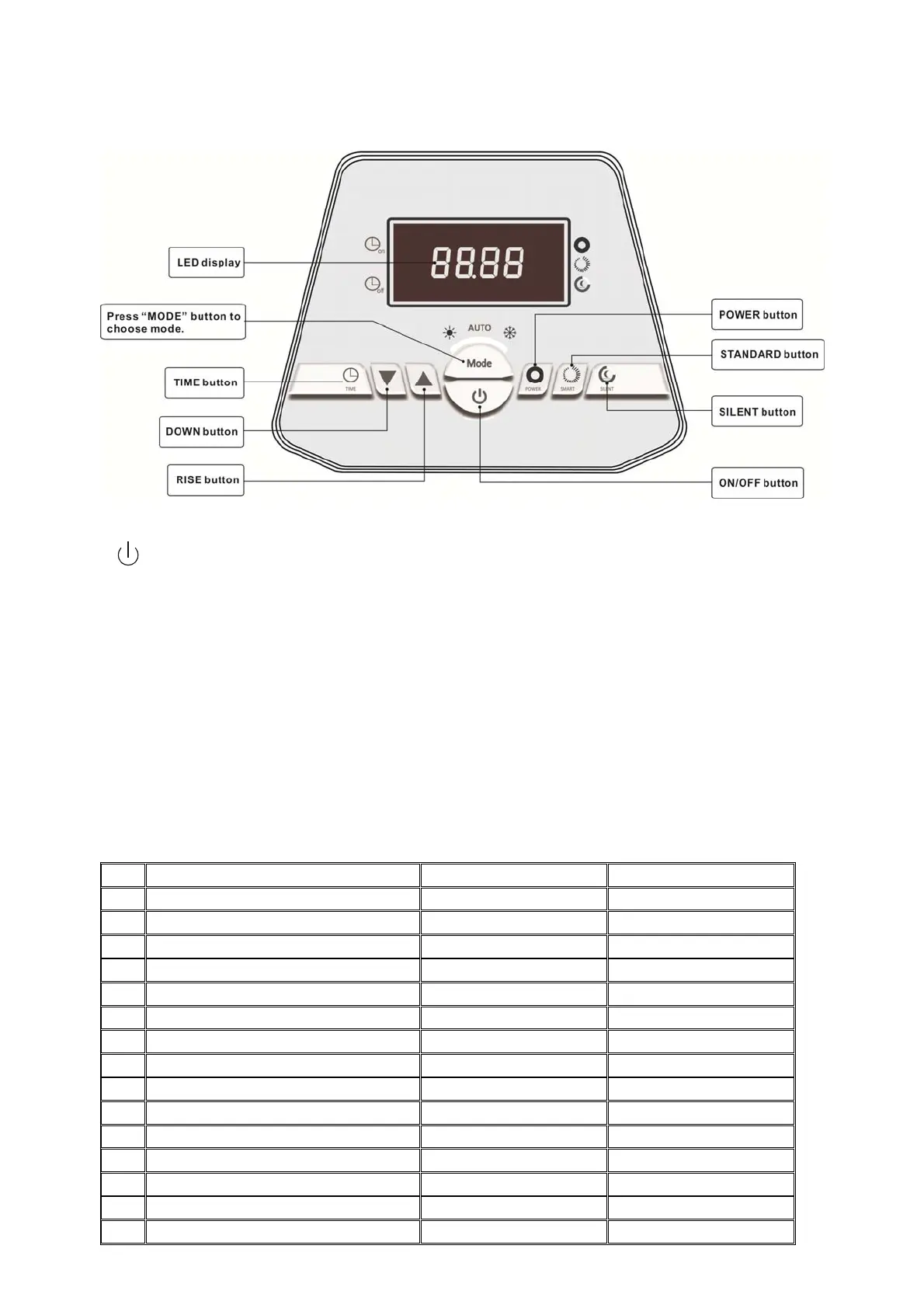
Functions of Buttons
“ ” button
If the machine is on, press this button to turn it off.
If the machine is off, press this button to turn it on. And the TSET will be shown for 5S. Then it will
show the inlet water temperature and working mode. (System will keep the working mode. If no,
the default working mode is Smart mode under Heating.)
During parameter checking or setting, press this button will return to default interface. (The
parameter checking setting will be saved.) Press this button again will turn the machine off.
“MODE”button
Press “M” button 3 seconds to convert modes.
Press this button to check and set parameters, With the function of “▲”“▼”buttons, you can
check current run parameters 1~F.
NO Meanin
Ran
e Remarks
1
Inlet water temperature -50 ~ 99°C Measured value
2
Outlet water temperature -50 ~ 99°C Measured value
3
Outdoor ambient temperature -50 ~ 99°C Measured value
4
Exhaust gas sensor temperature 0 ~ 150°C Measured value
5
Return gas sensor temperature -50 ~ 150°C Measured value
6
Heating coil sensor temperature -50 ~ 150°C Measured value
7
Cooling coil sensor temperature -50 ~ 150°C Measured value
8
Main EEV steps 80 ~ 480 Measured value
9
Auxiliary EEV steps 150 ~ 480 Measured value
A
Current of compressor 0 ~ 30A Measured value
b
Module temperature 50 ~ 150°C Measured value
C
DC bus voltage value
Measured value
d
Running frequency of compressor 20 ~ 90Hz Measured value
E
Rotation speed of fan 1 0 ~ 1599(rpm) Measured value
F
Rotation speed of fan 2 0 ~ 1599(rpm) Measured value



 To Next Page