EasyManua.ls Logo

Brilix XHP 100 - User Manual

Default Icon
28 pages
Print Icon
To Next Page IconTo Next Page
Loading...
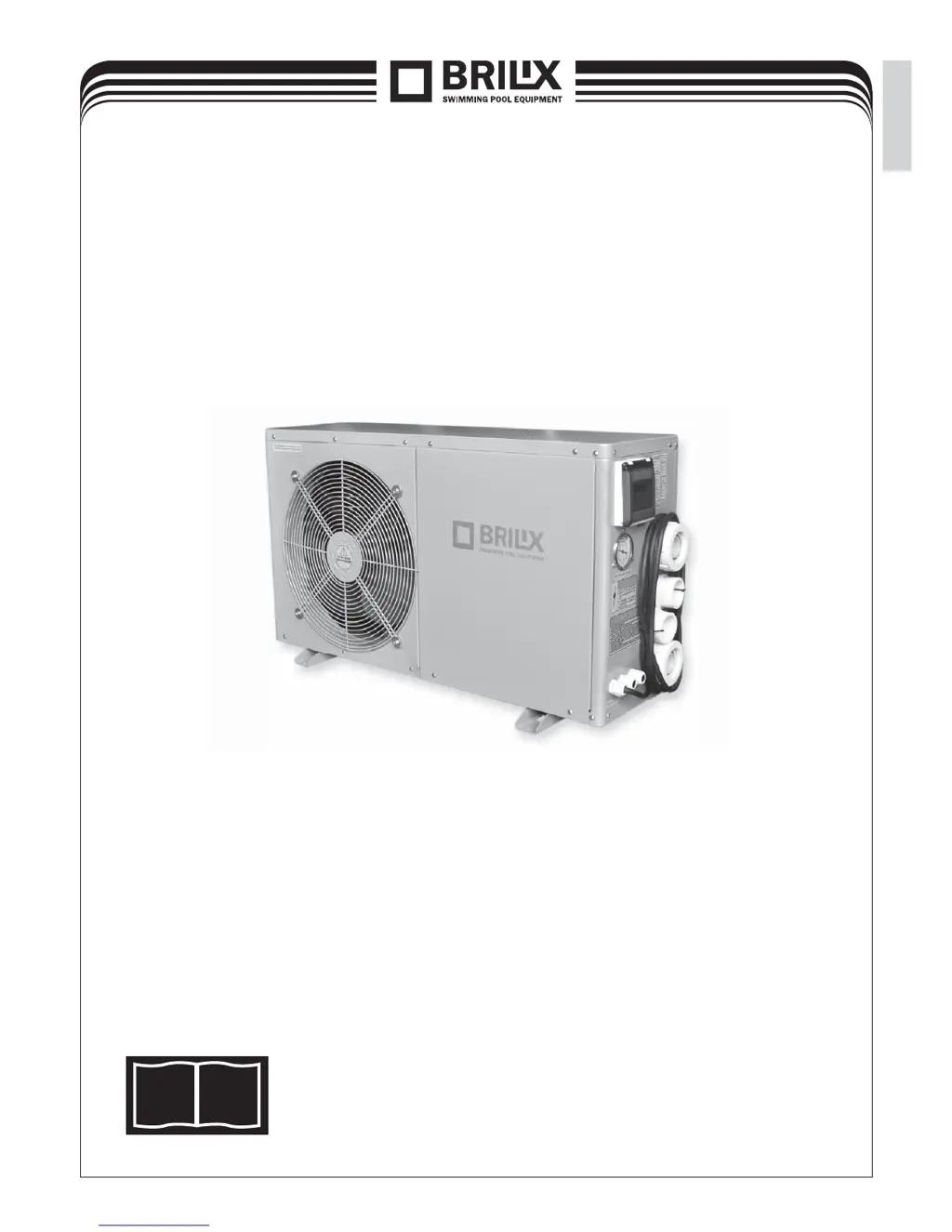
Swimming Pool Heat Pump XHP
INSTALLATION
AND USER GUIDE
Illustrative photo
i
Read the instructions
EN

Questions and Answers

Summary

1. Specification

1.1 Horizontal EU design, R410 A,HEATING AND COOLING

Technical specifications including heat output, power consumption, COP, voltage, current, water data, general data, and dimensions.

2. Performance curves

HEAT OUTPUT CURVE

Graph showing heat output vs. air temperature for different models.

INPUT curve

Graph showing input power vs. air temperature for different models.

COP curve

Graph showing COP vs. air temperature for different pool water temperatures.

3. Dimensions

4. Installation

4.1 Installation illustration

Diagram showing the placement of the heat pump in a swimming pool system.

4.2 Selection of the installation position

Guidelines for choosing a suitable location for the heat pump, considering ventilation and condensate.

4.3 The position of chemical elements in the system is also fundamental to the service life of the heater.

Importance of chemical element placement (chlorination/bromination) for heater longevity.

5. Electrical connection

5.1 Connection diagram for the swimming pool heat pump XHP 40, XHP 60, XHP 100

Wiring diagram for electrical connection of specific heat pump models.

5.2 Connection diagram for the swimming pool heat pump XHP 140

Wiring diagram for electrical connection of the XHP 140 model.

5.3 Connection diagram for the swimming pool heat pump XHP 200

Wiring diagram for electrical connection of the XHP 200 model.

6. Initial heat pump start-up and its winterization

THE START-UP PROCEDURE

Step-by-step guide for initial operation after installation.

Water flow switch:

Explanation of the water flow switch function and its role in protecting the unit.

6.1 Heat pump winterization

Procedure for preparing the heat pump for winter to prevent damage.

6.2 Starting up the heat pump again after winter

Steps to restart the heat pump after the winter season.

7. Setting operating data

7.1 Heating only operation

Information on setting the heat pump for heating-only mode.

7.2 Control display functions

Overview of the buttons and displays on the control panel.

Parameter 0

Setting incoming water temperature for cooling mode.

Parameter 1

Setting incoming water temperature for heating mode.

Parameter 2

Compressor operating time after defrosting.

Parameter 3

Conditions for activating the defrosting function.

Parameter 4

Conditions for deactivating the defrosting function.

Parameter 5

Defrosting function deactivation time.

Parameter 6

Selecting the operating mode (cooling, heating, etc.).

Parameter 7

Selecting the electronic expansion valve mode.

Parameter 8

Heat target for super performance.

Parameter 9

Heat target for super performance in cooling mode.

Parameter A

Manual setting for the electronic expansion valve.

Parameter B: temperature of incoming water

Display of incoming water temperature.

Parameter C: temperature of outgoing water

Display of outgoing water temperature.

Parameter D: capacitor temperature

Display of capacitor temperature in heating mode.

Parameter E: temperature of returned gas

Display of returned gas temperature.

Parameter F: ambient temperature

Display of ambient temperature.

Parameter G: capacitor temperature in cooling

Display of capacitor temperature in cooling mode.

Parameter H: current intervals of the electronic expansion valve

Display of current intervals for the electronic expansion valve.

7.5 Setting the water temperature

How to adjust the water temperature setting.

7.6 Setting the locking function

How to lock/unlock the control panel settings.

7.7 Setting the clock

How to set the internal clock of the unit.

7.8 Setting the activation of the timer

How to set the timer for the heat pump to switch on.

7.9 Setting the deactivation of the timer

How to set the timer for the heat pump to switch off.

8. Troubleshooting

8.1 Error codes shown on the controller with LED display

Table listing fault codes, causes, and solutions for LED display errors.

8.2 Other faults and solutions (with no display on the controller with LED)

Table listing faults without LED codes, causes, and solutions.

9. Schematic representation and list of parts

10. Spare parts 1

Evaporator

Image and label for the evaporator spare part.

Four-way valve

Image and label for the four-way valve spare part.

Plastic water flow switch

Image and label for the water flow switch spare part.

Filter

Image and label for the filter spare part.

Fan motor

Image and label for the fan motor spare part.

Electronic expansion valve

Image and label for the electronic expansion valve spare part.

Fan blade

Image and label for the fan blade spare part.

Titanium heat exchanger

Image and label for the titanium heat exchanger spare part.

Control LED display

Image and label for the control LED display spare part.

Watertight casing

Image and label for the watertight casing spare part.

Compressor

Image and label for the compressor spare part.

Suction valve

Image and label for the suction valve spare part.

10. Spare parts 2

manometer

Image and label for the manometer spare part.

fan motor capacitor

Image and label for the fan motor capacitor spare part.

temperature sensors

Image and label for temperature sensors spare part.

high pressure valve

Image and label for the high pressure valve spare part.

low pressure valve

Image and label for the low pressure valve spare part.

control unit

Image and label for the control unit spare part.

11. Cabling diagram (example - XHP 60)

Transformer

Part of the cabling diagram, showing the transformer.

Compressor capacitor

Part of the cabling diagram, showing the compressor capacitor.

Panel (main controller)

Part of the cabling diagram, showing the main controller panel.

12. Replacement of parts

Filter

Image of the filter component for replacement.

Electronic expansion valve

Image of the electronic expansion valve for replacement.

High pressure valve

Image of the high pressure valve for replacement.

Low pressure valve

Image of the low pressure valve for replacement.

Suction valve

Image of the suction valve for replacement.

Manometer

Image of the manometer for replacement.

Warranty terms and conditions

Safe disposal of the product after its service life

Claims and servicing

Brilix XHP 100 Specifications

General IconGeneral
Power supply230 V / 50 Hz
Power Output10 kW
COP6.4
Recommended pool volumeUp to 45 m³
Maximum current7.5 A
Water flow3 m³/h
Water connection50 mm
Noise level at 10 m40 dB
Net dimensions945 x 375 x 600 mm
Net weight46 kg
Heating Capacity10 kW
Maximum Water Flow3 m³/h
Inlet/Outlet Connection50 mm
Protection ClassIPx4
Dimensions945 x 375 x 600 mm
Weight46 kg

Related product manuals