19
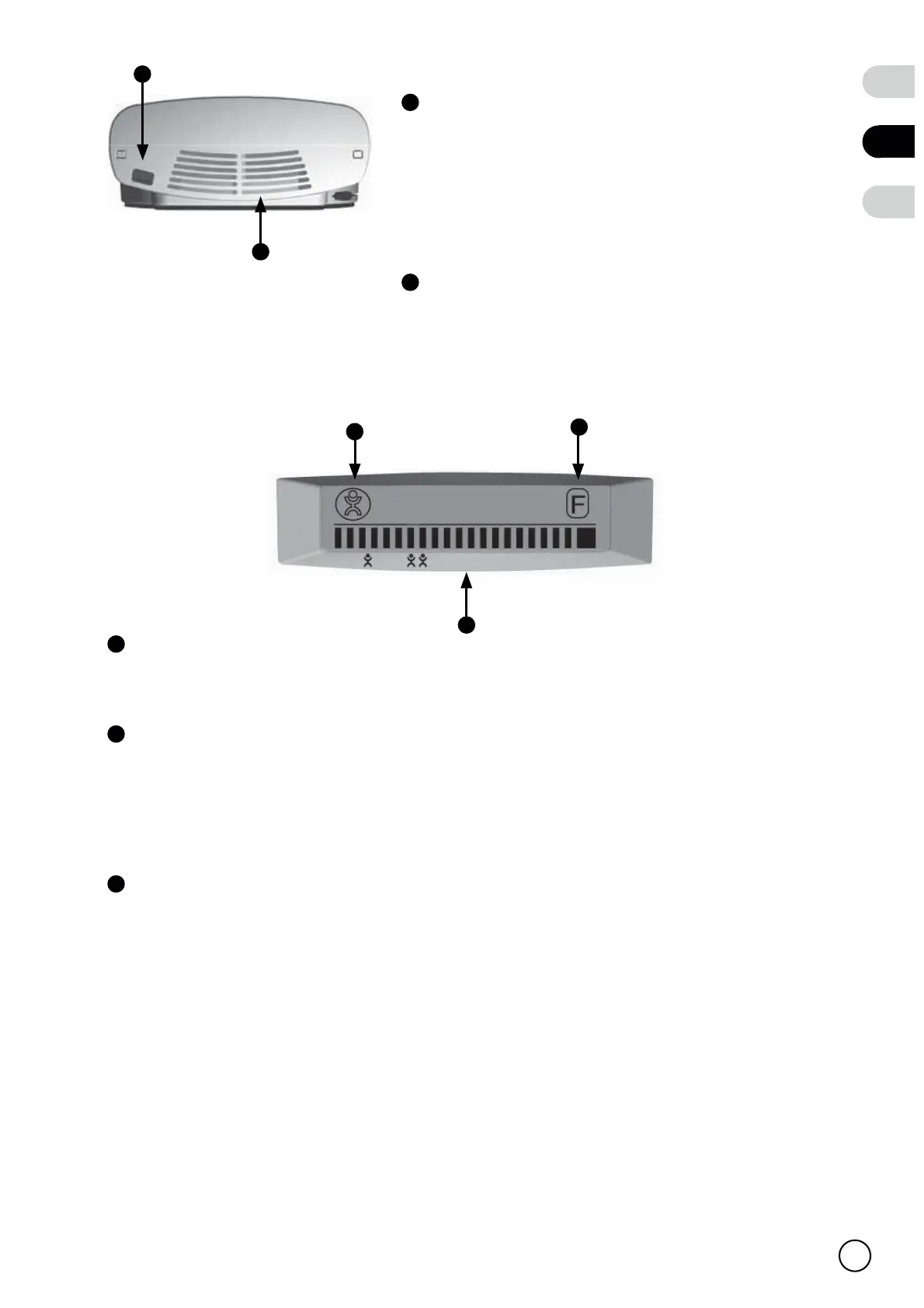
Power cable / Power cable connector
Your Sonair may be fitted with a loose or fixed
cable. Connect the fixed power cable to a
nearby power socket. The connector allows
you to connect the loose power cable.
Recirculation opening (Sonair A
+
only)
The fan sucks indoor air into the Sonair
through this opening.
2.2 The display
Power indicator
This icon is shown when the Sonair has power.
Indicator bar
This bar shows the current ventilation rate when you operate the Sonair
manually. The two buttons allow you to adjust the ventilation rate manually.
See page 20 for more information about ventilation rates.
Filter message indicator
This icon flashes when we advise you to replace the filter.
This message appears after the first 180 days of use or 180 days after the filter
indicator reset has been reset. Read the instructions on page 25 to see how
to replace the filter.
After the filter has been replaced, press simultaneously the two operation
buttons for 2 seconds to reset the filter indication. The filter message indicator
will disapear.
7
8
7
8
A
B
C
NL
EN
DE
MAX
A
B
C


 To Next Page