Once connected, Nyquist should be visible on the network to a controller that is also on the home
network via WIFI or Ethernet cable.
Nyquist supports streaming of PCM data up to 192kHz, MQA up to 384kHz and DSD 64.
Nyquist supports streaming from the following sources:
-Roon Core servers (controlled via the Roon app)
-UPnP servers (controlled via the MControl app)
-Tidal High Fidelity Music Streaming (controlled via the MControl app or the Roon app)
-Deezer Streaming Service (controlled via the MControl app)
-vTuner Internet Radio (controlled via the MControl app)
We recommend MConnect’s MControl app as mobile UPnP controller and for access to vTuner, Tidal
or Deezer. The App is freely available for both Android and Apple tablets and phones. Roon Core
servers can be accessed via the Roon app.
Roon
For the best streaming experience, we recommend Roon. Nyquist is a RoonReady ™ network player.
Please visit the Roon Website for further details on how to setup the system www.roonlabs.com.
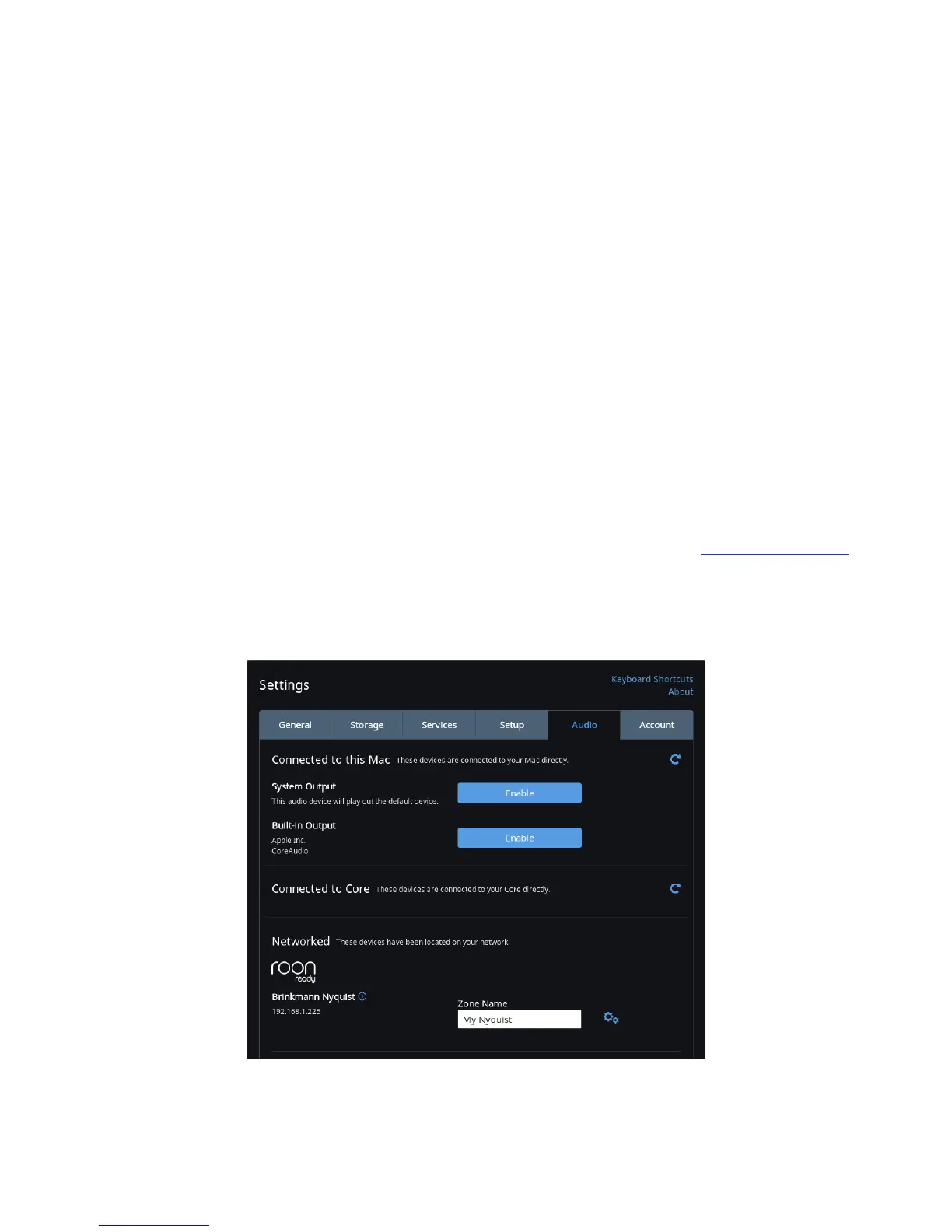
Roon will automacally discover Nyquist on your network. There are no specic sengs necessary
to support Nyquist. You need an account to use Roon.
Roon also integrates Tidal High Fidelity Music Streaming and les from connected servers or hard
drives.
Nyquist will appear as Roon ready device under „Networked“
14



 To Next Page