EasyManua.ls Logo

Brocade Communications Systems FWS648G-POE - User Manual

Brocade Communications Systems FWS648G-POE
74 pages
Print Icon
To Next Page IconTo Next Page
Loading...
53-1002188-01
18 February 2011
®
DRAFT: BROCADE CONFIDENTIAL
Brocade FastIron WS
Hardware Installation Guide
Supporting Release 07.2.02

Table of Contents

Question and Answer IconNeed help?

Do you have a question about the Brocade Communications Systems FWS648G-POE and is the answer not in the manual?

Summary

About This Document

Document Overview and Guidelines

Covers document purpose, audience, supported hardware/software, and conventions for text, commands, and notices.

Technical Support and Contact Information

Provides information on obtaining technical assistance, web access, and contact details via email and phone.

Chapter 1: Product Overview

Hardware Features and Models

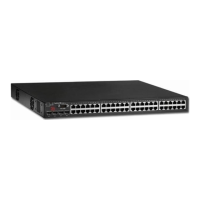
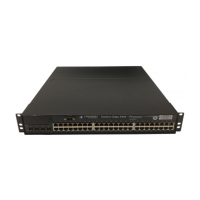
Details the hardware specifications, including physical characteristics and supported FastIron WS models.

System Features and Interfaces

Describes control features, serial management interface, POE applications, and network interfaces.

Power Supply Options

Explains the availability and types of optional redundant power supplies and their receptacles.

Chapter 2: Installation Procedures

Preparation and Precautions

Covers device unpacking, package contents, general requirements, site preparation, and installation precautions.

Device and Power Supply Installation

Provides instructions for installing the device (desktop/rack mount) and optional redundant power supplies.

Initial Configuration and Verification

Guides on attaching a PC or terminal, verifying proper operation, and initial system setup.

Chapter 3: Network Connectivity

System Configuration and IP Addressing

Details password management, recovering lost passwords, and configuring IP addresses for Layer 2 and Layer 3 devices.

Network Cabling and Connections

Explains network connectors, cable specifications, and how to connect to Ethernet, workstations, servers, routers, and fiber ports.

Connectivity Testing and Troubleshooting

Covers testing network connectivity using ping, LEDs, tracing, cable testing, and troubleshooting common connection issues.

Chapter 4: Hardware Management

Temperature and System Monitoring

Describes how to monitor device temperature, display CPU usage, and manage temperature warning/shutdown levels.

Hardware Maintenance and Replacement

Covers removing MAC address entries, hardware maintenance schedule, and replacing fiber optic modules.

Chapter 5: Hardware Specifications

Physical and Environmental Specifications

Lists physical dimensions, weight, and environmental requirements for operating and storing the device.

Interface, Cable, and Power Specifications

Details port pinouts, cable specifications, power cords, and AC/POE power supply characteristics.

Chapter 6: Troubleshooting

Diagnosing Switch Indicators and Issues

Provides a chart for diagnosing switch indicator states and troubleshooting power or cooling problems.

Installation and Access Problems

Guides on resolving installation issues and troubleshooting in-band access to the switch.

Appendix A: Regulatory Statements

Regional Compliance and Warnings

Presents regulatory statements and warnings for USA, Canada, Europe, Australia, and Japan (VCCI).

Specific Regulations and Approvals

Details power cord information for specific regions and lists general compliance certifications and approvals.

Appendix B: Safety Notices

Equipment Cautions and Dangers

Lists cautions and dangers related to device installation, operation, and handling, including warnings about temperature, airflow, lasers, and power.

Summary

About This Document

Document Overview and Guidelines

Covers document purpose, audience, supported hardware/software, and conventions for text, commands, and notices.

Technical Support and Contact Information

Provides information on obtaining technical assistance, web access, and contact details via email and phone.

Chapter 1: Product Overview

Hardware Features and Models

Details the hardware specifications, including physical characteristics and supported FastIron WS models.

System Features and Interfaces

Describes control features, serial management interface, POE applications, and network interfaces.

Power Supply Options

Explains the availability and types of optional redundant power supplies and their receptacles.

Chapter 2: Installation Procedures

Preparation and Precautions

Covers device unpacking, package contents, general requirements, site preparation, and installation precautions.

Device and Power Supply Installation

Provides instructions for installing the device (desktop/rack mount) and optional redundant power supplies.

Initial Configuration and Verification

Guides on attaching a PC or terminal, verifying proper operation, and initial system setup.

Chapter 3: Network Connectivity

System Configuration and IP Addressing

Details password management, recovering lost passwords, and configuring IP addresses for Layer 2 and Layer 3 devices.

Network Cabling and Connections

Explains network connectors, cable specifications, and how to connect to Ethernet, workstations, servers, routers, and fiber ports.

Connectivity Testing and Troubleshooting

Covers testing network connectivity using ping, LEDs, tracing, cable testing, and troubleshooting common connection issues.

Chapter 4: Hardware Management

Temperature and System Monitoring

Describes how to monitor device temperature, display CPU usage, and manage temperature warning/shutdown levels.

Hardware Maintenance and Replacement

Covers removing MAC address entries, hardware maintenance schedule, and replacing fiber optic modules.

Chapter 5: Hardware Specifications

Physical and Environmental Specifications

Lists physical dimensions, weight, and environmental requirements for operating and storing the device.

Interface, Cable, and Power Specifications

Details port pinouts, cable specifications, power cords, and AC/POE power supply characteristics.

Chapter 6: Troubleshooting

Diagnosing Switch Indicators and Issues

Provides a chart for diagnosing switch indicator states and troubleshooting power or cooling problems.

Installation and Access Problems

Guides on resolving installation issues and troubleshooting in-band access to the switch.

Appendix A: Regulatory Statements

Regional Compliance and Warnings

Presents regulatory statements and warnings for USA, Canada, Europe, Australia, and Japan (VCCI).

Specific Regulations and Approvals

Details power cord information for specific regions and lists general compliance certifications and approvals.

Appendix B: Safety Notices

Equipment Cautions and Dangers

Lists cautions and dangers related to device installation, operation, and handling, including warnings about temperature, airflow, lasers, and power.

Brocade Communications Systems FWS648G-POE Specifications

General IconGeneral
ModelFWS648G-POE
TypeManaged Switch
PoEYes
PoE Budget370W
Switching Capacity104 Gbps
Forwarding Rate77.4 Mpps
MAC Address Table Size16K
Relative Humidity10% to 90% (non-condensing)
Ports48 x 10/100/1000Base-T ports 4 x 1000BASE-X SFP ports
ManagementWeb-based GUI, CLI, SNMP
Power SupplyInternal
Operating Temperature0°C to 45°C (32°F to 113°F)
Storage Temperature-40°C to 70°C
Jumbo Frames9, 216 bytes

Related product manuals