13
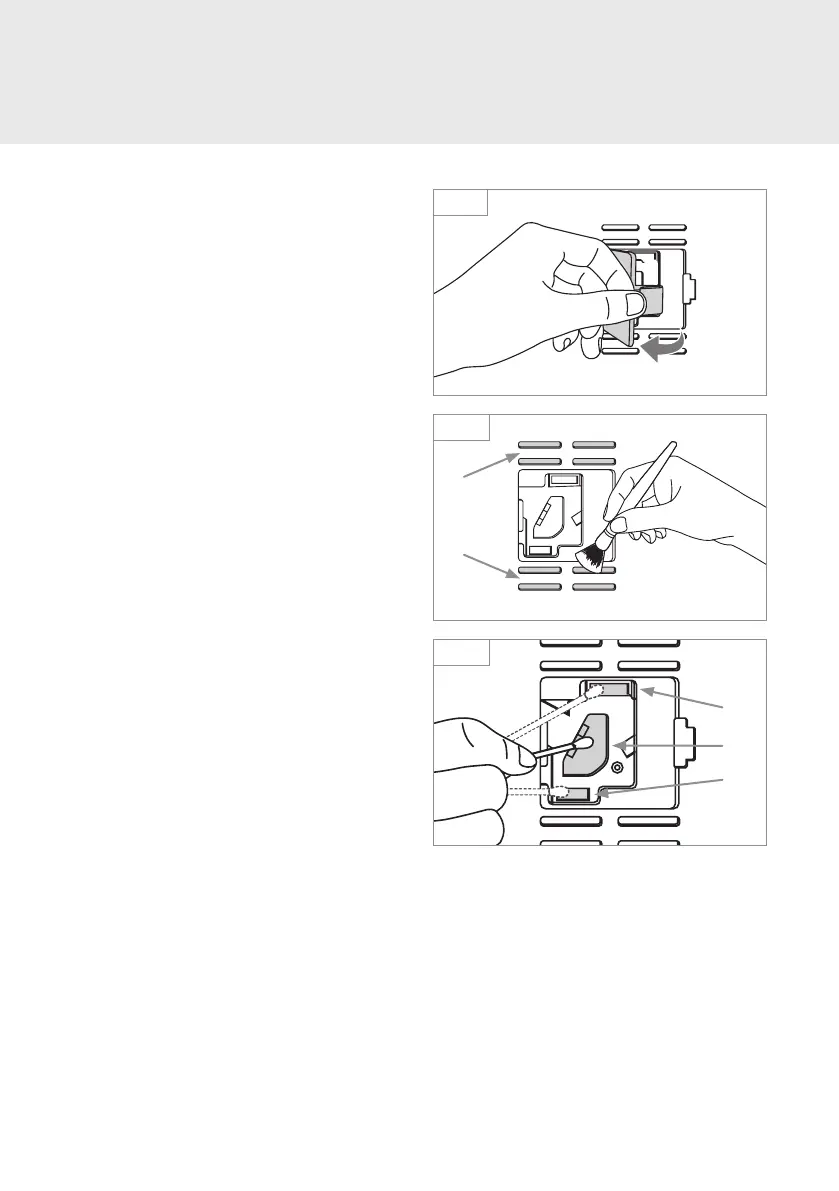
1. Remove the Air Sensor Cover by pinching
the tab towards the cover to release it.
2. Clean the Air Inlets (a) and Outlet Vents (b)
with a small brush or cotton swab.
3. Wet a cotton swab lightly and clean the
Lens (a), Dust Inlet (b), and Dust Outlet (c).
After cleaning, use a dry cotton swab to
remove any moisture.
4. Re-attach the Air Sensor Cover.
Note: Without regular cleaning of the Air
Sensor, the Brondell Pro Sanitizing Air Purifier
will decline in performance.
MAINTENANCE
Cleaning the Air Sensor
Step 1
Step 2
Step 3
b
a
c
a
b



 To Next Page