9
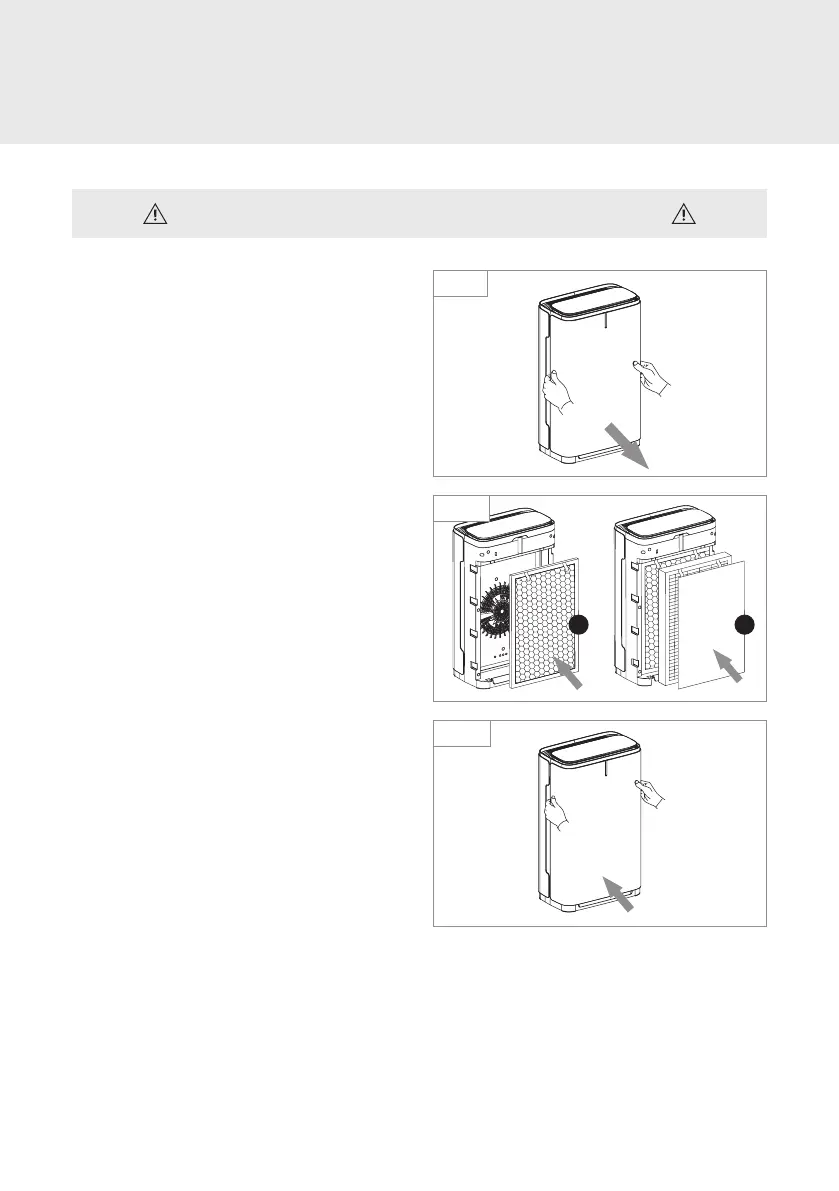
1. Remove the front panel by pulling it away
from the base unit.
2. Remove all the plastic packaging from
the filters.
3. Put the filters back in the unit in the
following order:
a) Nanocrystalline Filter
b) High Eciency AG+ Air Filter
Note: Make sure the cloth tabs on both filters
that indicate “Front” are facing outward.
4. Re-attach the front panel by inserting the
tabs on the bottom of the front panel into
the slots at the bottom base of the unit.
Push the top of the panel towards the unit;
a magnetic closure ensures the front panel
clicks securely into place.
Note: If the unit is plugged in, it will chime and
the Power button will begin blinking red when
the front panel is secured into place.
OPERATION
Preparing for First Use
Be sure to remove all plastic packaging from the filters before use.
Step 1
Step 4
Step 3
a
b



 To Next Page