7
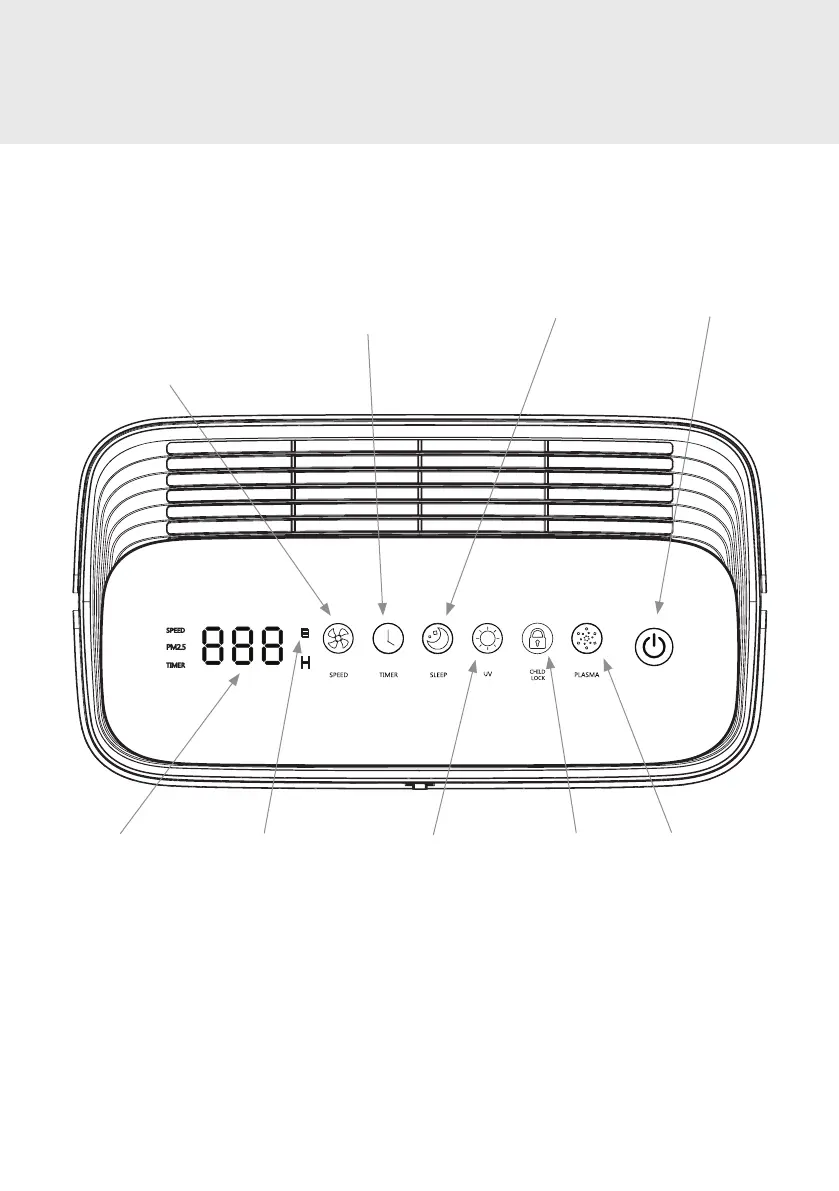
Timer
Touch to activate the Timer.
User can set the unit to stay
on for 1 to 12 hours.
PRODUCT FEATURES
Control Panel Detail
Power Button
Touch to turn
power on/o.
Sleep Mode
Touch to engage
Sleep Mode.
UV
Touch to turn
UV on/o.
Digital Display
Displays PM2.5 level,
timer hours, fan speed,
filter usage.
Filter Check Indicator
The red filter check icon
will appear when it is
time to check the health
of the filters.
Child Lock
Touch to lock/
unlock all control
panel buttons.
Plasma
Touch to turn the
Plasma function
on/o.
Air Speed Selector
The unit powers on in Auto Mode
(P0). Touch to select between
three air speed modes: LOW
(P1), MEDIUM (P2), HIGH (P3). To
reselect Auto Mode, touch the
button a fourth time.



 To Next Page