USING AUX IN
1. Plug one end of a 3.5mm-to-3.5mm cable (not
included) into your audio device, just like you would a pair
of headphones.
2. Lift the PORT COVER and plug the other end of the
cable into the unit's AUX IN port.
3. Use your audio device to control music playback.
4. Use your audio device and the speaker to control volume.
Note: If a device is currently paired with Bluetooth
®
, the wired
device takes precedence over a Bluetooth
®
device connection.
RESET
Press and hold the VOLUME + BUTTON and VOLUME -
BUTTON for 5 seconds to perform a reset. The speaker will
reset and power off.
CARE AND MAINTENANCE
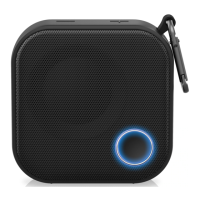
Big Blue Mini is water resistant. Do not submerge in water.
To clean, wipe the speaker with a soft, dry cloth.
14 15
SPECIFICATIONS
Power Supply ......................................... 5V, 1A
Power Output ............................................ .5W
Range ............................. Class 2, up to 33 ft (10 m)
Speaker ................................... 1.5" Full Range (1)
Frequency Response .......................... 150Hz~18KHz
Compatibility ...................... Bluetooth 2.0 or above with
A2DP/AVRCP
Li-ion Rechargeable Battery.................... 3.7V, 1150mAh
Battery Life................................... Approx. 4 hours
Charging Time................................. Approx. 2 hours
Weight .................................... Approx. 160 grams
Dimensions.................................. 3"(dia) x 2.36"(h)
The Bluetooth
®
word mark and logos are registered trademarks owned by
Bluetooth SIG, Inc. and any use of such marks by Brookstone is under license.
© Brookstone 2015



 To Next Page