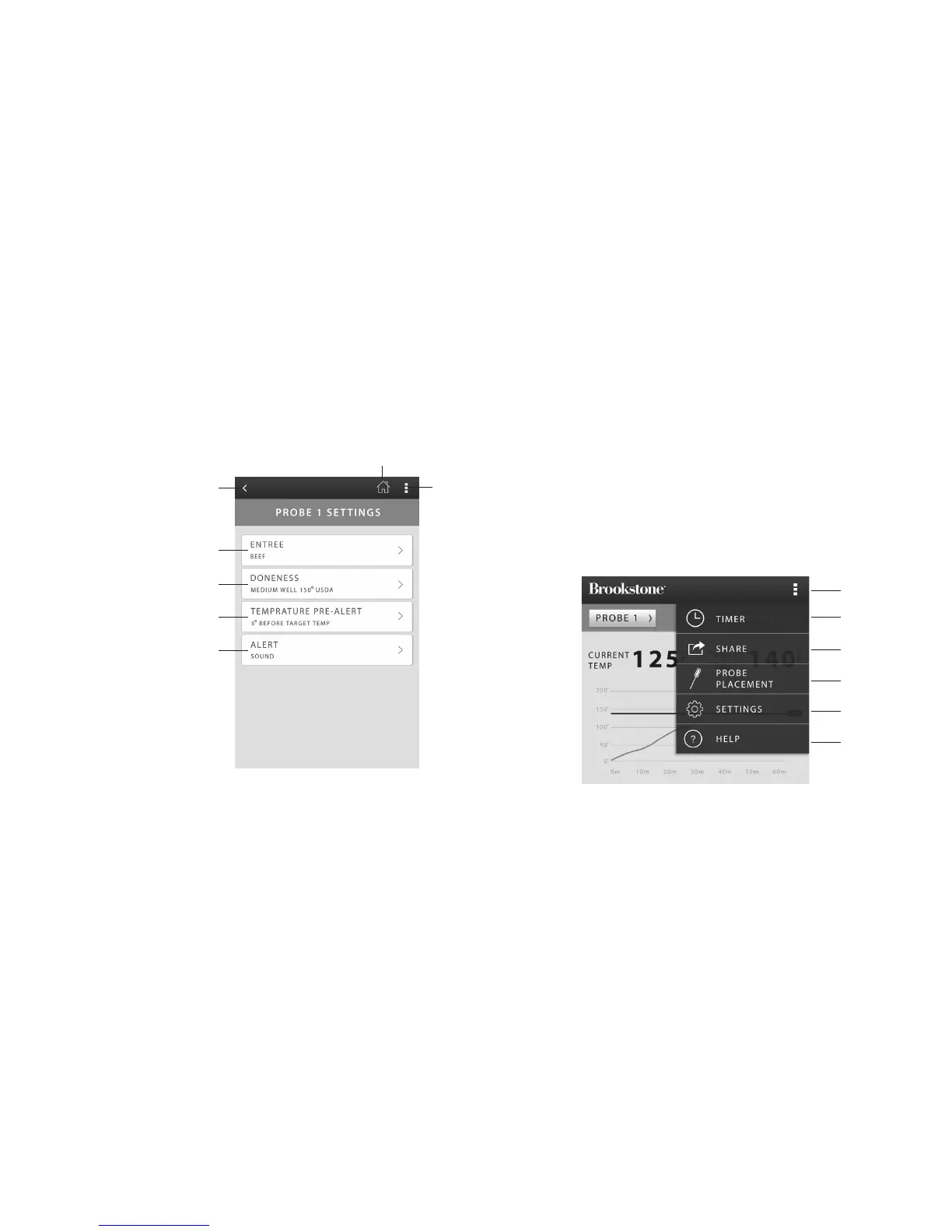
1. Previous Screen
2. Select Entree
3. Select Doneness
4. Select Temperature Pre-Alert
5. Select Alert
6. Return to Home Screen
7. Main Menu
10 11
MAIN MENU APP CONTROL
Note: The control layout may not appear exactly as shown, depending upon your device.
SETTINGS APP CONTROL
Note: The control layout may not appear exactly as shown, depending upon your device.
1. Main Menu
2. Timer
3. Share Photos
4. Probe Placement Information
5. Temperature/Bluetooth Pairing Settings
6. Quick Start Guide/Tutorial
4
6
7
3
2
1
5
919441_INS_BLUETOOTH_GRILL_ALERT
Size:5”Wx4.75”H_Output:100%_Prints:1/1,Blk
2
4
5
6
3
1


 To Next Page