Brose Display Allround | Operation and Control 27 | EN
5.2. Basic Control Elements
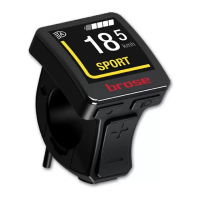
With the control unit keys, you can
ergonomically control the functions of the
e-bike system. The hand can remain on the
handlebar grip while the thumb operates
the control unit keys. The information on the
display tells you about the selected assistance
level and gives you more information about
your Brose Drive System.
Switch the e-bike on or off with the «On/Off»
key (Fig. A-a).
With the «Menu» key (Fig. A-b), a range of
information can be called up while riding.
Mit Use the «Increase» (Figure A-d) and
«Decrease» (Figure A-e) keys to increase or
decrease the assist level. If you are in a menu
(e.g. settings), you can use these two keys
to scroll up or down in the menu. Press the
«Menu» key (Fig. A-b) to confirm the settings.
You can go back one level at any time using
the «Walk assist» key (Fig. A-f). Changed
settings are saved.
NOTE: The menu and the settings menu cannot
be accessed while riding.
NOTE: All the interface illustrations and text on
the following pages correspond to the release
status of the software. Due to the fact that
the software can be updated several times
during a year, it is possible that the interface
illustrations and/or interface texts will change
slightly after an update.
5.3. Switching the Brose Drive
System On and Off
The Brose Drive System can only be operated
with a sufficiently charged battery.
Switching on
To switch on the e-bike system you have the
following options:
› With the e-bike battery inserted, briefly
press the «On/Off» key on the control unit
once.
› NOTE: Depending on the installed battery,
it may take a few moments for the display
to turn on.
› Press the «On/Off» key on the e-bike
battery (bicycle manufacturer-specific
solutions are possible that do not have
access to the battery «On/Off» key, see
battery/bicycle manufacturer‘s manual).
The display unit activates automatically.
› The Brose Drive System is now ready to
operate.
The drive is activated as soon as you pedal
(except in the «Walk Assist» function or in
the «OFF» assistance mode). The motor power
depends on the set assistance level on the
control unit.
As soon as you stop pedalling in normal
operation, or once you have reached a speed
of 25 km/h, the e-bike drive assistance
will be disabled. The drive is automatically
re-activated as soon as you pedal and the
speed is below 25 km/h.
190729_Brose_BDA-Allround-Multi.indd 27 29.07.2019 15:14:30


 To Next Page
 Loading...