Operation and Control | Brose Display AllroundEN | 28
Switching off
To switch off the e-bike system you have the
following options:
Press the «On/Off» key on the control unit for
at least 1.5 seconds.
› Switch off by pressing the «On/Off» key on
the e-bike battery (bicycle manufacturer-
specific solutions are possible that do
not have access to the battery «On/Off»
key, see battery/bicycle manufacturer‘s
manual). The system takes about
3 seconds to completely switch off. You
will not be able to turn the system on again
until it has completely shut down.
NOTE: Control and display unit, drive unit and
battery are completely switched off.
NOTE: If the e-bike drive power is not called
up for approx. 15 minutes (e.g. because the
e-bike is stationary) and no key is pressed on
the e-bike control unit, the e-bike system and
thus the battery will switch off automatically
for energy saving reasons.
The time in which the control unit goes to
«Shutdown Time» can be adjusted to your
needs at any time in the settings (refer to the
«Settings» chapter).
NOTE: The control/ display unit is always
switched on; even if motor assistance is
deactivated («OFF»).
NOTE: Always turn off the Brose Drive System
when you stop the e-bike.
5.4. Display and Settings
5.4.1. Display
km
kmh
18
5
47.5
TRIP
(3)
(6)(4)
(2)
(1)
(5)
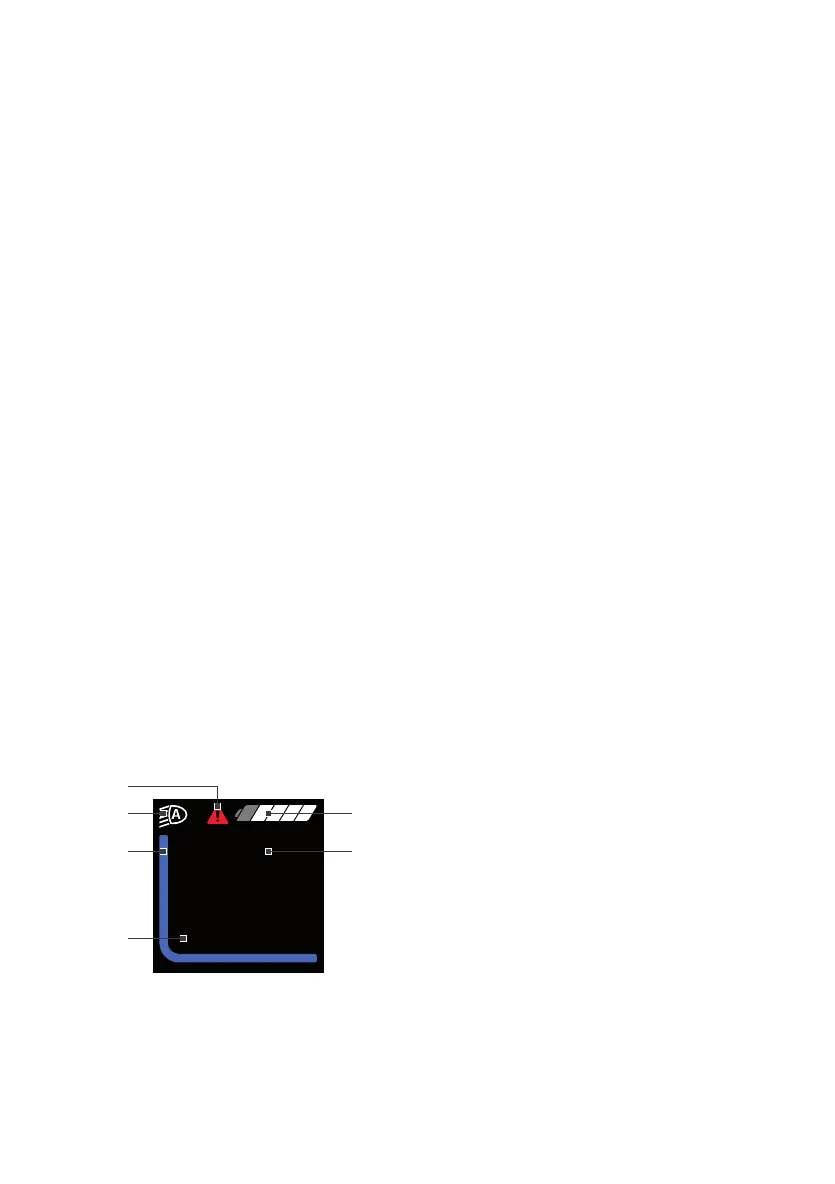
Fig. 2: Drive Mode
The display (Fig. 1) offers an overview of the
following information:
(1) System status information (e.g. faults)
(2) Lighting indicator
(3) Battery charge level indicator
(4) Display of current assistance
(5) Trip information (incl. unit)
(6) Speed (incl. unit)
The displays 1-3 form the status bar and are
displayed in the ride display on each screen.
With the «Menu» key you can also display
a range of information about your trip while
riding, so both hands can remain on the
handlebar while riding.
190729_Brose_BDA-Allround-Multi.indd 28 29.07.2019 15:14:30



 To Next Page