EasyManua.ls Logo

Brother CB3-B913 - Page 4

Brother CB3-B913
10 pages
Print Icon
To Next Page IconTo Next Page
To Previous Page IconTo Previous Page
Loading...
- Y
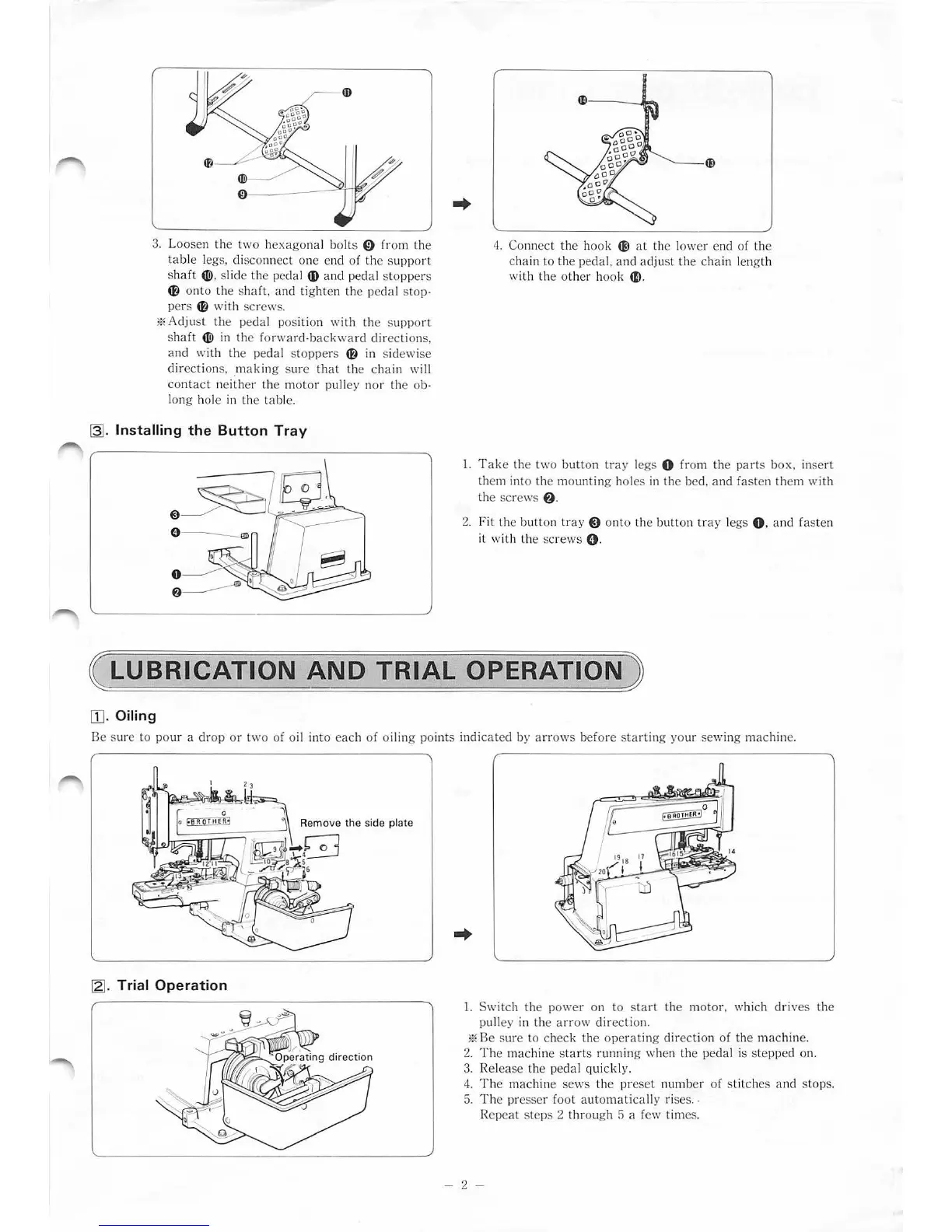
3.
Loo
se
n
the
two
h
exa
go
nal
bo
lts 0 from
the
t
ab
le le
gs
, di
sco
nn
ec
t
one
end
of
th
e su
pport
sh
aft
4Ji)
, slide
th
e pedal
4D
and
pedal st
op
pers
~
o
nto
the shaft. and tig
hten
the p
eda
l
stop·
pers
~
with
sc
rew
s.
*A
dju
st
th
e pedal position
with
th
e suppo
rt
s
haft
4Ji)
in
the
forward·backward
directions,
and
with
the
ped<
tl
s
toppe
rs
~
in s
id
ew
i
se
direction
s,
.ma
kin
g s
ure
that
the chain wi
ll
co
nt
act
neither
th
e m
oto
r pulley nor
th
e
ob·
l
ong
hole in
th
e
tab
le.
~
-
Installing
the
Button
Tray
..
4.
Connect the hook
til
at the lo
we
r end of
the
chain to
th
e p
eda
l, a nd
adj
u
st
the c
hain
l
engt
h
with
th
e o
th
er
h
oo
k
41)
.
l.
T
ake
th
e
tw
o b
utton
tr
ay
l
egs
0 f
rom
t
he
parts
box,
in
se
rt
them into
th
e mo
unting
h
oles
in
the
bed,
and
fas
ten
them
with
the
sc
r
ews
f)
.
2.
Fit
th
e bu
tton
tray
@
on
to
the
butt
on tr
ay
l
egs
O. and fas
te
n
it wi
th th
e
sc
rew
s 0 .
( LUBRICATION
AND
TRIAL
OPERATION)
[1
].
Oiling
Be sure
to
pour
a dr
op
or
two
of o
il
in
to
e
ach
of
oiling
po
in
ts
indi
cated
by
arrows
be
fore
st
artin
g yo
ur
se
wing m
ac
hine.
~
-
Trial
Operation
1.
Switch
the
p
owe
r on
to
s
tart
the m
oto
r, which drives
the
pulley in
the
a
rrow
di
rec
tion.
*Be
s
ur
e to ch
ec
k
th
e op
erat
ing d
ir
ec
tion
of
th
e m
ac
hine.
2.
Th
e
ma
chine sta
rt
s running when
the
pedal is
step
ped on.
3.
Release the p
eda
l quickl y.
4.
The machine
sews
the
pre
se
t
number
of
st
i
tch
es
an
d
st
ops.
5.
Th
e
pr
esser f
oo
l
automatic
a
ll
y ri
ses
. .
R
epea
t steps 2
thr
ough 5 a f
ew
times.
- 2 -
From the library of: Superior Sewing Machine & Supply LLC

Related product manuals