EasyManua.ls Logo

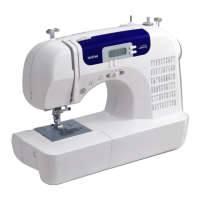
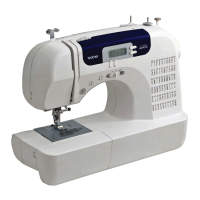
Brother CS-6000 - User Manual

Brother CS-6000
67 pages
Print Icon
To Next Page IconTo Next Page
Loading...
ncbc_brother_cover_Eng
PANTONE 285 K
English
885-S33/S34/S36/S37
XC8835-021
Printed in China
Operation Manual
Computerized Sewing Machine
APPENDIX
UTILITY STITCHES
SEWING BASICS
KNOWING YOUR
SEWING MACHINE

Table of Contents

Other manuals for Brother CS-6000

Questions and Answers

  • J
    Justin WagnerJul 26, 2025
    Why does my Brother Sewing Machine needle keep breaking?
    • P
      Peter GreenJul 26, 2025
      If your Brother Sewing Machine needle breaks, several factors could be at play. Ensure the needle is correctly fitted and the needle clamp screw is tightened with a screwdriver. A bent or blunt needle should be replaced. The fabric, thread, and needle combination should be appropriate for the task. Verify that the correct presser foot is attached for the stitch type. If the upper thread tension is too tight, loosen it. Lastly, use only bobbins designed for your machine, as incorrect ones won't work properly.
  • B
    bcampbellJul 30, 2025
    Why does the upper thread keep breaking on my Brother CS-6000?
    • P
      Paul WilliamsJul 30, 2025
      If the upper thread of your Brother Sewing Machine breaks, first, check the upper threading to ensure it's correct, including the spool fitting and thread guide. The needle must be appropriate for the thread. If the upper thread tension is too tight, loosen it. Also, replace the needle if it is bent or blunt.
  • J
    Jeffery RodriguezAug 3, 2025
    How to fix skipped stitches on my Brother CS-6000?
    • J
      judith93Aug 3, 2025
      If your Brother Sewing Machine is skipping stitches, ensure the upper thread is correctly threaded and use the appropriate combination of fabric, thread, and needle. Replace a bent or blunt needle. Also, remove the needle plate cover and clean the plate and the bobbin case to remove any accumulated dust.
  • L
    Lori WilliamsAug 8, 2025
    Why is the thread tension incorrect on my Brother Sewing Machine?
    • T
      Theresa HamptonAug 8, 2025
      If the thread tension on your Brother Sewing Machine is incorrect, make sure you've threaded the upper thread and wound the bobbin thread properly. Ensure the presser-foot holder is correctly attached and adjust the upper thread tension. Use only bobbins designed for the machine and fit the spool properly. Replace the needle if it is bent or blunt.
  • S
    Selena CraigAug 11, 2025
    Why is my Brother CS-6000 Sewing Machine making a high-pitched noise?
    • J
      Jason Hughes DDSAug 12, 2025
      If you hear a high-pitched noise while sewing with your Brother Sewing Machine, clean the bobbin case. Ensure that you have threaded the upper thread properly.
  • J
    John LynnAug 16, 2025
    Why is the fabric not feeding through my Brother CS-6000?
    • W
      wardsusanAug 16, 2025
      If the fabric does not feed through your Brother Sewing Machine, slide the feed dog position lever to the correct position.
  • T
    Taylor StokesAug 21, 2025
    What to do if the lower thread is tangled on my Brother CS-6000 Sewing Machine?
    • S
      Scott MckinneyAug 21, 2025
      If the lower thread on your Brother Sewing Machine is tangled or breaks, wind the bobbin thread properly and reset the bobbin thread correctly.

Summary

KNOWING YOUR SEWING MACHINE

Machine Parts Identification

Identifies main machine parts, operation panel, and controls.

Accessories Guide

Lists standard accessories provided with the sewing machine.

Machine Operation Setup

Covers power supply, foot controller, and speed control.

Threading the Machine

Guides for bobbin winding, lower, and upper threading.

Needle Replacement and Care

Instructions for handling, checking, and replacing needles.

Twin Needle and Presser Foot Use

Guides for sewing with a twin needle and replacing presser feet.

SEWING BASICS

General Sewing Procedure

Outlines the fundamental steps for operating the sewing machine.

Stitch Selection and Adjustment

Explains how to select, adjust stitch length, and width.

Starting, Stopping, and Thread Tension

Covers starting/stopping sewing and managing thread tension.

Useful Sewing Tips

Provides advice for trial sewing, changing direction, curves, and fabric handling.

UTILITY STITCHES

Overcasting and Basic Stitching

Details overcasting and basic straight stitches for seams.

Hemming and Buttonhole Techniques

Guides for blind hem stitching and sewing buttonholes.

Zipper Insertion and Stretch Fabrics

Instructions for sewing zippers and stretch fabrics with elastic.

Appliqué, Patchwork, and Quilting Stitches

Techniques for decorative stitching on appliqués, patchwork, and quilts.

Reinforcement and Decorative Stitching

Covers reinforcement stitches and various decorative patterns.

APPENDIX

Stitch Settings Reference

A table detailing stitch settings for utility stitches.

Maintenance and Troubleshooting

Guides for cleaning the machine and resolving common issues.

Error Messages and Beep Codes

Explains error messages and operation beep indicators.

Brother CS-6000 Specifications

General IconGeneral
Stitch Number60
Buttonhole Styles7
LCD DisplayYes
Automatic Needle ThreaderYes
Stitch Width7mm
Speed ControlYes
Free ArmYes
Max Sewing Speed850 spm
Bobbin TypeDrop-in
Presser FeetButtonhole foot, Overcasting foot, Monogramming foot, Zipper foot, Zigzag foot, Blindstitch foot

Related product manuals