Scanning Applications and Settings
17
5
Image settings
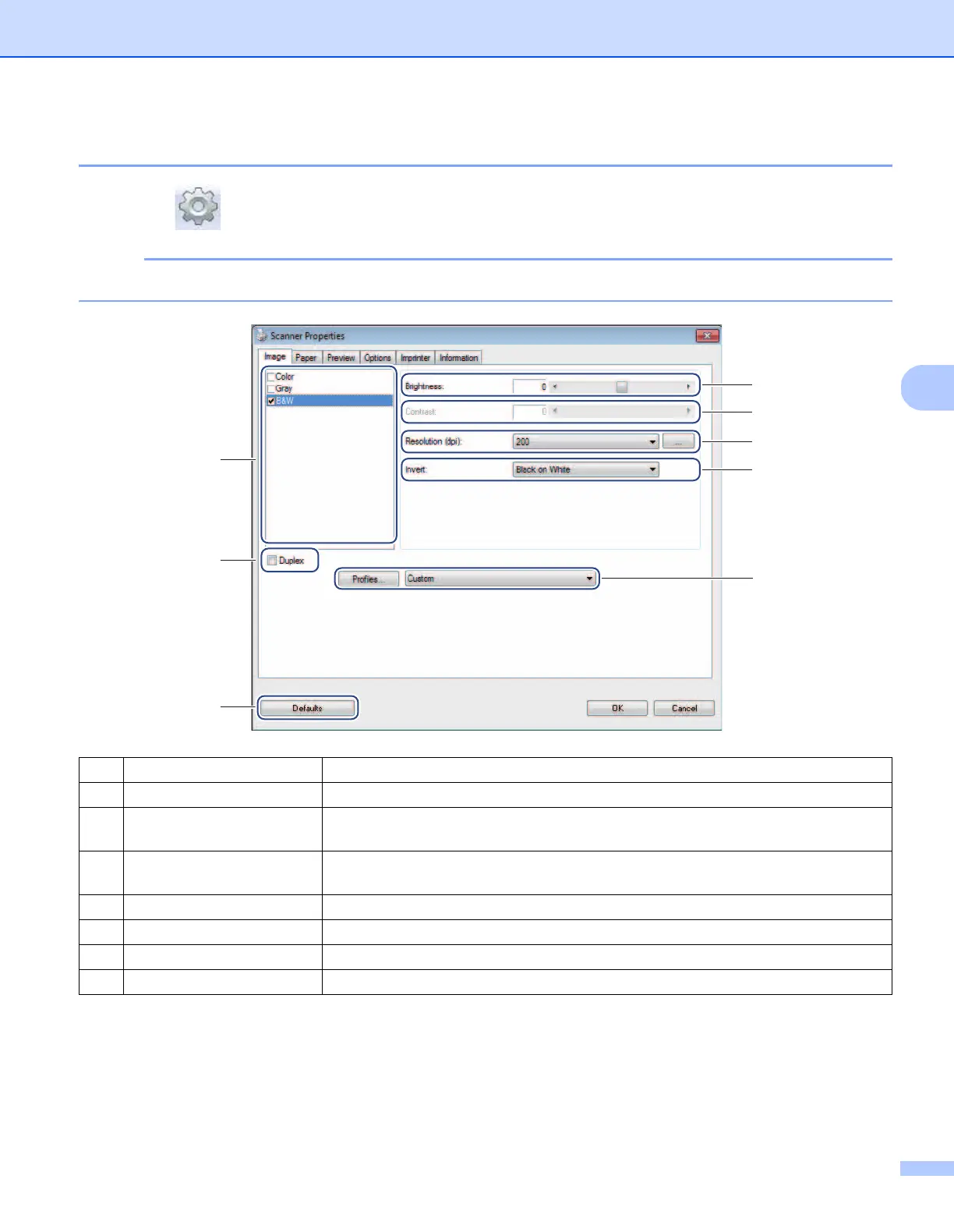
Click Setup , and then click the Image tab to choose the image type and to set basic scan settings.
NOTE
This image is from the DS-720D.
(1) Image Selection Box Choose the type of document you want to scan.
(2) Duplex (DS-720D only) Select the Duplex check box to perform Duplex (2 side) scanning.
(3) Brightness Adjusts the lightness or darkness of an image. The range is from -100 to +100. The
factory default is 0.
(4) Contrast Adjusts the range between the darkest and the lightest shades in the image. The
range is from -100 to +100. The factory default is 0.
(5) Resolution Determine the quality of the scanned image. The factory default is 200 dpi.
(6) Invert Reverse the brightness and the colours in the image.
(7) Profiles Save or change the scan setting in the Scanner Properties dialog box.
(8) Defaults Reset values in this and all other Properties tabs to the original factory settings.
(1)
(6)
(3)
(4)
(5)
(8)
(2)
(7)











 To Next Page