Scanning Applications and Settings
21
5
Options settings
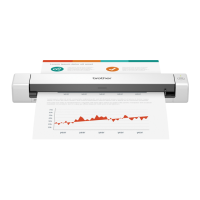
Click Setup , and then click the Options tab to choose additional image processing settings or
calibrate your scanner.
NOTE
This image is from the DS-720D.
(1) Flip Side Rotation
(DS-720D only)
Book
Select Book to maintain the same image orientation on the reverse side of the
output page.
Fanfold
Select Fanfold to rotate the image orientation 180 degrees on the reverse side of
the output page.
(2) Rotation Choose the rotation angle from the drop-down list if you want to rotate your
scanned image.
(3) Calibration Calibrate the scanner.
For more information, see Calibration using software (for Windows
®
) on page 37.
(4) Defaults Reset values in this and all other Properties tabs to the original factory settings.
(2)
(3)
(4)
(1)







 To Next Page