EasyManua.ls Logo

Brother P-Touch PT-H200 - User Manual

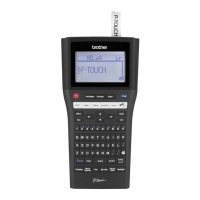
Brother P-Touch PT-H200
18 pages
Print Icon
To Next Page IconTo Next Page
Loading...
GETTING STARTED
NOTE
When using the optional AC adapter (AD-24ESA)
1. Insert adapter cord into the AC adapter socket at the bottom of the label maker.
2. Insert the plug into the nearest standard electrical socket.
For the memory backup feature, use either AAA alkaline batteries (LR03) or Ni-MH batteries (HR03)
together when using the AC adapter.
Power Supply and Ribbon Cassette or Tape Cassette
Open the cassette cover by pressing the
highlighted area at the top end of the label maker.
Make sure you turn the power off when replacing
batteries or ribbon/tape cassettes.
Insert the ribbon or tape cassette, making sure
it locks into place.
Make sure the end of the ribbon/tape feeds under the tape guides.
Use Genuine Brother P-touch TZe tapes with this label maker.
1
Print head
Tape cutter leverCassette cover
1
Tape exit slot
Toothed wheel
Cutter's edge
End of tape
Tape guides
2
ELECTRONIC LABELING SYSTEM
With your new Brother P-touch label maker, you can create a wide variety of custom, self-adhesive labels and
ribbons. This label maker uses Brother "TZe" tapes from 3.5 mm to 12 mm widths. "TZe" tape cassettes are available
in many colours and sizes. Visit
www.brother.com
for a complete list of tapes that work with your machine.
Read this guide before using this machine. After reading this guide, keep it in a safe place.
English
User’s Guide
PT-H200
D01CHY001

Questions and Answers

  • Y
    youngamyAug 20, 2025
    What to do if my Brother Label Maker is not printing correctly?
    • P
      Pamela WillisAug 20, 2025
      If your Brother Label Maker does not print or the printed characters are not formed correctly, check that you have properly inserted the tape cassette. If the tape cassette is empty, replace it. Also, ensure that the cassette cover is correctly closed.
  • D
    dburnettAug 22, 2025
    Why is the tape stuck in my Brother Label Maker?
    • L
      leslierollinsAug 22, 2025
      If the tape does not feed correctly or gets stuck inside your Brother Label Maker, check that the end of the tape feeds under the tape guides. Also, ensure that you are not pressing the cutter lever while printing.
  • R
    rushallisonAug 25, 2025
    Why does my Brother P-Touch PT-H200 Label Maker keep resetting?
    • T
      Tina WarrenAug 25, 2025
      If your Brother Label Maker's settings have reset, it may be due to low batteries. Replace them with six new AAA alkaline batteries, avoiding mixing old and new or different types. Note that disconnecting the power for more than three minutes will erase all text and formats in the display.
  • E
    Eric PerezAug 27, 2025
    Why does my Brother P-Touch PT-H200 Label Maker turn off when printing?
    • L
      lgarciaAug 27, 2025
      If the power turns off when you try to print with your Brother Label Maker, the batteries may be low. Replace them with six new AAA alkaline batteries, avoiding mixing old and new or different types. Also, check that the batteries are correctly inserted and that you are using the recommended AD-24ESA adapter.
  • Z
    zmooreAug 28, 2025
    What does 'No Cassette!' mean on my Brother P-Touch PT-H200 Label Maker?
    • A
      Amanda HillAug 28, 2025
      If your Brother Label Maker displays 'No Cassette!', it means you tried to print, feed, or preview a label when there was no cassette installed.
  • P
    Paul CampbellAug 29, 2025
    How to fix a Brother Label Maker when the display stays blank?
    • A
      Ashley FloydAug 30, 2025
      If your Brother Label Maker's display stays blank after turning it on, ensure the batteries are installed correctly, matching positive and negative ends. If the batteries are low, replace them with six new AAA alkaline batteries, avoiding mixing old and new or different types. Also, check that the AD-24ESA adapter is correctly connected.
  • J
    Julie ParkerAug 31, 2025
    How to fix 'Battery Low!' on a Brother P-Touch PT-H200 Label Maker?
    • A
      Andrea NorrisSep 1, 2025
      If your Brother Label Maker displays 'Battery Low!', replace the batteries with six new AAA alkaline batteries. Do not use old and new batteries together or mix alkaline batteries with other battery types. Alternatively, ensure rechargeable batteries are fully charged.
  • B
    Brittany PeckSep 2, 2025
    How to fix a blank line on Brother P-Touch PT-H200 Label Maker printout?
    • A
      andersongregorySep 2, 2025
      If a blank horizontal line appears through the printed label on your Brother Label Maker, it may be due to dust on the print head. Remove the tape cassette and gently wipe the print head with a dry cotton swab using an up-and-down motion. Alternatively, use the optional print head cleaning cassette (TZe-CL3).
  • S
    Susan SteinSep 4, 2025
    What does 'Text Full!' mean on my Brother P-Touch PT-H200 Label Maker?
    • J
      Jordan ClaySep 4, 2025
      If your Brother Label Maker displays 'Text Full!', make sure you do not exceed the maximum number of characters allowed (80 characters for text, 50 characters for templates. If your message contains symbols, the maximum number of characters may be reduced.)
  • O
    ohoodSep 6, 2025
    How to resolve 'Text Limit! Change Length' on Brother Label Maker?
    • D
      David KellySep 6, 2025
      If your Brother Label Maker displays 'Text Limit! Change Length', reduce the amount of text you've entered, or select [Auto] as the label length, since the number of characters exceeds the current label length.

Summary

1 GETTING STARTED

LCD

Initial Settings

Guide to setting the language and unit of measurement on the label maker.

Keyboard

Key Functions

Explanation of the function of each key on the label maker's keyboard.

2 BASIC USAGE

Entering Text

Instructions for entering text, switching case, and using two-line printing.

Printing Ribbons;Tapes

Guidance on previewing, feeding, and printing labels and ribbons.

Saving Ribbon;Tape Files

Instructions on how to save, print, and open stored label files.

3 USING TEMPLATES

4 FORMATTING KEYS

6 HELPFUL HINTS

Troubleshooting

Common error messages and their solutions for the label maker.

Resetting the label maker

Procedure to reset the label maker to factory settings, clearing all data.

Brother P-Touch PT-H200 Specifications

General IconGeneral
BrandBrother
ModelP-Touch PT-H200
CategoryLabel Maker
LanguageEnglish

Related product manuals