Sewing
35
SEWING BASICS
2
d
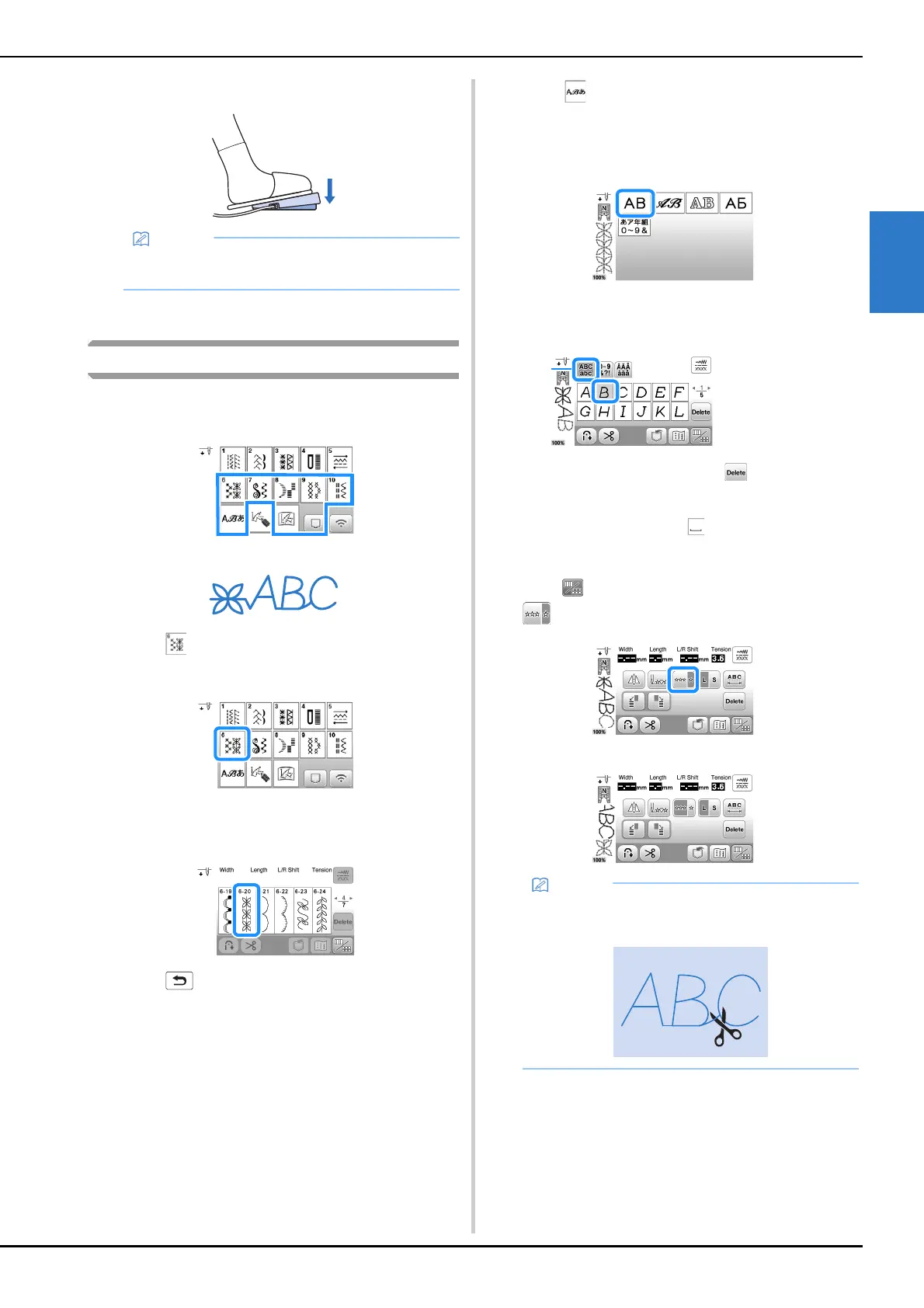
Slowly depress the foot controller to start sewing.
e
Release the foot controller to stop sewing.
Combining stitch patterns
Stitch patterns from the following categories can be
combined.
Example:
a
Touch .
b
Select the following stitch pattern.
c
Touch .
The display returns to the stitch selection screen.
d
Touch .
e
Select a font.
f
Touch a tab to change the selection screens and enter a
character.
• To delete the character, touch . Characters are
deleted individually starting with the last character
entered.
• To enter a space, touch .
g
If you want to sew the stitch pattern continuously,
touch to display editing screen, and then touch
.
The stitch pattern turns continuous.
• The speed set with the sewing speed controller is
the foot controller’s maximum sewing speed.
1 Tab
• When sewing is completed, trim any excess thread
between characters.










 To Next Page