Need help?
Do you have a question about the BT DTR-T2100 and is the answer not in the manual?
Guidance for setting up your BT TV box.
Instructions for remote usage, parental controls, and payment PINs.
Information on on-demand features and recording capabilities.
Explanation of the indicator lights on the BT TV box.
Details on how to obtain help and support for BT TV services.
Overview of accessibility options like audio description and subtitles.
Connect aerial and HDMI cables to the BT TV box.
Connect the BT TV box to your hub using an Ethernet cable.
Plug in and turn on the BT TV box.
Function of the power button on the remote.
Accessing preview bar, on-demand, apps, and settings.
Displaying programme information.
Recording a programme or series.
Viewing the TV and radio schedule.
Switching between AV devices like game consoles.
Accessing the library of on-demand entertainment.
Pausing, rewinding, and fast-forwarding content.
Finding content across TV and on-demand players.
Deleting recordings or toggling subtitles.
Guide to programming the BT TV remote to control your TV.
Setting up parental controls to manage content access.
Information on parental control and payment PINs, including default and reset procedures.
How to access and play recorded programmes via MyTV.
Explanation of automatic deletion of old recordings and how to prevent it.
Enabling accessibility features for live and recorded content.
Activating audio feedback for button presses to aid navigation.
Switching to a high-contrast colour scheme for menu readability.
Option to hide channel logos in the Guide for easier reading.
Adjusting settings to disable transparent backgrounds in the Guide.
Enlarging text in menus for better readability.
Enlarging text in the TV listings for better readability.
Software for controlling BT TV box via touch, switch, eye gaze.
Connecting and using a USB keyboard to control the BT TV box.
Instructions for using the provided power supply adaptor safely.
Ensuring the power supply adaptor and remote are kept away from children and pets.
Guidelines for battery handling and replacement.
Precautions regarding liquids near the TV box and power adaptor.
Safe procedures for cleaning the BT TV box and power supply adaptor.
Ensuring proper ventilation for the BT TV box to prevent overheating.
Information on suitable installation environments and operating conditions.
Important warnings regarding damaged equipment and power cord usage.
Steps to prevent damage to the BT TV box during use and setup.
Precautions to prevent data corruption on the hard disk drive.
Compliance declaration for BT TV Box with EU directives.
Information on the power consumption and supply details of the BT TV Box.
Details on YouView terms, broadband speed, and coverage.
Information regarding the use of open-source software in the TV box.
Details of the 12-month guarantee for the BT TV box.
Terms and conditions related to warranty claims and coverage.
Instructions on how to return your BT TV box for recycling.
Guidelines for responsible disposal of electronic equipment.
This document is a user guide for the BT TV box, providing instructions on setup, usage, and accessibility features.
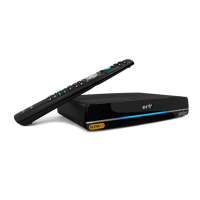
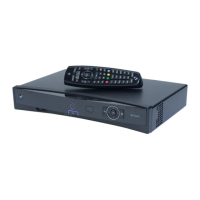
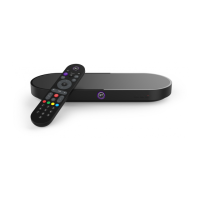
The BT TV box is a digital television receiver that allows users to watch live TV, record programmes, and access on-demand content. It integrates with your broadband service to provide a comprehensive entertainment experience. The box offers up to 300 hours of recording space, allowing users to save and watch their favourite shows at their convenience. It supports recording two programmes simultaneously, though this means a third live TV channel cannot be watched at the same time. Users can still access streaming services like Netflix or Now TV, or watch previously recorded content in such scenarios. The BT TV box also provides access to Freeview channels (001-250) and BT subscribed channels (300-550).
The BT Player is a central feature, offering a vast library of on-demand entertainment, including blockbuster movies and popular TV shows available for watching, buying, or renting. The BT TV app extends the functionality, allowing users to watch BT TV content (excluding Freeview) on mobile devices or tablets. This app supports a "Continue Watching" feature, enabling users to start a programme on their TV and pick it up later on a mobile device. It also allows remote recording, so users can set recordings even when away from home. The app provides access to live BT TV subscription channels, on-demand catch-up TV shows, and the ability to download purchased films and TV for offline viewing.
Setting up the BT TV box involves three main steps: plugging in the aerial and HDMI cables, connecting to the internet via an Ethernet cable to the BT Hub, and powering up the box. The guide recommends choosing 'Smart standby' for faster start-up during the initial setup.
The remote control is a key interface for interacting with the BT TV box. It features standard controls like On/off, Home (to access the preview bar, on-demand programmes, players, apps, recordings, and settings), Information (for programme details), Record (for one-off programmes or entire series), TV Guide (to see what's on TV and radio), Pause (to pause, rewind, and fast forward live or recorded TV), Search (for content across all TV and on-demand players), and Delete/Subtitle (to delete recordings or toggle subtitles). The remote also has a 'TV AV' input button to switch between AV devices like games consoles, and a dedicated 'BT Player' button for quick access to on-demand entertainment.
A notable feature of the remote is its ability to control the TV itself, reducing the need for multiple remotes. Users can program the remote with a four-digit code specific to their TV brand. Once programmed, the remote can turn the TV on/off and control its volume.
Parental controls are available to manage access to programmes based on age ratings, using a parental control PIN. A separate payment PIN is used for purchasing content on the BT Player. Both PINs can be the same for convenience. If a PIN is forgotten, the guide provides instructions for resetting it or contacting BT support.
The BT TV box uses a system of front lights to indicate its status, such as standby (Energy Saver or Always Ready), connected to hub, or recording. This visual feedback helps users understand what the box is doing at a glance.
The guide provides essential safety and legal information, including instructions for proper installation and use to prevent electric shock or fire. It emphasizes using only the provided power supply adaptor and connecting it to a secure socket. Users are advised to keep the power supply adaptor and remote control out of reach of children and pets. Batteries should not be exposed to excessive heat and should be replaced with equivalent types.
Cleaning instructions specify unplugging the BT TV box from the wall socket before cleaning and using a soft, dry cloth. Cleaning fluids or solvents should be avoided. Proper ventilation is crucial for the BT TV box; it should be placed in a well-ventilated area, not covered, or kept in confined spaces. The box should be protected from moisture, dust, and extreme temperatures, and not placed on soft furnishings or delicate surfaces that could be damaged by heat.
In case of damage or suspicious noise, users are instructed to stop using the box immediately, disconnect it from the electrical socket, and contact BT support. The guide also warns against damaging the power cord by bending, twisting, or placing objects on it, and stresses the importance of easy access to the mains plug for safety.
To avoid damage to the hard disk drive, users are advised not to move the BT TV box or suddenly turn off the power while the hard disk drive is running, as this could lead to data corruption.
The guide also covers accessibility tools to make BT TV easier to use. These include:
The document also mentions that the guide is available in other formats, including Braille, large print, and audio CD, and provides contact information for obtaining these.
 General
| Brand | BT |
|---|---|
| Model | DTR-T2100 |
| Type | Set-top box |
| Storage Capacity | 500GB |
| Recording Capability | Yes |
| HDMI Output | Yes |
| Ethernet Port | Yes |
| Wi-Fi | Yes |
| USB Ports | 1 |
| Tuner | Yes |
| Tuner Type | DVB-T2 |
| Resolution | 1080p |
| SCART Output | No |
| EPG | Yes |
| Timeshift | Yes |
| Parental Control | Yes |
| Teletext | Yes |
| Subtitles | Yes |
| Video Formats | H.264, MPEG-2 |
| Audio Formats | AAC, MP3 |

 To Next Page