391504
18
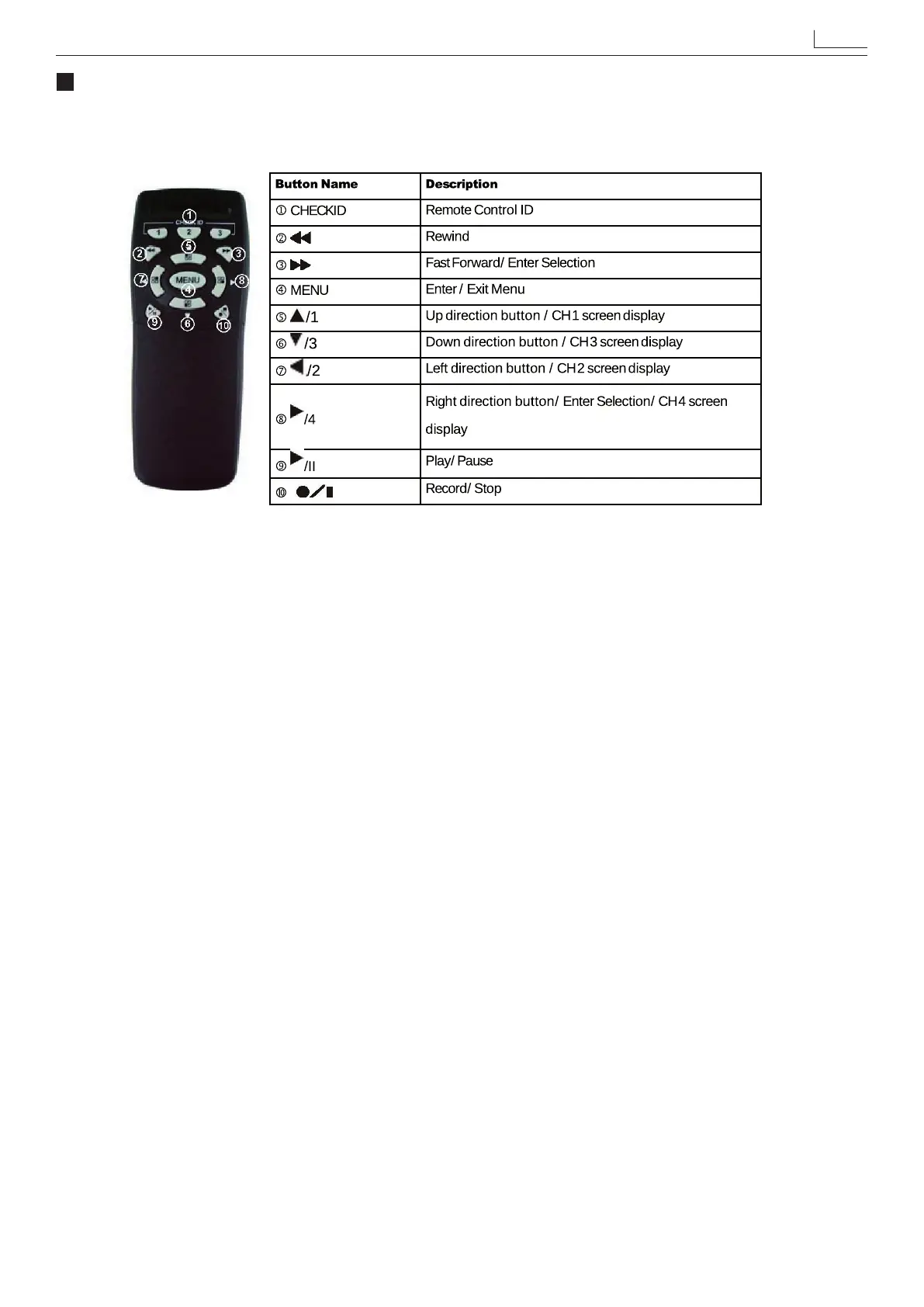
REMOTE CONTROL
Enter MENU and select item Remote Control ID to setup remote controller ID.
(1) Enter MENU nd item Remote Control ID and setup a set of number for CHECK ID
(Remote control ID consists of 10 sets of the numbers: ALL, 11, 12, 13, 21, 22, 23, 31, 32, 33).
(2) After Remote Control ID setup, you must return to LIVE monitoring mode.
Because the setup is only eective if you return to LIVE mode after the setup.
(3) After returning to LIVE monitoring mode, press remote control CHECK ID (ALL, 11, 12, 21, 22, 23, 31, 32, 33)
to conrm synchronization. When the message “REMOTE ID IS CORRECT” appears, indicate synchronize
function setup is complete. Now you are able to control the DVR using remote control.
(4) Each time, synchronization allows only one single device to be controlled by a single remote control.
Note: the model of remote control could change.
Remote Control ID


 To Next Page